


New Participant
June 7, 2022
Answered

No option to select LOCATION to export

  • June 7, 2022
  • 23 replies
  • 14721 views

Such a funny bug. Adobe Premiere Pro 2022 doesn't show the location path option at all when I am trying to export anything. Not sure where the issue is. 
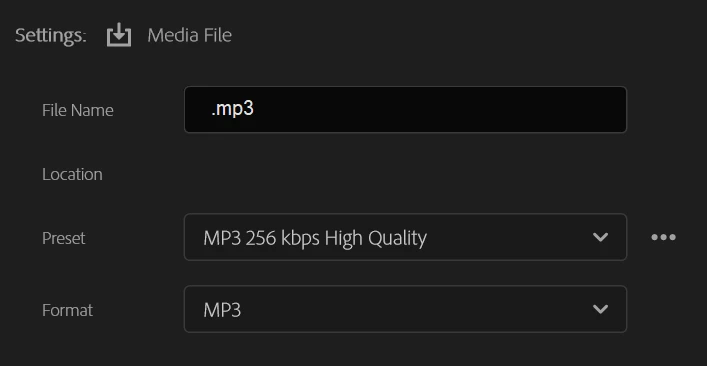


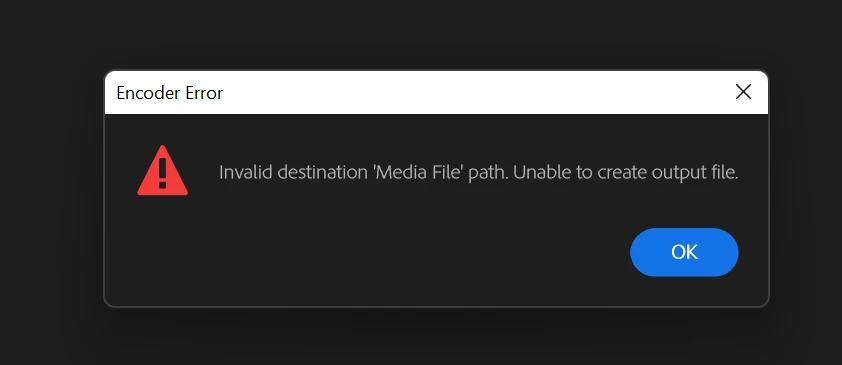
And of course when I click export, I get the following error which is obvious. 
 

Anyone has a solve to this?

Correct answer Ann Bens

Issue has been fixed.


EDIT: this issue has NOT been fixed.

23 replies

New Participant
November 19, 2025

I created a new project
Created a new sequence and pasted the sequence there and the option to set save location worked again

New Participant
June 30, 2025

Just got this glitch on Premiere Pro 2025, wasn't having much luck with any of the fixes previously mentioned, changing to YT or creating a new sequence didn't help. In the end I created a new project and just copied my clips across and the file location thankfully returned.

It occured during media encoder exporting, my media encoder basically just froze mid export and that seemed to trigger the bug for me. Fingers crossed it doesn't come back! A bit disappointed to hear this has been around since 2022 tho 

New Participant
April 23, 2025

This is a solution, but not a fix for Adobe's bug. Hopefully, it will not happen again for me.

I had the missing location, probably caused by my file name being too large. Issue found on 4/22/25 for Premiere 24+25.


Will work: Start a new sequence from scratch and give it a shorter name

Won't work: Duplicating the sequence, Renaming the sequence, Renaming the export, Changing the export type/preset/format, Trying to export to publish options such as youtube/etc, Changing the export range, Updating/Downgrading Premiere because I tried every 24 and 25 version available.


Hopefully, this helps save someone the time I spent figuring out a temporary fix.

New Participant
March 24, 2025

If anywone continue to have this problem, I resolved my problem triggering the ftp mode, change to selection for the media file and select the location field. it open de location again.

New Participant
September 10, 2024

Found a fix here :

https://community.adobe.com/t5/premiere-pro-discussions/cant-export-video/m-p/13063105

Just toggling to yiou tube shows the path again,

Thanks

Aamir Khan

New Participant
June 11, 2024

I'm having the same issue and we're in 2024.. I have tried all of the solutions offered by every source I found, and NOTHING works. I literally can't export my project and it's sitting waiting.


If anyone discovered anything, please let me know

New Participant
June 11, 2024

UPDATE:

I actually just found something that worked for me! I will share this, even though it could have been some random clicking around that got me this effect..

On the left side, when clicking on "Media File", the issue was that the "Location" did not have any path next to it, and therefore, we could not change it.

it turns out that this area where there is nothing was actually clickable! (When you hovered over the grey area where you were supposed to see the path but did not see anything, you can see the mouse change into the little hand to show that you can actually click). I was super excited to see that when I did click, I saw the windows explorer open up to let me chose a location. After choosing the name and location, I got disappointed to see that the same error came up, even though I actually did chose a location (even though I could not see it).

Right after this false hope, I tried duplicating that destination (Media File) that I just chose a location that I could not even see, and THAT ONE also had the invisible grey area clickable, but this time, IT DID WORK.

I hope this works for you all 🙂


New Participant
March 7, 2024

I'm having this exact same issue! I tried everything suggested below (i.e. creating a new sequence, selecting Youtube as publishing destination, shortening the file name, holding shift upon launch and reseting preferences, but NOTHING IS WORKING. I'm under deadline and have no way of exporting my file. Where is a working solution to this???

Megatonks
New Participant
November 1, 2023

Just had the same after accidentally selecting the Location of inside a zip (by C+P the full address in windows). Now Location is completely bugged out and nothing seems to be recovering it. Damn Adobe, fix your bugs.

Megatonks
New Participant
November 1, 2023

OK I managed to work arund the bug. Duplicate the 'Media File' export template on the left side. for whatever reason this made the 'location' area clickable again on the new one, and then also on the original broken one - although it hadn't VISIBLY changed. Make sure to toggle off/delete the new 'media file' so exporting is possible. 

New Participant
July 7, 2025

This! I duplicated "Media File" and then turned on another export option, and even though the hyperlink to the location did not show, i could click the empty space and change the location.

Adobe seriously needs better QC.

New Participant
October 10, 2023

I just had this issue, it started when i accidently chose my organisations onedrive folder as the export location, then the location tab dissappered and i cannot change it to anything else. I have tried restarting, uninstalling, copying to new sequence, and other things, nothing worked. I open encoder and open the project/sequence there to be able to export, its a terrible solution, and as one person wrote before me, we are paying a premium for something this dumb and irritating not to be fixed in over 2 years.

New Participant
October 8, 2023

I just created a new sequence and copied/paste all the clips to the new sequence and exported no problem. They do need to fix this though.