
Inspiring
May 30, 2018
Answered

Not seeing both cameras in Multi Camera View

  • May 30, 2018
  • 2 replies
  • 4670 views

I know there have been a zillion questions on this topic but I didn't understand the answers so here we go again...

( Premiere Pro 2015.2 release, CC version 9.2 )

I have a Multicam sequence with two video tracks and an audio track created with Create Multi Camera Source Sequence.  I've toggled Multi Camera View on but one of the views remains black.

Each video track can independently be displayed in the right-hand viewer, say by disabling the other one with the little "eye" icon - toggle track output, but my understanding was that I should be able to see both cameras at the same time.

Screen shot...
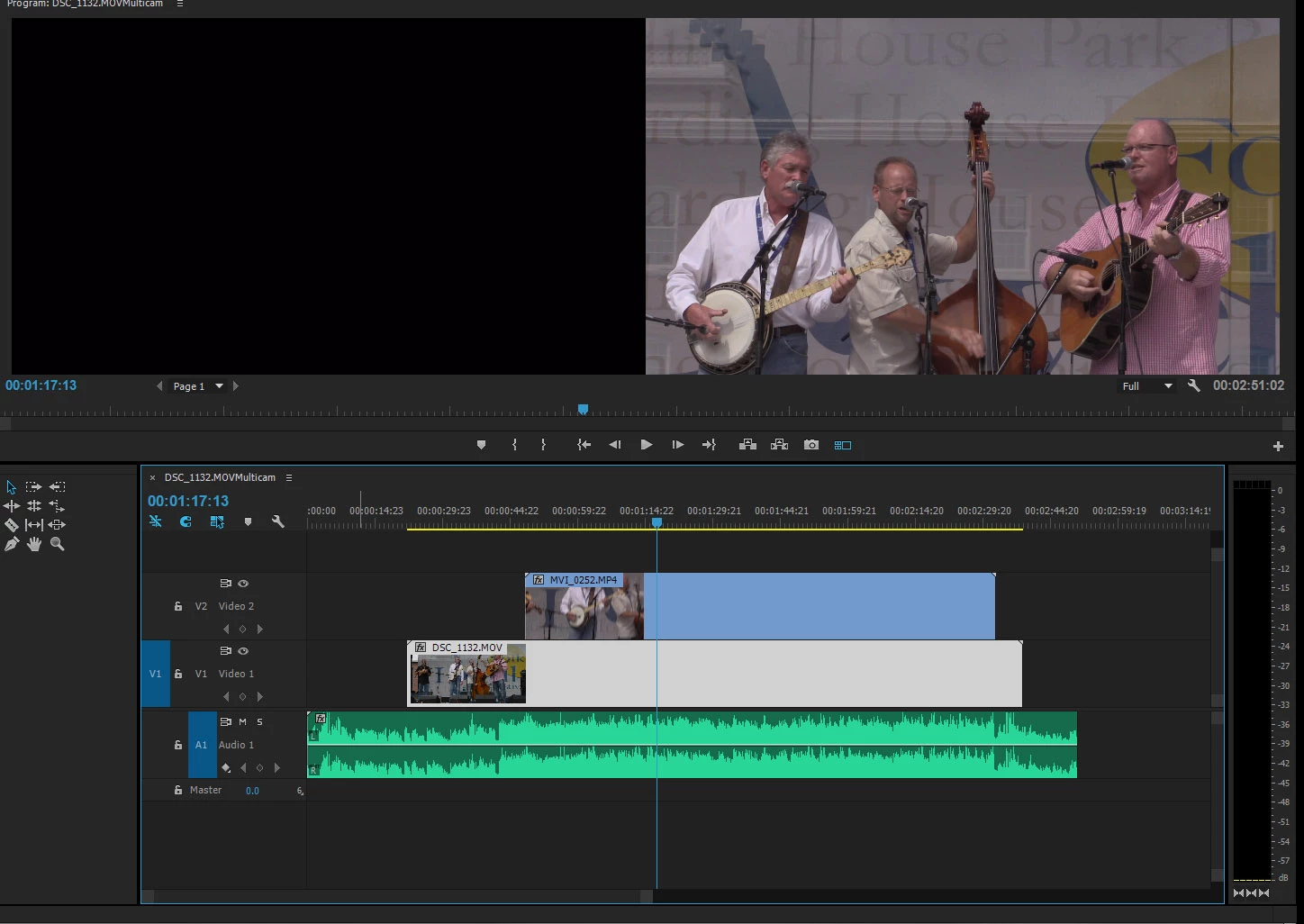
I've seen people say it has something to do with "targeting" but I don't really understand what that means.

Thanks in advance for any advice!

This topic has been closed for replies.
Correct answer Stan Jones

It has been a while since I did this. but I believe that the "Create Multi Camera Source Sequence" creates a "source" multicam sequence, and you must create a "target" multicam sequence. In the project panel, right click the (source) multicam sequence you created and pick "New Sequence From Clip."

Did you do that?

You must also enable multicam in the program monitor.

I can't tell from your screen shot. Is that the program monitor or the source monitor?

Edit: Here is help (2018) for multicam:

Create and edit a multi-camera sequence in Premiere Pro

2 replies

Stan Jones
Community Expert
Stan JonesCommunity ExpertCorrect answer
Community Expert
May 30, 2018

It has been a while since I did this. but I believe that the "Create Multi Camera Source Sequence" creates a "source" multicam sequence, and you must create a "target" multicam sequence. In the project panel, right click the (source) multicam sequence you created and pick "New Sequence From Clip."

Did you do that?

You must also enable multicam in the program monitor.

I can't tell from your screen shot. Is that the program monitor or the source monitor?

Edit: Here is help (2018) for multicam:

Create and edit a multi-camera sequence in Premiere Pro

Inspiring
May 30, 2018

Yes, that seems to be it. Thanks!  Now I have a new problem (in multi-camera view I can select different angles but no cuts are made and selected angle has a yellow border, not a red one) but I'll create a new thread on it.

Community Expert
May 30, 2018

you have to drop your multicam source sequence onto the timeline and not open it in the timeline, check the video :

multicam on Vimeo

Inspiring
May 30, 2018

you have to drop your multicam source sequence onto the timeline and not open it in the timeline

It won't let me -  it puts up a message saying "No content in sequence In/Out range".     What does that message mean?    (related question:  is there a official list of Adobe error messages from their products?  I often see error messages in Premiere Pro and Photoshop that I can't find in the "official" documentation)

I looked at the linked video but I couldn't make heads or tails out of it -  it has no audio.

Community Expert
May 30, 2018

Create and edit a multi-camera sequence in Premiere Pro

there is a video at the end of this link, watch it