


Participant
January 22, 2017
Question

Opening CS3 file in Premiere CC

  • January 22, 2017
  • 5 replies
  • 2928 views

Hello gang.

I am trying to open an old project i worked on several years ago. The project was created in Adobe Premiere CS3 (windows) and now i am trying to open it into Adobe Premiere CC (MAC OSX) but i'm getting an error message and it goes as follows.
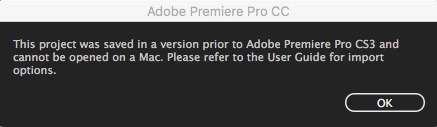
I've searched the web and the only solution that i found was to export the project file FROM the version that it originated from into an Final Cut PRO XML file. But i no longer have that version and cannot seem to access it from the CC older option versions. I also believe that even if i did access it, CS3 wouldn't install onto Sierra (OS 10.12)

Soo, would anyone in the community have a trick or perhaps a type of software/app that would be able to import and convert from CS3 and spit it out to a version that CC would understand?

Any idea or suggestions would greatly be appreciated.

5 replies

Participant
January 23, 2017

Little update folks

I downloaded a trial version of VMware and found a trial version of Adobe Premiere CS3. I still have a copy of Windows Vista kicking around and managed to installed a virtual machine on my iMac.

I installed the OS and the trial version of CS3, which will give me a 30 day trial period. Much to my surprised, i was able to open the premiere project.

No my question is, how can i export the project to open in Adobe CC 2017? The export options are not the same as what we have today. We i only have Export to EDL, Adobe Clip notes.

Under the Project tab, i have Export project as AAF.

Any suggestions?

Participant
January 26, 2017

I've been trying to find tutorial for a method but haven't found anything that works as well as XML workflow. Has anyone successfully exported from much older Premiere version to the a CC one?

Participant
January 23, 2017

Thank you Warren for offering your help.

How will you be able to export the CS3 project file without having to send you ALL the assets?

Will it still work if i just send you the .PPRJ file?

Legend
January 22, 2017

You will need to open this file on a Windows machine first using a version of Premiere Pro newer than CS3.  From there, you can save it out as a file that should open on a Mac.

Ann Bens
Community Expert
Community Expert
January 22, 2017

Might work if opening in CS6 on windows first.

Community Expert
January 22, 2017

Over the years it's too easy to lose track of how far back each version of PR can go.

I'm pretty sure that I have PR CS4, CS5 and CS5.5 still installed on my old 17-inch Macbook Pro.

If you want to provide a download link for the PR CS3 project file (copy it into a folder and them create a Zip archive of the folder), I can try bring the file forward to CC2017 for you.

-Warren

Community Expert
January 23, 2017

Was CS3 when it wasn't on the Mac platform for a brief period?  I can't remember.  I was deep in Final Cut Pro and Media Composer at the time (but still using AE, PS, AI, ID).