
Exit
  • Global community
    • Language:
      • Deutsch
      • English
      • Español
      • Français
      • Português
  • 日本語コミュニティ
  • 한국 커뮤니티
0

Outdated graphic card

Explorer ,
Feb 12, 2020 Feb 12, 2020

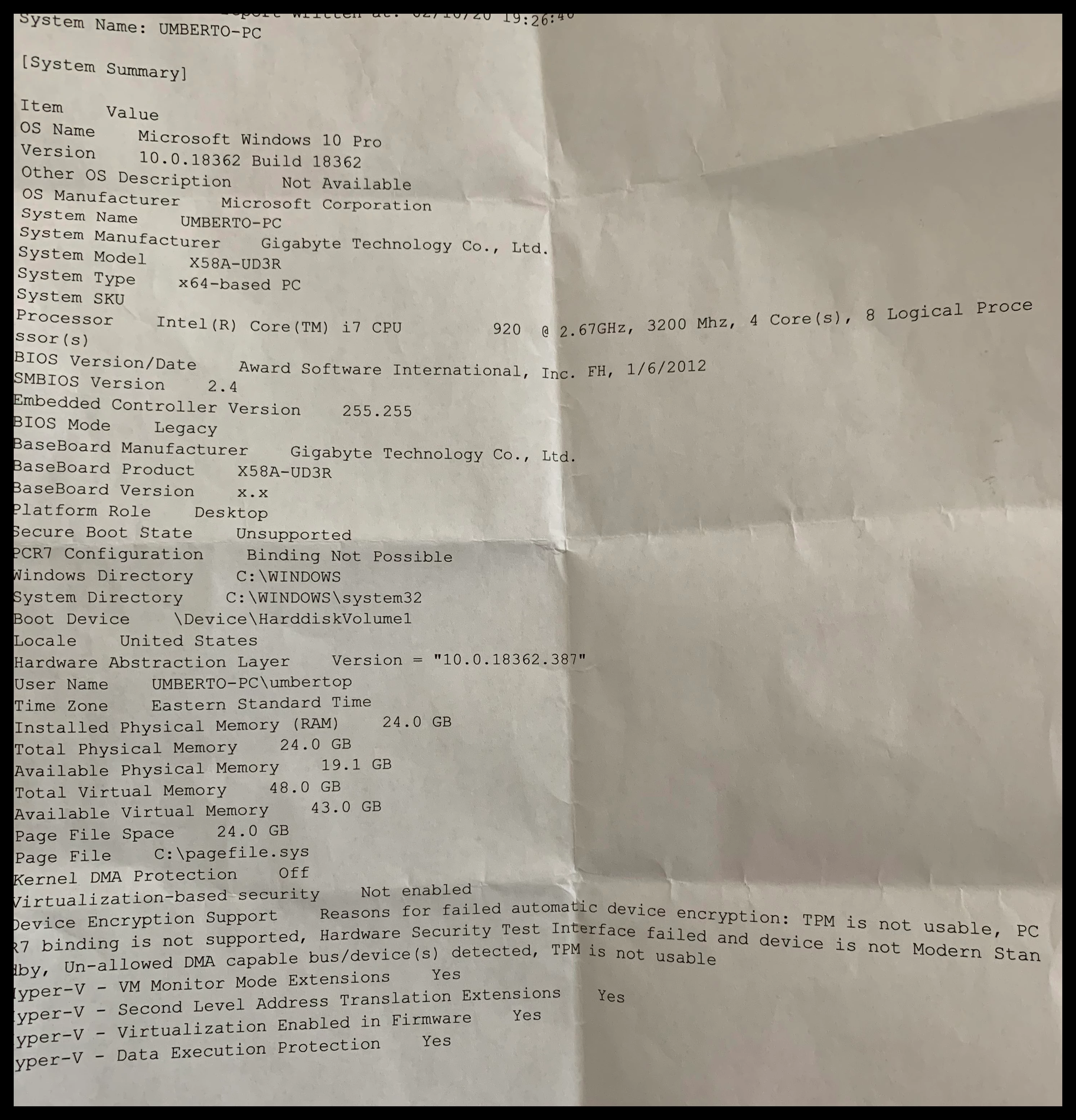
I work with high definition video, not 4k and not intensive stuff at all. I have had a computer for a good 10 years and has worked fine till a few months ago till my graphic card, a GTX570, has been discontinued by Adobe. I would like to know if I can make my computer work with a new graphic card without upgrading my mother board and processor.  I have attached a file with my computer configuration. Thank you, Umberto.specs for computer.jpg
TOPICS
Hardware or GPU , Performance
903
Translate
Report
Community guidelines
Be kind and respectful, give credit to the original source of content, and search for duplicates before posting. Learn more
community guidelines
LEGEND ,
Feb 12, 2020 Feb 12, 2020

It's not Adobe. It's NVIDIA. You see, NVIDIA had discontinued all driver support for all Fermi GPUs, including yours, back in 2018. The last driver that was compatible with Fermi GPUs, version 391.35, dated all the way back to March of 2018. But Premiere Pro, beginning with the last major version (2019/13.x), now requires a newer driver version than 391.35 just to work properly. Changes in the CUDA requirements is the key. 391.35 does not support the version of CUDA that's required of all currently available versions of Premiere Pro. And version 2020 (14.x) now requires a driver version higher than 430.xx to work properly.


In other words, your GPU is now totally and permanently obsolete by the manufacturer itself. And Adobe was now faced with the choice between continuing to support old and obsolete hardware or enhancing features, performance and format support. And given that no company can have everything all at once without severely compromising stability, Adobe wisely opted to follow the newer hardware path. Had it opted to continue to support legacy and/or obsolete hardware, Premiere Pro's feature set, performance and format support would have been stuck all the way back at CS4 levels - in other words, it would have fallen farther behind the competition in almost every aspect.


And in addition, I would STRONGLY recommend that you save up for a completely new system at this point: That i7-920 is now completely outdated in terms of performance. Even today's budget desktop or even mid-range laptop PC will significantly outperform your current desktop system. As a result, there is absolutely no cost-effective GPU upgrade for that PC of yours, which I now believe to be stuck between a rock and a hard place. Performance-wise, a GT 1030 (among currently available GPUs) would be a downgrade in absolute performance while a GTX 1650 would have been overkill - and there is absolutely nothing in between within NVIDIA's currently available GPU lineup.

Translate
Report
Community guidelines
Be kind and respectful, give credit to the original source of content, and search for duplicates before posting. Learn more
community guidelines
LEGEND ,
Feb 12, 2020 Feb 12, 2020

Sorry my previous reply was removed, but I will substitute a more direct answer. If you will not be upgrading the rest of your system in the foreseeable future, just get yourself a GTX 1650 and be done with it. Anything higher than that will become seriously bottlenecked by your system's CPU.

Translate
Report
Community guidelines
Be kind and respectful, give credit to the original source of content, and search for duplicates before posting. Learn more
community guidelines
Explorer ,
Feb 12, 2020 Feb 12, 2020
I understand. I really appreciate your help. Thank you
Translate
Report
Community guidelines
Be kind and respectful, give credit to the original source of content, and search for duplicates before posting. Learn more
community guidelines
Explorer ,
Feb 12, 2020 Feb 12, 2020
Hi. Thanks for your help. Actually the reason why I am trying to make this
computer work vs buying a new one is not because of money. I was trying to
find the easy way out. I will buy a new computer as soon as I can. However
my question is my gtx 570 is a 2.0x16. But what would happen if I stuck in
there an inexpensive 3.0x16 like a gt 1650 or else. Would it make Premiere
run a little better? Thank you for your time.
Translate
Report
Community guidelines
Be kind and respectful, give credit to the original source of content, and search for duplicates before posting. Learn more
community guidelines
LEGEND ,
Feb 12, 2020 Feb 12, 2020
LATEST

Actually, I based my response only on the CPU's performance. I checked the system information further, and discovered that the installation of a newer graphics card is now complicated further by the fact that your system has only a legacy BIOS. Newer GPUs now require UEFI support just to even work at all. Your system's motherboard predates the introduction of Gigabyte's implementation of UEFI. Therefore, I am qualifying the recommendation with the warning that you MUST find a newer-generation card that has been shown to be compatible with a non-UEFI legacy BIOS.

Translate
Report
Community guidelines
Be kind and respectful, give credit to the original source of content, and search for duplicates before posting. Learn more
community guidelines