


New Participant
April 9, 2025
Answered

P: System Compatibility Report Intel Arc Graphics Crashing

  • April 9, 2025
  • 25 replies
  • 14261 views

I recently updated Premiere to 25.2.1. After the update, this warning appears.
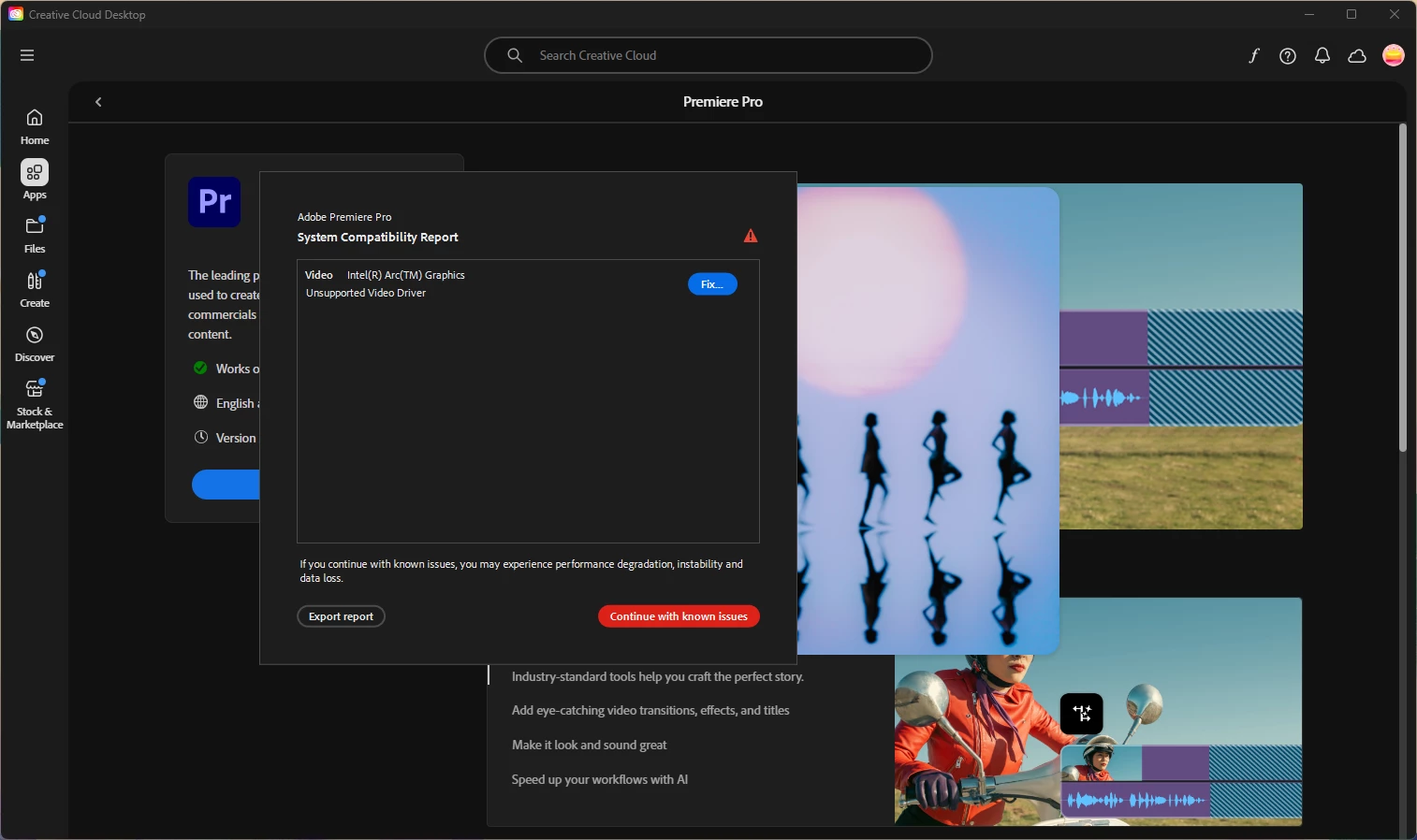
I followed the steps to fix this, and it worked for about a day. My computer had some more updates and now every time I try to work in Premiere, it not only crashes, but freezes my system. I can't even save a project before it crashes.


I've tried uninstalling and reinstalling Premiere, going back to an older 25 update, and updating my drivers, to no avail. There's probably more I'm missing but I was just curious if anyone had any suggestions to help out. Here are my specs as well: 


Lenovo ThinkPad

Intel(R) Core(TM) Ultra 7 165H 1.40 GHz

64 GB RAM

64-bit operating system, x64-based processor

Windows 11 Pro


Correct answer motivated_warmth7825

Jamie and Mayjain,


Thank you for your assistance today! I am back running normally now. No more incompatibility error or crashes. 


Solution:

 I used the DDU utility and completely removed both my NVIDIA and INTEL gpu drivers.  I then reinstalled the latest versions of both and that seemed to do the trick. Between Premiere, Windows 11 and Intel all pushing updates out this past week, perhaps something was leftover, causing issues.  Once again, thank you!

25 replies

New Participant
November 13, 2025

Premiere Pro Driver Compatibility Warning – Intel Arc Graphics

Hello Adobe Support,

I am using Adobe Premiere Pro on Windows 11 with an Intel Arc graphics driver. The System Compatibility Report shows a warning: "Unsupported Video Driver."

Could you please confirm which Intel Arc driver version is currently validated for Premiere Pro? If the latest WHQL-certified driver is not yet supported, I would appreciate guidance on the recommended stable version.

Thank you for your assistance.

Ann Bens
Community Expert
November 13, 2025

Always install the most current driver.

New Participant
November 13, 2025

The most current one is the problem. So what is the alternative rollback?

New Participant
October 15, 2025

Hi, I recently got a new laptop the MSI Modern 15 H AI


My specs are 32 GB RAM, 1 TB, Intel Core Ultra 9 and Intel Arc Graphics.

I felt like it a was a great deal and I'm fascinated with it but when I try to work on premiere I'm experiencing some compatibility issues with the graphics, when I first open Premiere I had to Install my drivers and I had it fix, but days later got the issue back, so I uninstalled drivers and Intsalled again and seem to work just fine, but next day the problem came back.

is my graphic not compatible with premierer? or is there a way to fix it?


I'm able to return the laptop but I don't really want to do it


Fergus H
Community Manager
Community Manager
October 15, 2025

@JULIO CESAR_VILLEGAS 2638 The issue you are experiencing is most likely caused by Windows Update replacing the updated Intel video driver you installed manually. Windows Update is replacing the updated driver with an older version which does not work reliably with our applications. 


An article on Intel's website explains this issue: https://www.intel.com/content/www/us/en/support/articles/000087834/graphics.html


Regards,

Fergus

Inspiring
September 10, 2025

Greetings Rachel,


When we got this error, we went to this location and updated the most recent Pro driver (after some trial and error):


Intel® Arc™ Graphics Drivers


https://www.intel.com/content/www/us/en/products/docs/discrete-gpus/arc/software/drivers.html


We had to go direct, because (as an example) the last time we installed via the Intel app, it installed an old driver that fell off the list, and even then, the Game On driver (rather than a Pro driver). So we know the official Intel app made an incorrect determination and installed the wrong driver set, as it chose a driver that cannot (technically) be directly downloaded anymore manually, unless someone has it listed elsewhere besides the Intel site. Also, the Intel app cannot seem to figure out the difference between a dedicated editing machine, or maybe "it thinks" we're secretly gaming on corporate systems, etc.


I think Adobe needs to get a technical engineer liason for Nvidia, Microsoft and Intel, because things are getting so contradictive there needs to be someone that can get all these guys (or gals) in the same room to be on the same page anytime there is an update, especially for Windows Enterprise, but for anything of the big four.

New Participant
August 26, 2025

Estou tendo problemas ao abrir o Premiere, onde ele não usa a placa da NVIDIA para nada. Toda vez que abro o Premiere, esse aviso aparece: 

Em anexo está o report de erro. Já configurei no app da NVIDIA pra sempre usar a placa da NVIDIAno Premiere e todos os programas da Adobe mas só o Premiere está com esse problema.

Meu notebook é um Alienware m16 R2, minha placa de vídeo integrada é Intel(R) Arc(TM) Graphics v.32.0.101.6078 e a outra é uma NVIDIA GeForce RTX 4070 Laptop GPU v.32.0.15.7700.

Brainiac
August 26, 2025

Na verdade, sua GPU Nvidia está sendo utilizada. O problema é o driver da GPU integrada Intel Core Ultra, que precisa ser atualizado. Infelizmente, cabe ao fabricante de renome do seu laptop fornecer um driver suficientemente atualizado para a GPU integrada, e instalar um driver genérico do site da Intel pode ser complicado, se não impossível.

Inspiring
May 28, 2025

Greetings,


When we encountered this issue our solution case was simple. We went to the Intel site and downloaded the latest Pro driver set. Our new Dell machines were 4 drivers behind (I think it was about an entire year). The strange thing is, none of the detection software, such as Dell Support, Windows Updates, or even the Intel Manager, seemed to figure out that the driver set was four drivers behind. So of course, we had to do this manually, but it worked. Premiere Pro compatiability error message gone.

Community Manager
May 29, 2025

Hi Edit Videos,


Thank you for sharing this solution! We appreciate you taking the time to investigate the issue and share your findings with the community.


Regards,

Sumeet

Participating Frequently
April 30, 2025

Following an update of several Creative Cloud applications, including Premiere Pro, I have experienced error messages regarding graphics drivers -- first in Animate and now in Premiere Pro. I have an NVIDIA graphics card and have attempted to update through NVIDIA, yet the error persists. Microsoft is completely unhelpful as the instructions are to simply use Microsoft Update to update the graphics drivers. Has anyone encountered this error and found a solution? Thanks.

Oh, and as additional information I have an NVIDIA RTX A2000 graphics card.

jamieclarke
Community Manager
Community Manager
April 30, 2025

Hi @judy_2488 - You are receiving this message because the minimum driver version for your iGPU graphics card you need to have installed is 32.0.101.6314.  Please update and let us know if that helps your issue.  I will merge your post with the primary that has more specific instructions if needed.

Participating Frequently
April 30, 2025

Thanks Jamie. Please link me to the detailed post. I'm not as computer savvy as most. 😉

New Participant
April 17, 2025

Getting this when I open Adobe PR

How do I fix this? All my drivers have been updated.

Fergus H
Community Manager
Community Manager
April 17, 2025

@MAvila2011 what you're probably seeing is that the GPU driver provided by Windows Update is older than the driver that both Intel and Adobe recommend for creative applications like Premiere Pro. 


Intel recommends that you use the Intel Driver & Support Assistant (DSA) to install driver updates. It's available here: https://www.intel.com/content/www/us/en/support/intel-driver-support-assistant.html


Be aware that it is possible that after a driver update via DSA, Windows Update will replace the driver with an older version. If you experience this problem (you'd know because Premiere Pro would warn you at launch, just like the message you posted above), you should follow the directions in this Intel article: 

https://www.intel.com/content/www/us/en/support/articles/000087834/graphics.html


I hope this helps!


Regards,

Fergus


Community Manager
April 11, 2025

Thanks, @motivated_warmth7825 , for the update; glad to hear it helped! 😊
Feel free to reach out if you run into any other issues in the future.

Best regards,
Mayjain

Participating Frequently
April 14, 2025

Hello,

I figured out something that could be helpful.  Windows update is pushing the outdated Intel driver from March 2024 on to machines with the latest intel driver installed!  I happened to notice this today and as soon as the updates finished, I now receive the warning box upon start up again.  Are you in communication with Intel or Microsoft to report this behavior? The driver is extremely old and causing problems with adobe premiere pro..  Thanks in advance. 

Community Manager
April 16, 2025

Thanks, @motivated_warmth7825 , for sharing the details.

Here’s a workaround recommended by Intel that may help: Intel Support Article 000087834

Please let us know if this resolves the issue on your end.

Thanks,
Mayjain

motivated_warmth7825Correct answer
Participating Frequently
April 11, 2025

Jamie and Mayjain,


Thank you for your assistance today! I am back running normally now. No more incompatibility error or crashes. 


Solution:

 I used the DDU utility and completely removed both my NVIDIA and INTEL gpu drivers.  I then reinstalled the latest versions of both and that seemed to do the trick. Between Premiere, Windows 11 and Intel all pushing updates out this past week, perhaps something was leftover, causing issues.  Once again, thank you!

jamieclarke
Community Manager
Community Manager
April 11, 2025

Hi @motivated_warmth7825 - Try using the DDU utility without disabling your Nvidia GPU.  I was just seeing if there was an incompatibility between the two.