


- Home
- Premiere Pro
- Discussions
- Re: PF_EventExtra->effect_win.current_frame BUG
- Re: PF_EventExtra->effect_win.current_frame BUG

Copy link to clipboard
Copied
Hi There,
either I am doing something very wrong or this is indeed a serious bug.
According to SDK Guides this should report the width of the window in which the Plug-In Resides. The Effect List window where one adjusts the effect.
I take you guys added this feature so that a plug-in can react to the user broadening the window and adjust their interface.
Anyway, here is the bug.
I create an ARB Param and set its width to a default of 200 - wanting to later adjust it to the size of the effect list width.
Here is what happens when I call PF_EventExtra->effect_win.current_frame. It will ALWAYS report the width of the arb minus 4 pixels. No matter how wide the user broadens the effect list view.
This way it becomes impossible to respond to user changes. Why it reports the width of my ARB I dont understand. I KNOW how wide my arb is, as I set its width -)
Clumsy Workaround for anyone who is experiencing this
Set the ARBs width when you create to the max size of its type. Or 100000. Or whichever value you believe will exceed the amount of pixels any future display will be able to physically hold... Just make sure that the value you do pick WILL be large than ANY display's width...
Setting this ridiculous width will somehow make PF_EventExtra->effect_win.current_frame return the actual width of the effect list window.


 1 Correct answer


Interesting; since we introduced Arb parameters (in AE 4.0, 1998), you're the first developer to complain about that behavior. 
I don't think the host respecting your plug-in's stated max value, is a bug.
Why it reports the width of my ARB I dont understand. I KNOW how wide my arb is, as I set its width -)
You knew the maximum stated value, but your effect cannot know the current PF_EventExtra->effect_win.current_frame.
As you mentioned, setting a large maximum width obviates any difficulty.

 6
Replies
6
6
Replies
6

Copy link to clipboard
Copied
Interesting; since we introduced Arb parameters (in AE 4.0, 1998), you're the first developer to complain about that behavior. 
I don't think the host respecting your plug-in's stated max value, is a bug.
Why it reports the width of my ARB I dont understand. I KNOW how wide my arb is, as I set its width -)
You knew the maximum stated value, but your effect cannot know the current PF_EventExtra->effect_win.current_frame.
As you mentioned, setting a large maximum width obviates any difficulty.
Copy link to clipboard
Copied
bbb_999 wrote
Interesting; since we introduced Arb parameters (in AE 4.0, 1998), you're the first developer to complain about that behavior.
I get it 
To me though, when asking for the Window's current frame size I would expect that it would report its current size without me having to first put something insanely large in to it... The EffectListWindow has a size before our plug-in becomes instantiated so I'd gather that it would be aware of its intrinsic size.
In regards to other developer having not complained... The plugs I have seen from 3rd pty. running in premiere either use standard SDK sliders or controls which aren't resizing with the EffectListWindow in which case that particular value would never be of any concern. In our case this posed an immediate concern.
Anyway, having figured out the workaround - this does not post a concern any longer !!
Thx
Copy link to clipboard
Copied
Sorry Bruce, I have to take all back that this aint no bug. It is. But in Premiere Only not inside of AfterEffects.
The guy who wrote ColorGrid obviously did not know of this bug... One can see that in the DrawFunction where it is obvious that he counts on the window being able to report it intrinsic size. Which it does in AE but NOT in Premiere. Hence, his code isn't working and won't scale the ColorGrid as he expects. It scales correctly in AE. Not in PPRO.
Also and adding to the BUGs list...
Premiere does not report the Param Title Frame nor does it report the HorizOffset. Which AE does.
Here are the screen shots. And the sad results of the breakpoint set the same place running in AE and PPRO with an identical EffectListView Width...
It is very clear that one of the apps aren't working correctly. I take PPRO is to blame as AE reports what I would expect it to report.
AE Break Point vs PPRO BreakPoint
AE
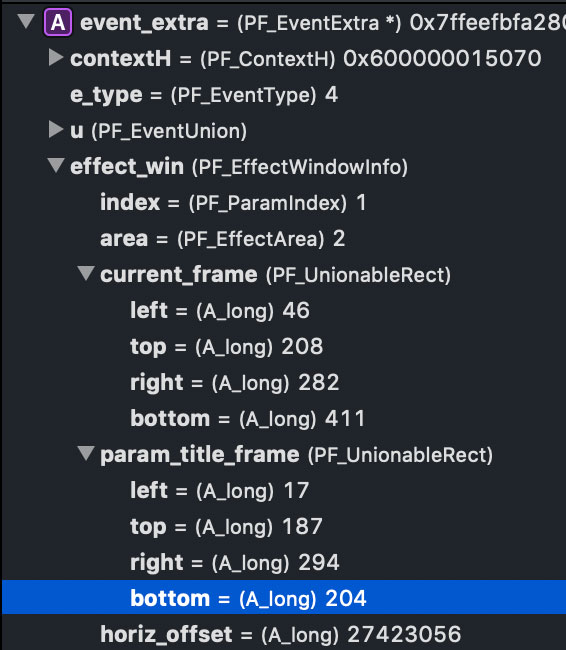
PPRO

Here the App Screen Shots
PPRO
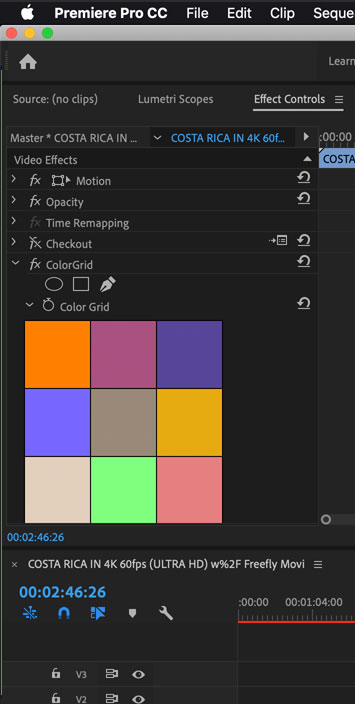
AE 
Copy link to clipboard
Copied
The guy who wrote ColorGrid obviously did not know of this bug...
Clearly! In our defense, Premiere (not yet "Pro") didn't host AE effect plug-ins, when Eric and I wrote ColorGrid.
We're tracking this issue as DVAPR-4214092, "PPro's API does not provide accurate information to AE effects with custom UI".
Copy link to clipboard
Copied
LOL... Sorry Bruce, didn't know you wrote it...
The way it was written does a really good job, though, in teaching about ARBs and what one can accomplish with them !
Thanks for confirming,
Morten
Copy link to clipboard
Copied
Anything good and useful in ColorGrid, was written by Eric Sanders.


Get ready! An upgraded Adobe Community experience is coming in January.
Learn more
 AdChoices