


kratos
Participant
November 3, 2018
Answered

Premier Pro 2019 - no video in program monitor or source monitor
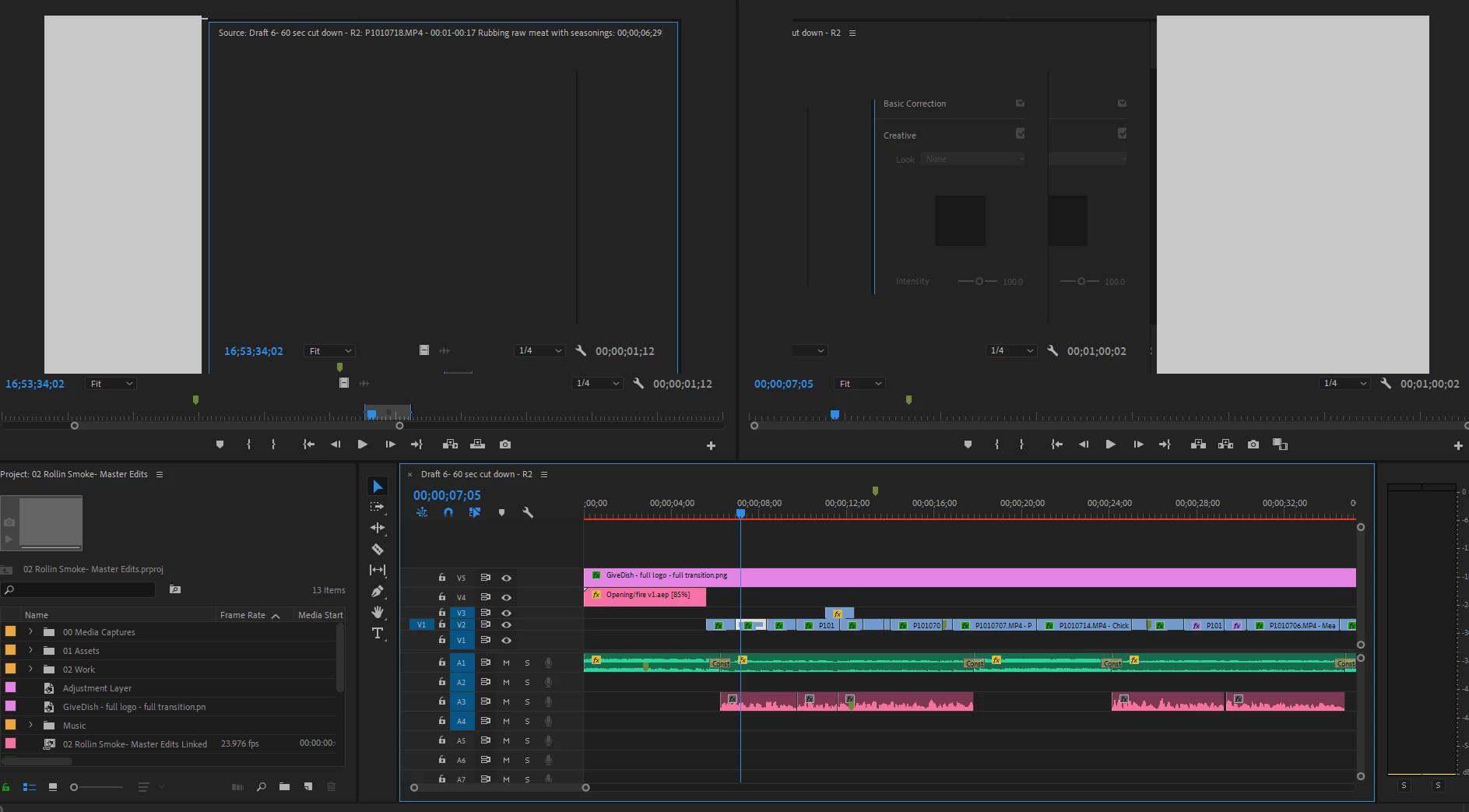
  • November 3, 2018
  • 4 replies
  • 4685 views

anyone have any ideas what is causing this? it plays audio fine but the video doesn't play. video plays fine in after effects and media encoder. I exported from timeline to encoder and it shows there and I created an AE comp from within premier and it played fine in AE. It just doesn't show in premier. My system windows 10. All updated. nvidoa Quadro m5000 card.

I installed Nvidia cuda toolkit and after that it does this..tried install and reinstall.  If anyone can help thank you! 

    This topic has been closed for replies.
    Correct answer caroline_edits

    Hi LemMaurer!

    There was a strange little bug with overlays like Safe Margins and it is being handled by the engineers! You can sidestep the bug by going File > Project Settings > General and changing the renderer to OpenCL.

    -Caroline

    4 replies

    Participant
    January 10, 2019

    That worked !

    Thanks!

    Participant
    January 2, 2019

    I had the same issue in the Program Monitor. I shut-off "Safe Margins"in the program monitor, and then it worked great. Too bad, as I use Safe Margins a lot. Must be some kind of bug???!!!

    caroline_edits
    Community Manager
    caroline_editsCommunity ManagerCorrect answer
    Community Manager
    January 2, 2019

    Hi LemMaurer!

    There was a strange little bug with overlays like Safe Margins and it is being handled by the engineers! You can sidestep the bug by going File > Project Settings > General and changing the renderer to OpenCL.

    -Caroline

    Participant
    January 4, 2019

    Thanks, Caroline. That works well.

    Kevin-Monahan
    Community Manager
    Community Manager
    December 21, 2018

    Still struggling with this, kratos? Let us know.

    Thanks,
    Kevin

    Kevin Monahan - Sr. Community & Engagement Strategist – Pro Video and Audio
    John T Smith
    Community Expert
    Community Expert
    November 3, 2018

    More information needed for someone to help... please click below and provide the requested information

    -Troubleshooting https://forums.adobe.com/thread/2261475

    -Premiere Pro Video Editing Information FAQ http://forums.adobe.com/message/4200840

    Do not count on Windows to be fully up to date when it comes to device drivers

    Go to the vendor site to be sure you have an updated driver for your graphic adapter

    •nVidia Driver Downloads http://www.nvidia.com/Download/index.aspx?lang=en-us

    There are also intermittent reports that the newest driver is not always the best driver due to driver bugs or compatibility issues, so you MAY need to try an earlier driver version