panchsheeel
Participant
October 22, 2018
Answered

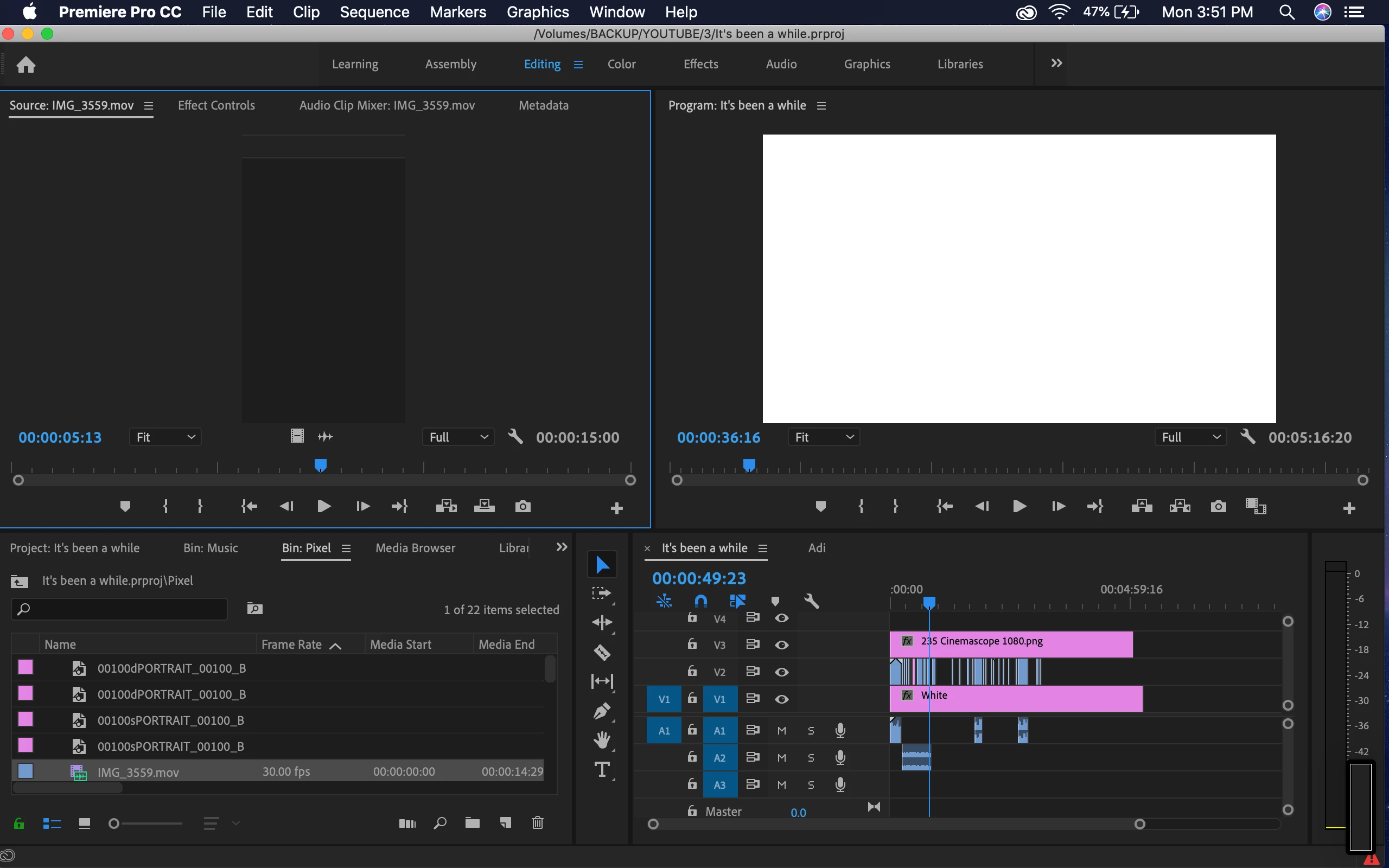
Premiere 2019 showing white screen only

  • October 22, 2018
  • 13 replies
  • 53574 views

Hey,
Having a problem with this.
Anytime I open a project, it shows this white screen in the preview monitor. Tried with multiple projects. Not working.
Premiere also doesn't quit normally. Have to force quit it.
The error shown is "A low level exception occurred in Adobe Scopes (Transmit::CreateInstance).
Any help would be appreciated!

This topic has been closed for replies.
Correct answer Shivangi_Gupta

Updated :/
No difference


Thank you for sharing the information, panchsheeel.

Try resetting preferences and let us know if that helps.

FAQ: How to reset (trash) preferences in Premiere Pro?


Thanks,
Shivangi

13 replies

Known Participant
September 3, 2023

Strangely, during the time it took for me to find this thread and browse through the replies, my Program Monitor suddenly started showing my video footage again. Perhaps there was some sort of buffering issue?


I'd advise people to let PP sit for a few minutes first before attempting any sort of drastic fix. Chances are, it just hasn't loaded up into storage/memory yet.


On a side note, I have noticed a positive improvement by rendering the effects I've applied to my clips, so give that a try as well. It is possible that too many temporary effects are weighing on the overall performance of the project.

Participating Frequently
October 25, 2021

This has been a a constant bug/issue for me and after trying restarts, reinstalls, downgrading projects to previous version, clearing plugin cache and even throwing the kitchen sink at it I finally got it to clear the screen by clicking Edit >> Preferences >> Sync Setting >> Check Box: Automatically clear settings on application quit. Then restarted Premiere Pro and finally got to work on my cut again.

igorcaiedoamaral
Participating Frequently
August 25, 2021

 Unfortunately, same problem here!  Mac Mini M1, Adobe Premiere 15.4.1.

This problema happens all the time, when I'm using grid, wave warp, or even lumetri combined with other effects... it's annoying...  And, I just tried all workarounds: reset preferences, disable transmit, change project folder, everything... 
It's also happend in the thumbnails of a nested sequence in timeline, every small icon turns white. The same when aplly lumetri color in master properties... all white! WHY ???

Participant
November 18, 2021

Did you fix it?

igorcaiedoamaral
Participating Frequently
November 18, 2021

Hello, Gabriel. So... My problems almost stopped when I started to use the 15.2 version, running the app using Rosseta. In M1 I'm having serveral different problems, since this white screen when apply lumetri color in combinnation with other effects, and even bizarre glitches in export files... This workaround worked for me and I considerably reduce many problems....


Participant
December 9, 2020

 my Adobe premiere pro freeze at this place and after not responding few days ago this is work properly but today this not working 


Participant
November 8, 2020

I've opened my project in an older version of Pp. So far, it works for me.

Go to Creative Cloud, find Pp and click the 3 dots. Then, click on "other versions." Find the oldest version. Install it and watch this video on how to open new projects in old versions. Nothing else adviced here has helped me. I hope it works for you too.

Participant
January 14, 2020

I am having the same problem and none of these suggestions fixed the promblem?
If I don't get this fixed soon I will have to switch to final cut.

Participant
May 14, 2020

I have the exact same problem

October 20, 2019

I had same problem.

I Opened 'Task manager' and looked for 'nahimic' services and kick all.
I did it and my problem solved.

Participant
October 21, 2019

Thank you mostafa.miri65,

this worked for me. The other things did't.

October 21, 2019

Welcome 😉

TwoTwentyEast
Participant
October 4, 2019

I had the same issue. I moved all of my media files to another folder, reopened the project, and made premiere relocate the media. That fixed it for me!


tyler 

Inspiring
August 10, 2019

I have not been able to use Adobe Premiere Pro for any length of time without getting this issue. The Program Monitor eventually turns white every single time, wasting time and corrupting the project. I have tried every suggested solution many times to no avail.

I experience this on two different systems with two completely different setups.  The only solution I have found is too start completely over in Adobe Premiere 2018.

Thanks for this Adobe.  FYI, I'm now building an Avid system thanks to 8 months of this nonsense. If we don't pay our subsciption fees, Adobe shuts us down. They can't fix something, and they just keep pushing it out.

Participant
September 22, 2020

I had this issue as well. On my PC I went to Edit < Preferences < Media. And I unchecked "enable hardware accelerated encoding and decoding (requires restart)." Thaat fixed the issue. Hope it helps!

lucash51881171
Participant
April 22, 2019

For me to fix it I went into "window" on the top bar then click ->" Workspaces" then scroll down and see if "import workspaces from projects" has a check mark if so click it to turn it off. Then save your project shut it down and reopen it. This fixed the problem for me after spending hours on the phone with Adobe and should only take a minute for you to do.

Hope this helps!!!

michael37421
Participant
October 3, 2019
Thanks! that worked!