


Known Participant
May 27, 2023
Question

Premiere is all of a sudden Pinning RAM usage at 98-100%

  • May 27, 2023
  • 2 replies
  • 825 views

AND YES, I have already specified in the memory settings not to do so, but It's doing it anyway and I am unable to export, here's the media encoder error log: I don't know what to do, the moment I open the project it goes up to 100%.
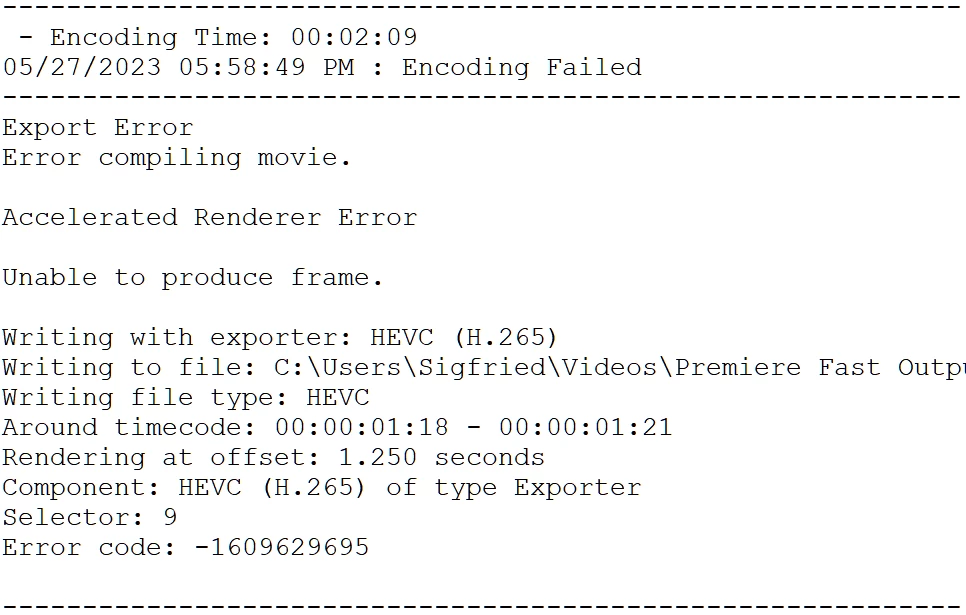
even If I have only media encoder opened, a 'premiere pro 2023' task appears and starts overloading the RAM.

If it was a matter of not using the PC it would be... not ok, but almost acceptable but It is straight-up unable to render.

I need help ASAP, I can't work like this.

This topic has been closed for replies.

2 replies

Legend
May 29, 2023

yeah, Zwea's right that we need more info, but smart rendering might get you over the hump

https://community.adobe.com/t5/premiere-pro-discussions/faq-what-is-smart-rendering/td-p/10648488

oh and HEVC is a bear of a format.  I'd try exporting as something like prores and then bring the resulting file into encoder to transcode to HEVC.

Known Participant
July 31, 2023

HVEC worked so far, like most things, I don't think I can inser "smart rendering" in my workflow at the moment.

Inspiring
May 29, 2023

Please post some more details man. Without any information on your hardware, footage, effects/transitions, sequence settings and export settings we won't be able to help much.


Aside from assigning RAM usage Premiere, what have you tried?

Known Participant
June 11, 2023

CPU: Ryzen 5 3600xt

GPU: Rtx 4070 Ti / Rx 5600xt *

RAM: 32gb 3600mhz


* when I first encountered the issue I had a 4070ti installed, now It's away for RMA and I'm using my old 5600xt but the issue persists