
Participant
March 5, 2019
Question

Premiere not saving new subtitle/caption changes in timeline to new exports

  • March 5, 2019
  • 1 reply
  • 1065 views

Hey guys,

I have been trying to make corrections in the subs for a film in premiere. The subs were originally made there.

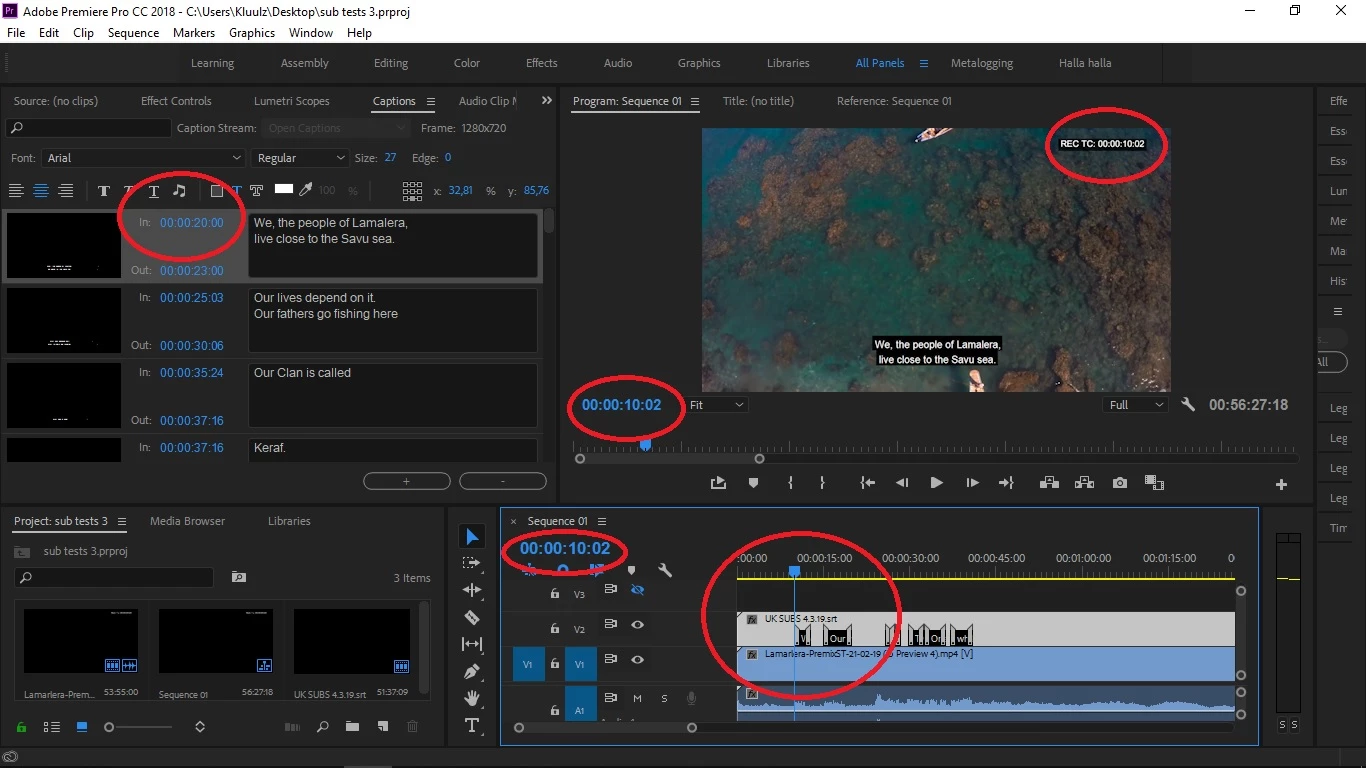
For some reason, despite making changes on the timeline and the changes appearing in the preview screen,

the caption window does not register these changes. Even after saving the project, opening again and then

exporting the captions, the changes in the timeline are not there.

I have posted a picture to show.

I hope there's a way of making the export of the subs take in the changes I've made.
Thanks
    This topic has been closed for replies.

    1 reply

    Stan Jones
    Community Expert
    Community Expert
    March 5, 2019

    My guess is that you shortened the beginning of the caption stream in the timeline, so zero in the timeline is at about 10 seconds of the caption stream. And, therefore, 10 seconds in the timeline is at about 20 seconds in the caption stream. If you're burning in Open Captions, it doesn't matter, because what you see on the screen is what you get.

    But when your goal is to export .srt from your project, with Open Captions, all you can do is to export the Caption Stream from the Project Panel (not the edited captions from the timeline). It is for this same type of reason that you can't cut and move parts of the caption stream.

    If all of your captions are off by the same amount, you can export as srt and adjust the timings in a free program like SubtitleEdit.

    You can test my theory about the caption stream placement: in the Caption Panel, adjust the start time of the first caption to 11 seconds. Does it now appear in the timeline at approximately the 1 second mark?

    kluulzAuthor
    Participant
    March 5, 2019

    Hey Stan, thanks for your reply.

    Unfortunately it is not just moving the subs, but I have also split some up, making them fit better (i.e. adding new caption text thingies.)

    But to answer your question, once I change the first sub placement from 20 sec as displayed, to 11 sec, then in the timeline, the corresponding caption is now at 1 sec.

    Stan Jones
    Community Expert
    Community Expert
    March 5, 2019

    See this thread for more description and some options. Even though the thread title is "import," the post I linked to (post 3) addresses the export problem you are having.

    Re: Can't import a complete srt file

    kluulz  wrote

    Unfortunately it is not just moving the subs, but I have also split some up, making them fit better (i.e. adding new caption text thingies.)

    If you cut and paste, cut and move, etc, PR sees this as one caption stream in the project panel/caption panel. If you actually created a new caption stream, whether you put it on the same track as the original caption stream or not, PR sees it as separate streams.

    Even if your captions are not in the right order in your caption stream, I think I would export and use SubtitleEdit or similar. You can move groups of captions. You can use a version of your video and do the timing there. And you can export/convert to numerous formats.