


Answered
Premiere Pro 2020- System Compatibility Report
Hi,
I have Premier Pro 2020, when I open I see windows like this
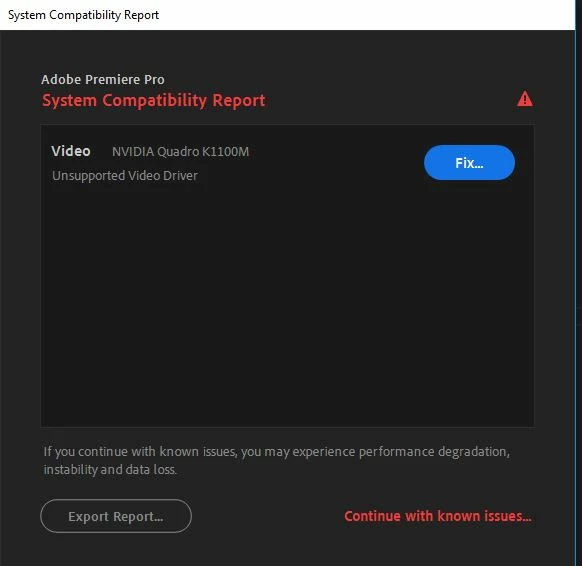
I have updated NVIDIA driver and it does not show any error or warning so goes success. Still, every time I see this window. I tried to export small video from Premiere which took hours so really very slow.
I am also attaching "Export Report" here.
____________________________________________________________________________

System Components:

Operating System    Windows v.10.0.17134.1
----------------------------------------------------------------------------
	No conflicts to report.

Video    NVIDIA Quadro K1100M v.25.21.14.2632
----------------------------------------------------------------------------
1.	NVIDIA has identified a bug which causes random crashes in your Adobe application and has provided a fix in driver version 430.86. This driver update is strongly recommended.
	URL: https://helpx.adobe.com/premiere-pro/kb/drivers-video-win-nvidia.html

Video    iDisplay (Microsoft Corporation - WDDM v1.1) v.12.41.36.57
----------------------------------------------------------------------------
	No conflicts to report.

Audio    Jabra EVOLVE LINK MS v.10.0.17134.1
----------------------------------------------------------------------------
	No conflicts to report.

Audio    NVIDIA High Definition Audio v.1.3.38.13
----------------------------------------------------------------------------
	No conflicts to report.

Audio    Realtek High Definition Audio v.6.0.1.8108
----------------------------------------------------------------------------
	No conflicts to report.

Network    Cisco AnyConnect Secure Mobility Client Virtual Miniport Adapter for Windows x64 v.3.1.6019.0
----------------------------------------------------------------------------
	No conflicts to report.

Network    Hyper-V Virtual Ethernet Adapter v.10.0.17134.1
----------------------------------------------------------------------------
	No conflicts to report.

Network    Hyper-V Virtual Ethernet Adapter #2 v.10.0.17134.1
----------------------------------------------------------------------------
	No conflicts to report.

Network    Hyper-V Virtual Ethernet Adapter #3 v.10.0.17134.1
----------------------------------------------------------------------------
	No conflicts to report.

Network    Hyper-V Virtual Ethernet Adapter #4 v.10.0.17134.1
----------------------------------------------------------------------------
	No conflicts to report.

Network    Hyper-V Virtual Ethernet Adapter #5 v.10.0.17134.1
----------------------------------------------------------------------------
	No conflicts to report.

Network    Hyper-V Virtual Switch Extension Adapter v.10.0.17134.1
----------------------------------------------------------------------------
	No conflicts to report.

Network    Hyper-V Virtual Switch Extension Adapter #2 v.10.0.17134.1
----------------------------------------------------------------------------
	No conflicts to report.

Network    Hyper-V Virtual Switch Extension Adapter #3 v.10.0.17134.1
----------------------------------------------------------------------------
	No conflicts to report.

Network    Hyper-V Virtual Switch Extension Adapter #4 v.10.0.17134.1
----------------------------------------------------------------------------
	No conflicts to report.

Network    Hyper-V Virtual Switch Extension Adapter #5 v.10.0.17134.1
----------------------------------------------------------------------------
	No conflicts to report.

Network    Intel(R) Dual Band Wireless-AC 7260 v.18.33.12.2
----------------------------------------------------------------------------
	No conflicts to report.

Network    Intel(R) Ethernet Connection I217-LM v.12.15.23.1
----------------------------------------------------------------------------
	No conflicts to report.

Network    Microsoft Kernel Debug Network Adapter v.10.0.17134.1
----------------------------------------------------------------------------
	No conflicts to report.

Network    Microsoft Wi-Fi Direct Virtual Adapter v.10.0.17134.1
----------------------------------------------------------------------------
	No conflicts to report.

Network    Microsoft Wi-Fi Direct Virtual Adapter #2 v.10.0.17134.1
----------------------------------------------------------------------------
	No conflicts to report.

Network    SonicWALL Virtual NIC v.10.1.0.40
----------------------------------------------------------------------------
	No conflicts to report.

Network    VMware Virtual Ethernet Adapter for VMnet1 v.14.0.0.0
----------------------------------------------------------------------------
	No conflicts to report.

Network    VMware Virtual Ethernet Adapter for VMnet8 v.14.0.0.0
----------------------------------------------------------------------------
	No conflicts to report.

Network    WAN Miniport (IKEv2) v.10.0.17134.1
----------------------------------------------------------------------------
	No conflicts to report.

Network    WAN Miniport (IP) v.10.0.17134.1
----------------------------------------------------------------------------
	No conflicts to report.

Network    WAN Miniport (IPv6) v.10.0.17134.1
----------------------------------------------------------------------------
	No conflicts to report.

Network    WAN Miniport (L2TP) v.10.0.17134.1
----------------------------------------------------------------------------
	No conflicts to report.

Network    WAN Miniport (Network Monitor) v.10.0.17134.1
----------------------------------------------------------------------------
	No conflicts to report.

Network    WAN Miniport (PPPOE) v.10.0.17134.1
----------------------------------------------------------------------------
	No conflicts to report.

Network    WAN Miniport (PPTP) v.10.0.17134.1
----------------------------------------------------------------------------
	No conflicts to report.

Network    WAN Miniport (SSTP) v.10.0.17134.1
----------------------------------------------------------------------------
	No conflicts to report.


____________________________________________________________________________

    Debug database settings:
        AEResolveQTDataRefs: 			 Current: true Default:
LegacyQTCodecsAndGamma: Current: false Default: 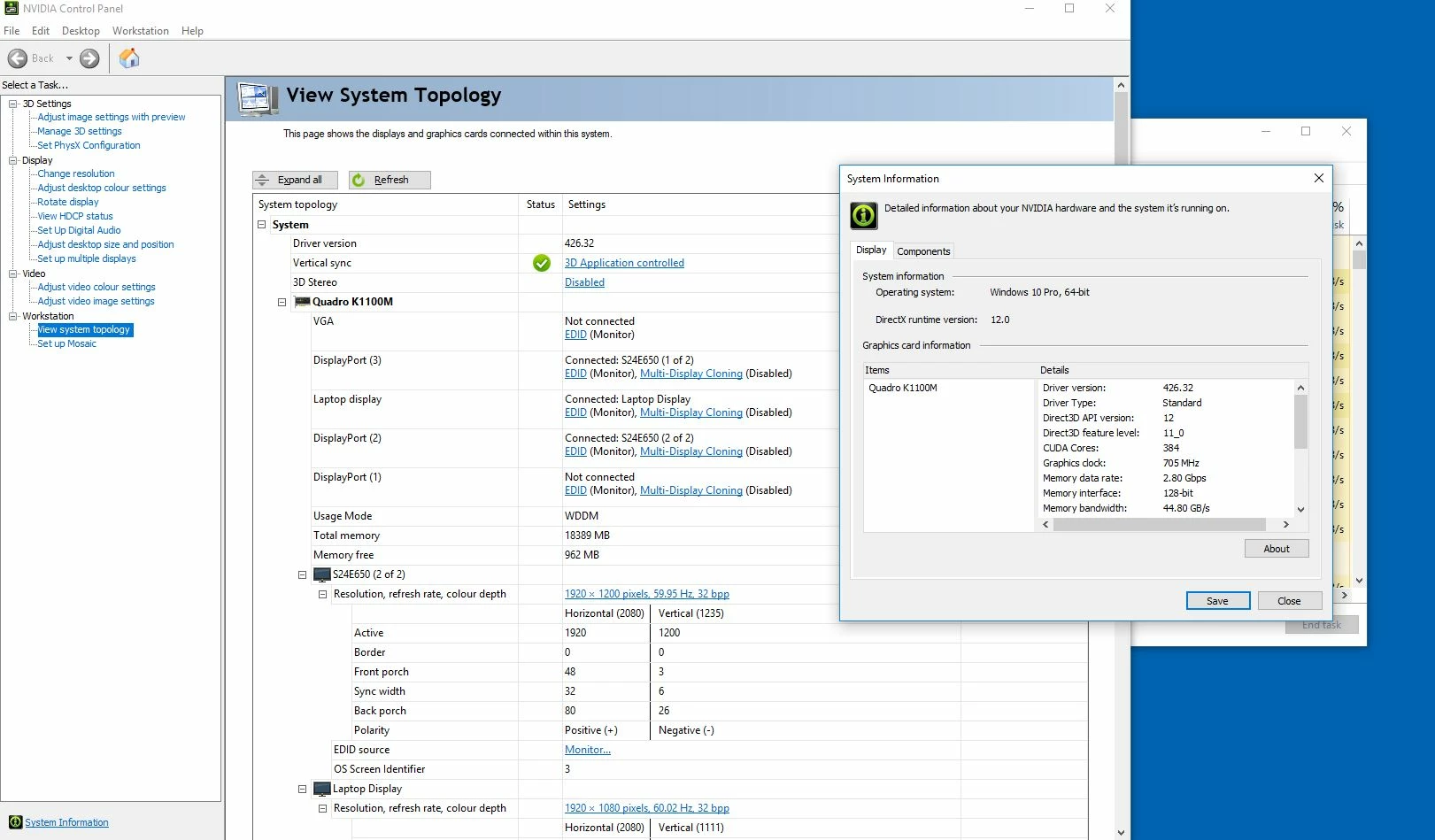
Please advise, how to fix it.
Thanks
 AdChoices