
Participant
October 23, 2024
Answered

Premiere Pro 2025 - No option to transcribe sequence in text tab

  • October 23, 2024
  • 5 replies
  • 5641 views

Trying to transcribe a sequence interview footage (clean audio) and the option to transcribe just isn't there in the text panel. Only option it gives is to generate a static transcript.

Correct answer Stan Jones

@Matthew38616698cmux,


That is odd. What you are missing is the name(s) of the untranscribed source clips in the sequence - Nico in my screengrab.
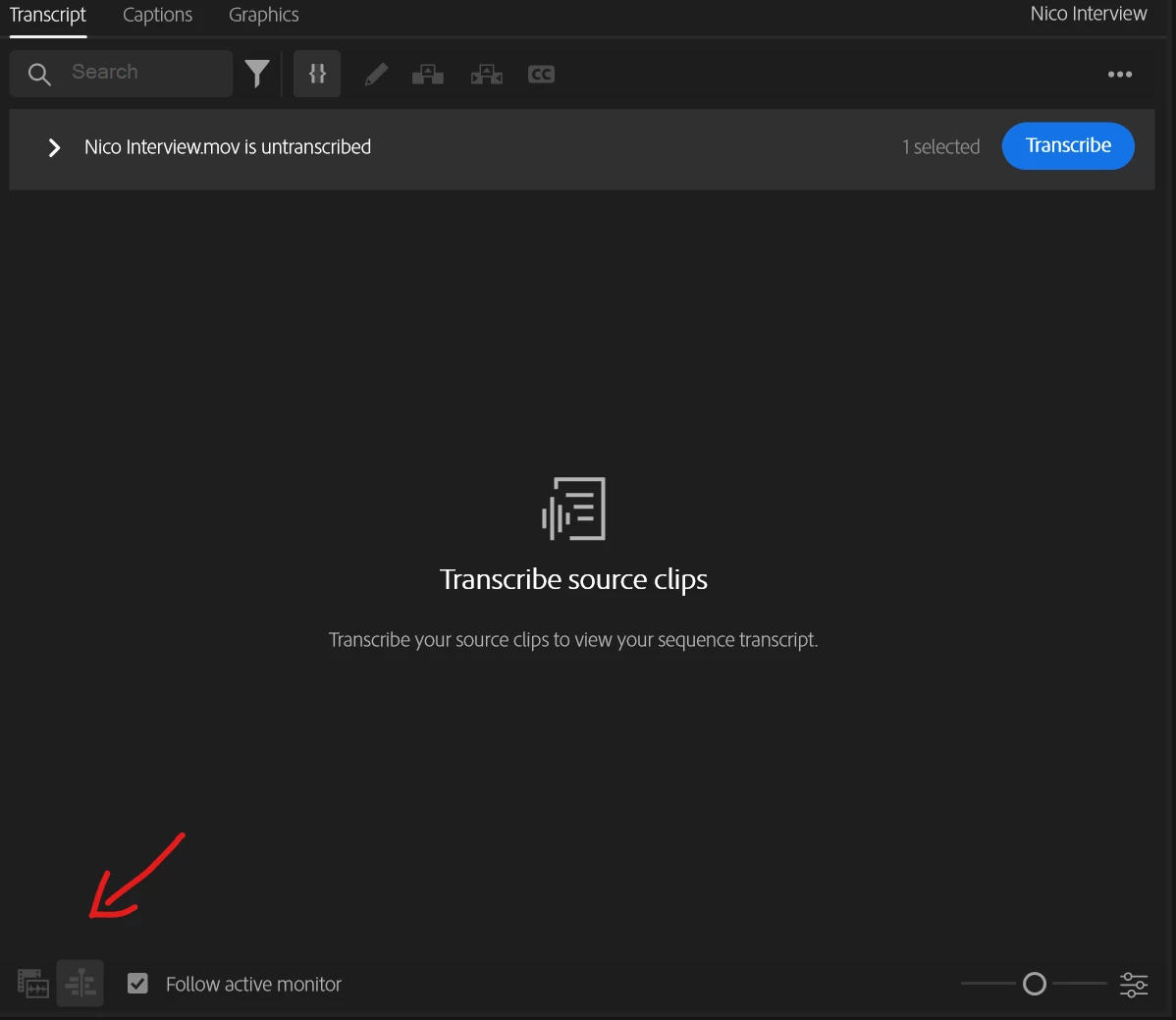
You can simply select the clip in the Project Panel, right-click, and pick Transcribe.


Stan


5 replies

Participating Frequently
April 3, 2025

I have the same issue. I am unable to transcribe a sequence. I have followed all troubleshooting steps to no avail. I can transcribe clips in the project panel and source monitor but not a sequence or active monitor. I am using Windows. I am going to switch over to a Mac and see if it works there. I am working on a documentary with Spanish interviews that need to be translated and captioned in English. 

Participating Frequently
April 3, 2025

Same on a Mac. Not able to transcribe a sequence. 

Participant
April 4, 2025

I found clearing all the cache and renders, resetting preferences, restarting machine and then reloading everything into a new project (minus any graphics) seemed to work for me. It's a massive inconvenience but it seemed to be the only way I could resolve the issue.

Participant
March 10, 2025

I'm having the same issue - I click on the Text tab but the option to transcribe (or infact any of the other usual options) isn't there. I've tried selecting the clip and the sequence, restarting Prem, resetting preferences etc and still no joy. Currently working off 25.1.0 (the most up to date version currently). Can anyone help?

Stan Jones
Community Expert
Community Expert
March 10, 2025

@Martin35425760n4d9,


The text panel has crashed. Odd given what you've tried.


Create a new test project. Add one clip. Right click in the project panel, and pick transcribe. Does that work?


@Kerstin Ebert @Alexander_DVA 


Stan


Participant
March 10, 2025

Hi Stan,


Thanks for the reply. I've tried this and reset preferences again, whilst the correct panels now show up when I click on the Text tab, nothing within the tab is clickable so I can't create active or static transcriptions. Don't suppose you have any idea what the fixmight be or is it just a Premiere glitch?

Stan Jones
Community Expert
Stan JonesCommunity ExpertCorrect answer
Community Expert
October 24, 2024

@Matthew38616698cmux,


That is odd. What you are missing is the name(s) of the untranscribed source clips in the sequence - Nico in my screengrab.

You can simply select the clip in the Project Panel, right-click, and pick Transcribe.


Stan


Participant
January 10, 2025

Thank you so much, Mr. Jones. You've helped us a lot.

IanB_360
Community Manager
Community Manager
October 23, 2024

Hi @Matthew38616698cmux 

Welcome to the Premiere Pro forums! We are glad to see you here. We need a few more details to try to help with the issue. Please see, How do I write a bug report ?

Thanks for submitting your bug report. I hope we can help you soon. Sorry for the frustration!

Thanks,

Ian

Participant
October 23, 2024