



MWongSound
Participating Frequently
April 14, 2022
Answered

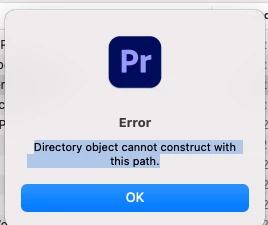
Premiere Pro 22.3 Error Directory object cannot construct with this path.

  • April 14, 2022
  • 20 replies
  • 47539 views

Fresh install of Premiere Pro 22.3 today and when I lauch the Premiere Pro it comes up with the error "Directory object cannot construct with this path."  


Im on Big Sur 11.6.5, File & Folder permissions all checked, tried with full disk access as well with the same errror on launch.


Tried uninstalling and reinstalling, same error.


No idea what directory its trying to create.
 

Correct answer Lee at Wham

I had the same issue. 


I followed MWongSounds advice and checked the read/write status of the settings folder to no avail. What I did notice however is I was trying to run version 23 and the folder was for version 22. I made a copy of the folder and renamed it "23.0" and booted up Premiere again... Success! 

20 replies

Participant
January 3, 2023

I'm receiving this error, too. I work with Adobe products daily for work and they've been extremely unreliable as of late, this is extremely frustrating. I used Premiere Pro maybe 4 times already today (opened, worked, and quit) and now the error. I tried doing all of the suggestions in this thread- Changing permissions, changing folders, uninstalling/reinstalling and the only thing that semi works is creating a new user on my mac, but then I lose access to all of the files and presets I was using earlier today. Can someone please help?

Known Participant
December 31, 2022

What happens if I was a dumb b*tch and accidentally deleted the 22.3 file...?

Participant
December 9, 2022

I had the same problem.


The default path for Premiere Pro is "/User/ Documents/Adobe/Premiere Pro/<version>", however, this had not been created by Creative clouds/Premiere Pro itself when it was installed.


So, I manually created the directory and fired up the application and everything worked fine after that.


Just fyi - I'm running OSX Monterey + Izotope Plugins

nunop38651187
Participant
December 27, 2022

This solution completely worked! Thank you very much!
I also use the same version and have Izotope plugins.

Participant
December 5, 2022

I solved it Premiere 23, Windows 10, I gave Premiere full access from the Firewall and Security services.


I have lost lots of time though, solve this ADOBE.

Kevin-Monahan
Community Manager
Community Manager
December 6, 2022

Sorry about that, felipegarridog. Glad you are back in action. You can file a bug if you like here: https://community.adobe.com/t5/premiere-pro/ct-p/ct-premiere-pro?page=1&sort=latest_replies&filter=all&lang=all&tabid=bugs


Thank You,

Kevin

Kevin Monahan - Sr. Community &amp; Engagement Strategist – Pro Video and Audio
Participant
December 5, 2022

I have the same problem, Windows 10, Premiere 23.0.


Annoying, I am tired of Adobe. I have tried to work in 3 computers and I have lost meny days of work becuase the last update just works horribly bad.

nunop38651187
Participant
November 30, 2022
 
I'm having the same problem. I already uninstalled and installed all possible versions in the creative cloud and always the same problem.
Kevin-Monahan
Community Manager
Community Manager
November 30, 2022

Hi nunop38651187,

What troubleshooting steps have you tried so far?


Thanks,
Kevin

Kevin Monahan - Sr. Community &amp; Engagement Strategist – Pro Video and Audio
Participant
November 24, 2022

I'm a Windows user. this same issue or error interrupted me. I fixed it by going to windows security-Virus & Threat protection in this section I disabled Controlled folder access and it worked for me. try to find this alternative on MAC.

Kevin-Monahan
Community Manager
Community Manager
November 28, 2022

Thanks for sharing your potential fix, Abhishek.


Kevin

Kevin Monahan - Sr. Community &amp; Engagement Strategist – Pro Video and Audio
Lee at WhamCorrect answer
Participant
October 28, 2022

I had the same issue. 


I followed MWongSounds advice and checked the read/write status of the settings folder to no avail. What I did notice however is I was trying to run version 23 and the folder was for version 22. I made a copy of the folder and renamed it "23.0" and booted up Premiere again... Success! 

Participant
September 7, 2022

You solve the problem by changing the rigth of your adobe premiere pro folder.

this problem sometimes happens when you create a new computer user

Participant
October 10, 2022

Shame on you Adobe!

Such a bug. 
I cannot fix it by any means. The only what helps is running the program as the administrator. 

Kevin-Monahan
Community Manager
Community Manager
October 10, 2022

Sorry about that, Johnny_Zet. To make the product team aware of this issue, please file it here: https://adobe-video.uservoice.com/forums/911233-premiere-pro Weird. I could not find a bug you can upvote. Let us know the URL so we can help advocate for your bug fix.


Thanks,
Kevin

Kevin Monahan - Sr. Community &amp; Engagement Strategist – Pro Video and Audio
Participating Frequently
August 16, 2022

Tried it all, still having this with version 22.5. It suddenly happened one day when I opened the program. 

Participating Frequently
August 16, 2022

Kinda drives me crazy now.