

Copy link to clipboard
Copied
Ok, just updated to v 25.1 opened my projects in progress to find out that none of them uses my iGPU to decode.
Went on checking it with different formats that are decoded (h264 8-bit 4:2:0, h265 8-bit 4:2:0, h265 10-bit 4:2:0, h265 10-bit 4:2:2) by the iGPU - all of them show 0% load.
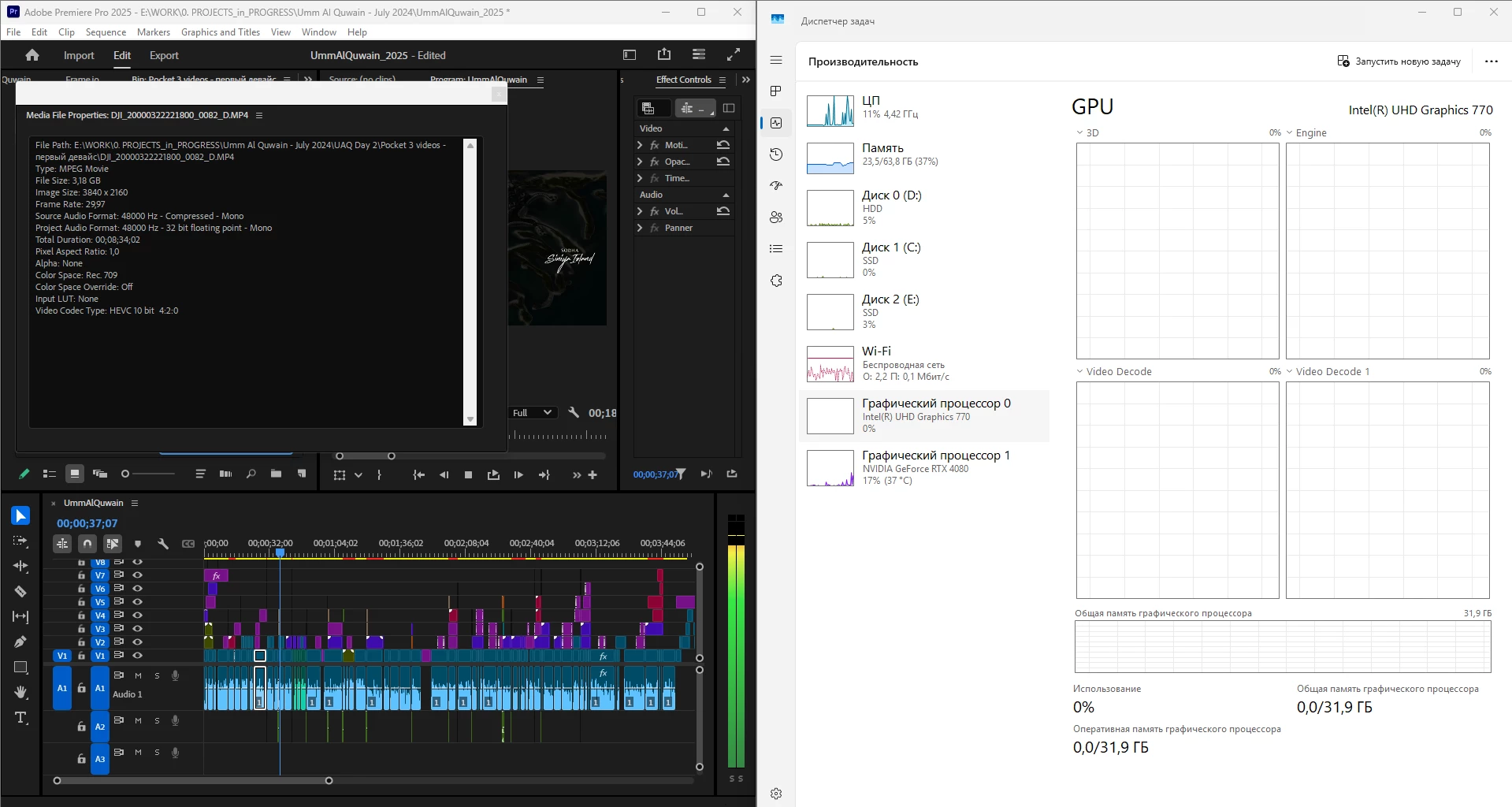
What is going on, guys? Why is it "new version - new bugs" thing every time? My CPU immediately started being loaded more, like by 60% all the time, even though my GPU does the decoding, whereas on the previous versions the average CPU load was 20-30% with the iGPU doing all the decoding job.
Yes, I tried reinstalling both Premiere Pro (as well as resetting its cache, preferences and plugins via the start+shift menu) and all the drivers.
Steps to reproduce? Open a project or create one, import a knowingly decoded video, put it on your timeline, press Play. Watch the the Windows Task manager - Performance graphs.
i7 14700K, RTX 4080, 64 Gb ram, SSDs, Win 11 24h2
Hi all,
Thanks to everyone who contributed to this thread and thanks to those people we’ve spoken to via video call.
I’d like to summarize the changes we made in v25.1, the impact, and possible changes in the future.
As @mayjain has mentioned, in v25.1, we changed GPU priority so that an Nvidia GPU will be given priority over an Intel GPU when decoding H.264 in 8-bit 4:2:0. Note that in more complex sequences, Premiere Pro uses both GPUs, splitting the load between them.
Based on our tes
...Hi All,
Apologies for the inconvenience caused. We have addressed a major issue discussed in this post, where HEVC files in non-English folder paths may not be decoded via Hardware.
We truly appreciate your support and collaboration in investigating this issue. While beta builds are not recommended for production, they
...Copy link to clipboard
Copied
Wow. I nearly dropped off my chair just now... So Premiere Pro 25.1 basically makes 13900K perform worse than 9900K which was released in 2019...
Jesus Christ, Adobe...
Copy link to clipboard
Copied
Actually, the i9-9900K will also be heavily affected by the 25.1 and later versions, as well. Thus, the relative ranking of all Intel CPUs of all generations with iGPU enabled that are running the exact same version of Premiere Pro will remain the same. What's more, the i9-9900K's performance will, if anything, plummet even more from its pre-25.1 performance than an i7-13700K will when both CPUs are running 25.1.
Copy link to clipboard
Copied
Thank you for confirming my tests. Adobe employees often reply that everything works fine for them. But it doesn't. Adobe Premiere used to also be able to use two GPUs to decode at the same time. But until version 25.1, Intel DGPU took priority and this worked fine, saving NVIDIA DGPU resources for other complex tasks, effects processing. Now in version 25.1, the DGPU is overloaded and cannot perform other tasks well.
Copy link to clipboard
Copied
Cool test! 🙂
Copy link to clipboard
Copied
Worth checking if it's the decode or the 3d graph, because the 3d graph does not show the actual decoding but rather some job like the UI acceleration or some effects related tasks
Copy link to clipboard
Copied
I checked Video Decode 0 and 1 in Premiere Pro, with a h264 project, and indeed it showed activity during scrubbing
Most of the decode activity is being done by nVidia, but it sure shows different information at different Decode graphs
Copy link to clipboard
Copied
So I set it up like I would any project (drive wise) files on m.2 and scratch on different m.2. Both not the c: drive (cache on c:)
Both screenshots are on Beta 25.2.0 b96
First time thru... (no dropped frames)
And again...
I'll try it on 25.1 in just a bit.
Copy link to clipboard
Copied
OK from 25.1, same situation as above, set all the settings like I would use it, but set the scratch disk to a different folder on the same drive as usual. The bad news, 25.1 is not great! Lots of dropped frames, just as the @Raman275720276xpc posted.
The good news, beta 25.2 b96 (last nights) AFAI can tell, is working well.
Copy link to clipboard
Copied
Hi @MyerPj ; @RjL190365
I just donwloaded the latest Beta 25.2 Build 97 to try out, but not sure the team have made any different tweaks to this yet regarding this problem ?
Using my Intel 13900K Win 11 23H2 system with 4080 Super GPU - result of the @Raman275720276xpc test was pretty horrible - over 900 dropped frames and staggered like mad.
The NVidia Card was at 100% most of the time screaming for help I think. iGPU idling at about 10 to 13%
Forgot to mention before that I use same setup on disks as any project - Multidisk system
C NVMe System only, NVMe Project drive with Scratch, NVMe drive with Media Cache, SSD drive Media
The above comment from @RjL190365 regarding roll over to software renderring is a bit of an eye opener !
Copy link to clipboard
Copied
BTW: There are dropped frames from both versions, but 175ish for 25.2.0 b96, and 950+ for 25.1
This on Win11 23H2
Copy link to clipboard
Copied
Thank you for the findings. Adobe has, indeed, switched the decoding priority from the iGPU to the discrete GPU when decoding H.264. Unfortunately, this creates a new problem: Some decoding tasks heavily misuse the dGPU's resources, and by the time the dGPU hands off the decoding task to the iGPU, the Mercury Playback Engine renderer gets automatically and ungracefully locked into the software-only mode (with absolutely no warning whatsoever) for the remainder of the processing/exporting job for that timeline.
And by the way, my secondary mini-ITX system with an AMD Ryzen 5 7600X and an AMD Radeon RX 6700 XT did perform slightly better with version 25.1 than it did with 25.0 and earlier versions. And that's only because the earlier versions had broken support for the AMD iGPU which was fixed in the 25.1 version.
Copy link to clipboard
Copied
And here goes the famous and most trustworthy PugetBench test from Puget systems:
Premiere Pro 25.1:
Premiere Pro 25.0:
The result is catastrophic...
14700K, RTX 4080, SSD (7600\7300 speed), 64 Gb of ram at 5600 Hz.
Copy link to clipboard
Copied
That first result is about the same score that I got from my i9-14900K system with an RTX 4070 Ti GPU and 64 GB of DDR5-6400 RAM (also running 25.1). However, my system only got 14300-ish to 14500-ish scores with 25.0 in the same PugetBench testing.
This seems to indicate that the i9-14900K is less affected by the 25.1 changes than lesser Intel CPUs are. It also indicates that my PC's performance is more GPU-bound than CPU-bound.
And the i7-4790K that I had from 2014 to 2019 would have choked badly on 25.1, given how poorly (relatively speaking) it would have run on versions 24 to 25.0.
Copy link to clipboard
Copied
Puget Test bench has crashed my Premiere Pro 25.1 three times this afternoon. Need to investigate further but have previously run OCCT stress test ok on my PC. More headaches. Think I'm going to take up gardening.....
Copy link to clipboard
Copied
@JonesVid try resetting Premier's settings, cache and plugins cache via shift key pressed on its start. Mine 25.1 crashed too for the first time. 25.0 ran fine btw.
Copy link to clipboard
Copied
I have yet to test 25.0, but 25.1 gave me these results
i9 14900k, 64 GB RAM, RTX 4080 Super
Copy link to clipboard
Copied
Here is Premiere 25.0. It was (slightly) faster.
Copy link to clipboard
Copied
1000 points is not "slightly", you know, it's the same result I get in v 25.0 with a cpu $100 cheaper. I guess in Premiere Pro 25.2 you'll get like 14k that way, me - even less. It's called ssergorp.
Copy link to clipboard
Copied
Hi all,
Thanks to everyone who contributed to this thread and thanks to those people we’ve spoken to via video call.
I’d like to summarize the changes we made in v25.1, the impact, and possible changes in the future.
As @mayjain has mentioned, in v25.1, we changed GPU priority so that an Nvidia GPU will be given priority over an Intel GPU when decoding H.264 in 8-bit 4:2:0. Note that in more complex sequences, Premiere Pro uses both GPUs, splitting the load between them.
Based on our testing and feedback while this change was in beta, this is a good change for most Windows computers where the Nvidia GPU is more powerful than the Intel GPU.
However, it is not always the best choice, and we have seen some cases where the Intel GPU is more powerful than the Nvidia GPU. We have seen this in some laptops and in cases where a customer has built a new computer, with a recent CPU but has kept their older GPU.
It is possible to simply disable the Nvidia GPU, via Preferences > Media, forcing all decoding to be done on the Intel GPU. However, on complex sequences like the test project @Raman275720276xpc shared, this means that the load can no longer be split between the GPUs and performance will suffer.
We are considering adding an option to Premiere Pro to let you choose which GPU should be given priority. On a computer with both Nvidia and Intel GPU, the default priority would be Nvidia, but you could change that.
So, in summary, while we have data that shows the GPU priority change was a good change for most Windows customers, we know that some customers can see worse performance and we’re on a way to mitigate that.
Regards,
Fergus
Copy link to clipboard
Copied
Thanks for the very thoughtful and informative reply, Fergus ... that made this all make sense. Not that anything is ever perfect, of course. But at least quite understandable.
Copy link to clipboard
Copied
This is all very sad.
Let me remind you again:
In release 25.1 you wrote about improving H264 performance by two times.
First AndrewTheGreat wrote about the problem here. Two months passed and you wrote that you changed the DGPU-IGPU priority.
We tested it for a long time and said that it works worse.
Then you said that you did not disable the IGPU (it will connect when the DGPU is busy) and that it will work better in heavy tasks. I created a test project (9x 4K video). It turned out that all this works poorly in version 25.1, but well on version 25.
Now you write:
"Based on our testing and feedback while this change was in beta, this is a good change for most Windows computers where the Nvidia GPU is more powerful than the Intel GPU."
4080 super is a powerful enough card? This did not help.
I want to see where version 25.1 will work better. Give a test project where you saw this. Everyone who tested in this thread noted that this is not true.
Most users do not know about decoding and do not look in the task manager, they did not notice anything. Where do you get positive reviews from?
Intel's IGPU still decodes better than any NVIDIA card. You have not yet connected the new cards (RTX 50XX) at 100%, maybe it will be different with them.
Please return the IGPU priority, it worked better!
The main problem: the DGPU switches to the IGPU too late, when decoding takes 100% and the card cannot perform other effects processing tasks.
Copy link to clipboard
Copied
@Raman275720276xpc That's not the problem, you just have to do it like in Video Pro X, select your GPU for each task.
So that users can set the priority themselves.
Copy link to clipboard
Copied
I wouldn't mind a manual override. Even a Windows option. Using both currently is a step forward. The onboard gpu is getting used some. There was a time we would recommend getting a processor w/out a gpu.
Copy link to clipboard
Copied
I think the suggested possible move to allow GPU priority could be a good move (if possible) rather than simply ' turning off' the NVidia GPU completely.
On the Forum you see many people still having to use older GPU's and do not have access to the budget to upgrade to higher end GPUs like NVidia 5000 series. These are expensive investments to purchase on a personal basis.
Please keep us posted on what developments we can test on this for any beta releases.
I could carry out some tests on my older 2070 GPU.
As I have mentioned in this thread - agreeing a performance benchmark test method would be a step forward.
Copy link to clipboard
Copied
Just read through this duscussion and I'm having all these symptoms except that I don't care for the iGPU working or not - if Adobe think the dGPU should be the main decoding device, let it be - I have notice drastic performance gap between the old Premiere Pro 24.6.3 and the new 25.1. The performnance is horrible. I have all the same workflow, all the same materials from 3 different cameras, have had these for years already, and in version 25.1 I cannot work at all. Simple things I used to do in version 24.6 are now making my system struggle. I guess I'll have to install version 24 and work in it or swith to some other software.
Get ready! An upgraded Adobe Community experience is coming in January.
Learn more