



AndrewTheGreat
Known Participant
December 5, 2024
Question

Premiere Pro 25.1 - iGPU stopped decoding my footage

  • December 5, 2024
  • 68 replies
  • 52902 views

Ok, just updated to v 25.1 opened my projects in progress to find out that none of them uses my iGPU to decode.

Went on checking it with different formats that are decoded (h264 8-bit 4:2:0, h265 8-bit 4:2:0, h265 10-bit 4:2:0, h265 10-bit 4:2:2) by the iGPU - all of them show 0% load.
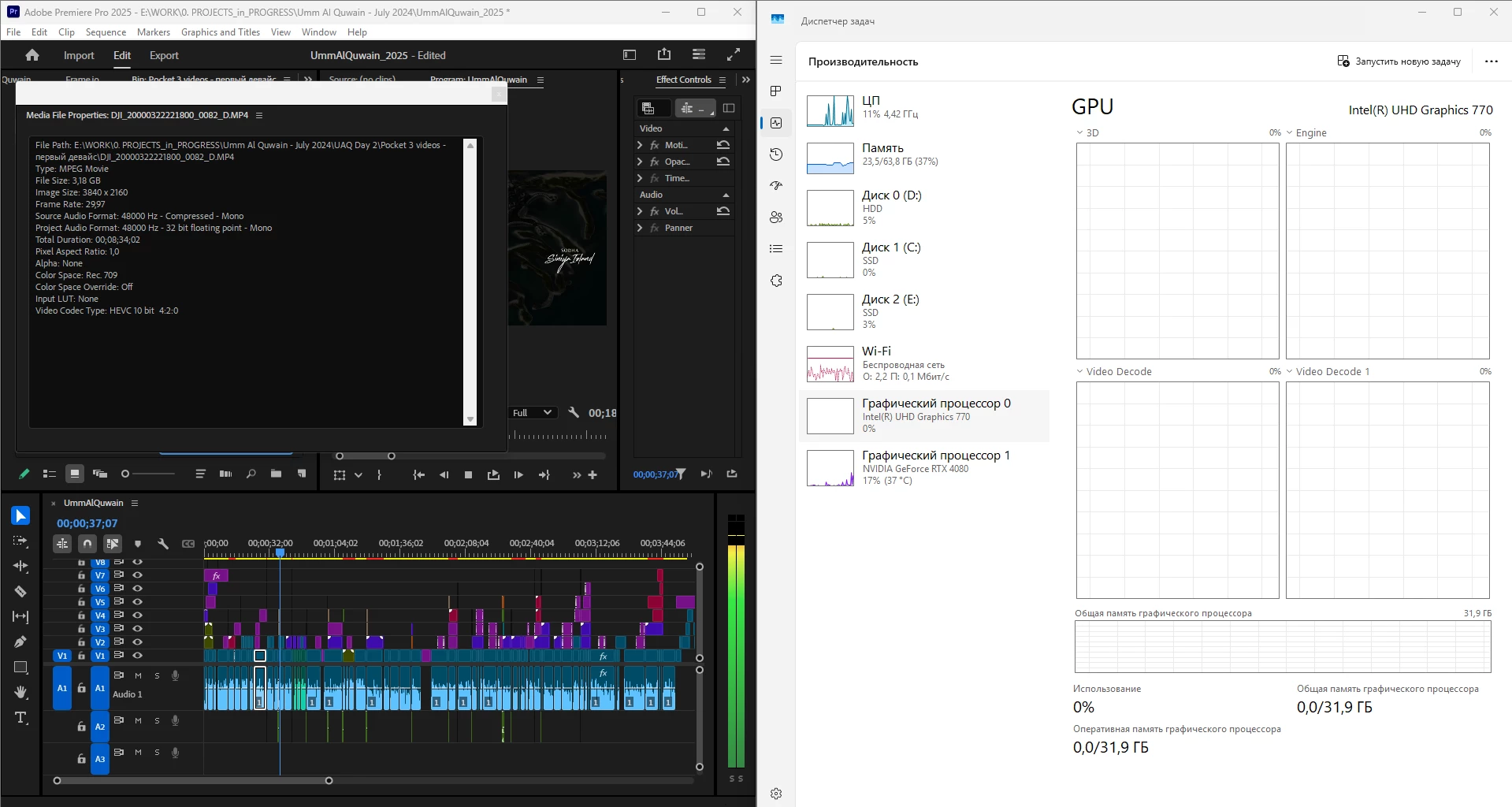
 

What is going on, guys? Why is it "new version - new bugs" thing every time? My CPU immediately started being loaded more, like by 60% all the time, even though my GPU does the decoding, whereas on the previous versions the average CPU load was 20-30% with the iGPU doing all the decoding job.


Yes, I tried reinstalling both Premiere Pro (as well as resetting its cache, preferences and plugins via the start+shift menu) and all the drivers. 


Steps to reproduce? Open a project or create one, import a knowingly decoded video, put it on your timeline, press Play. Watch the the Windows Task manager - Performance graphs.


i7 14700K, RTX 4080, 64 Gb ram, SSDs, Win 11 24h2

68 replies

Community Manager
August 26, 2025

Hi All,

Apologies for the inconvenience caused. We have addressed a major issue discussed in this post, where HEVC files in non-English folder paths may not be decoded via Hardware.

  • The fix is now available in the latest beta versions of Premiere Pro (25.6.35 and later), AME, and AE, and is expected to be included in the next official updates of these apps.

We truly appreciate your support and collaboration in investigating this issue. While beta builds are not recommended for production, they install separately from release versions and can be used for testing the fix. Please let us know your feedback after testing.

Thank you for your patience and continued support.

Best regards,
Mayjain

Inspiring
August 25, 2025

Well, it might be a little stupid question,

Not only the rendering (Export), but also the timeline preview is affected by that, right?


If you use a premier version of 25.1 or higher, except in special circumstances
Intel QuickSync Does Not Work Properly Under Normal Conditions

Can I see this information as something I need to know?

AndrewTheGreat
Known Participant
August 25, 2025

Rendering is the last thing you should consider. It normally is as fast as your system can provide. The problem we are dealing with here mainly affects the playback speed and smoothness.

Inspiring
August 26, 2025

Thank you for your kind information
Thanks to you, I think my thoughts are organized well !

 
JonesVid
Community Expert
Community Expert
August 16, 2025

Hi @AndrewTheGreat 

I'm a bit late on this as only just returned home. I see the problem has already been identified which is good.

For the sake of checking I did try it out and results attached.

iGPU happily decoding at about 49%. 13900K CPU at 20%. NVidia 4080 Super at 59%.

Intel iGPU driver on latest one, 32.0.101.6987.

NVidia Driver 576.80


AndrewTheGreat
Known Participant
August 12, 2025

I would like Adobe staff explain this, @Fergus H @mayjain7130546 @jamieclarke  

How come that if a 100% iGPU-decoded video is not decoded if the file comes from a folder with the name written in russian or chinese (didn't check other languages) and IS decoded if the name is written in english? What type of linguistic discrimination is that?

Here's a proof. A copy of one and the same file was put into folders with a russian, english and chinese name. 


Legend
August 12, 2025

Simple. The alphabets of the program and the file names must match. Otherwise, the program will default to fail-safe parameters. No wonder why the English-language version of Premiere Pro works for hardware acceleration with Latin letter script but not with Cyrillic or Chinese script.


[Moderator: this is incorrect. There is no requirement for the application to be using the same language as path names and Premiere Pro has no fail-safe mode that it defaults to. The issue discovered by @AndrewTheGreat is a bug that we will fix. We are actively working on it.]

Participating Frequently
August 13, 2025

What do you mean not surprising? So if you are from a non-English speaking country you should use limited functionality?

JonesVid
Community Expert
Community Expert
August 11, 2025

@RjL190365 

Are you using the Intel Support assistant for driver updates and option to do a 'clean install'?

I always use this to update and clean install Intel iGPU driver.

I'll try this test when I'm back home end this week on my 13000k based system and post result.

@AndrewTheGreat - thx for posting this. 

Legend
August 11, 2025

I downloaded the driver directly from the Intel Web site, and then run the setup program after I allowed Windows Update to install an iGPU driver because I had (mistakenly) believed that the Setup Assistant download supported only overwrite (in-place) driver upgrades.


And with the iGPU driver that's currently on my system, I did use the 'clean install' option in the setup program. Previously, I simply overwrote the older driver.

AndrewTheGreat
Known Participant
August 11, 2025

I suggest that everyone interested test out this file in Premiere Pro: https://disk.yandex.ru/i/kHkJfArIgaAfGQ

The file info: 


Why this file? Because it's an iGPU decoded one:

The expected behavior is this:

The reality in Premiere Pro 25.3.0 build 84 is this (see the CPU and the iGPU load):


Should anyone have their iGPU rolling, their PC should be investigated and taken for a reference.

Legend
August 11, 2025

This is what I get on my system:


Anything else besides what I am showing you may be caused by improper iGPU driver installation. Specifically, a totally clean install of a generic iGPU driver without first letting Windows Update install an "OEM-optimized" version of the iGPU driver. That will cause everything to default to fail-safe driver settings.

AndrewTheGreat
Known Participant
August 11, 2025

Can you post your full specs? Because never has this file been able to be played back by the iGPU unless 1) it's Premiere Pro 25.0 or older , 2) It's Win 10 or Win 11 23h2. 3) It's Davinci Resolve


It's nonsense that there's some driver misinstall issue - believe me, I have tested every possible variant or combination of software  or scenario on the planet. It's been almost a year already

Participating Frequently
August 6, 2025

Hi!
It's been a long time, but I still have to stay on version 25.0. Because all the versions released after that DON'T support hardware decoding of some video formats. I took screenshots while working on one video file.


Screenshots shows that in Premiere 25.0 this format (HEVC 10 bit 420) is successfully decoded by the integrated graphics card.

And there is NO DECODING in newer versions. There is also no hardware decoding on the RTX 5080, which claims to support this format.


In davinci resolve, hardware decoding is supported on the rtx 5080. 


Will this issue really be resolved? Or is it time to switch to davinci? I don't want that. I know premiere very well, and love it. But it has become difficult to work in it due to various bugs.

I understand that not everyone has this problem. But it is available. And it's clearly programmatic. And it's clearly about Premiere.

I've tried installing different versions of the graphics card drivers, but the result is always the same.

My system:

14900K, RTX 5080, windows 11 24h2 (same results on windows 10)

Participating Frequently
August 6, 2025
MyerPj
Community Expert
Community Expert
August 6, 2025

Hey @Dmitriy36779285gov2 


I gave it a try with my RTX-4070, and 12th gen I-9, Intel UHD 770, and it works well. I think NVidia has dropped the ball on this one, they should be getting the signal by now, and we have an nvidia person on this thread which is good news. I hope an acknowledgement and the fix comes soon.


FWIW: Here's two screenshots


MyerPj
Community Expert
Community Expert
July 2, 2025

I was rendering a 1-hour multi-cam (edited with Proxies) but of course rendering with the full media, which was almost all h.264. 2 - 1080p cameras and one UHD 3840x2160, in a 1080p timeline. Had some nice numbers going:

12th Gen 12900k, RTX 4070, basically I'm only using the beta these days PP 25.4.0 b68


JonesVid
Community Expert
Community Expert
June 19, 2025

Hi @Fergus H 

Thanks for stepping into this conversation.

It would be interesting to find out what exactly is stopping the NVidia GPU being used in @andreik18371608 case after following this journey to find a solution.


As regards ongoing work tuning GPU priority use,  it would be good to know if there any future Beta releases we should try out.


Fergus H
Community Manager
Community Manager
June 19, 2025

@JonesVid We will definitely let people in this thread know when there is a beta that has changes related to GPU prioritization. 


Regards,

Fergus

MyerPj
Community Expert
Community Expert
June 18, 2025

Oh, I do continue to run with the media prefs like this: