
ztodd
Known Participant
October 18, 2018
Answered

Premiere Pro CC 13 - Various Crashes on Project Open

  • October 18, 2018
  • 2 replies
  • 2525 views

I have a video project I've been working with for about 5 years.  It has between 2900-3400 separate clips.  Runs in CC 12.x (2018) without issue, when it attempts to gather files for up-version to 2019 I encounter two different encoding errors/warnings.  These are then followed by a crash without a reporting option.

The overall project size is only about 160gb and the scratch disks have 150-400gb free.  The project is loading from a drive with 2.9tb free.

Troubleshooting Steps Attempted:

  1. Reinstall 2018
    1. 2018 picked up my old project without issue
  2. Clean location. In 2018 I used project manager to move the entire project to a new drive. Loaded in 2019 from there, crashed while loading files.
  3. Clean Installations
    1. Uninstalled 2018, 2019, CC, used adobe cleaner to remove install files.
    2. Uninstalled Nvidia drivers.
    3. Restart
    4. Installed Nvidia drives
    5. Restart
    6. Installed Premiere 2019.
    7. Crashes on load files still.

The first error that appears on screen is a low level exception for 'lvcod64.dll GetAVICodecs' (I have not seen any google hits for this error in the past month)

After this I see a cascade of errors up to the crash point;
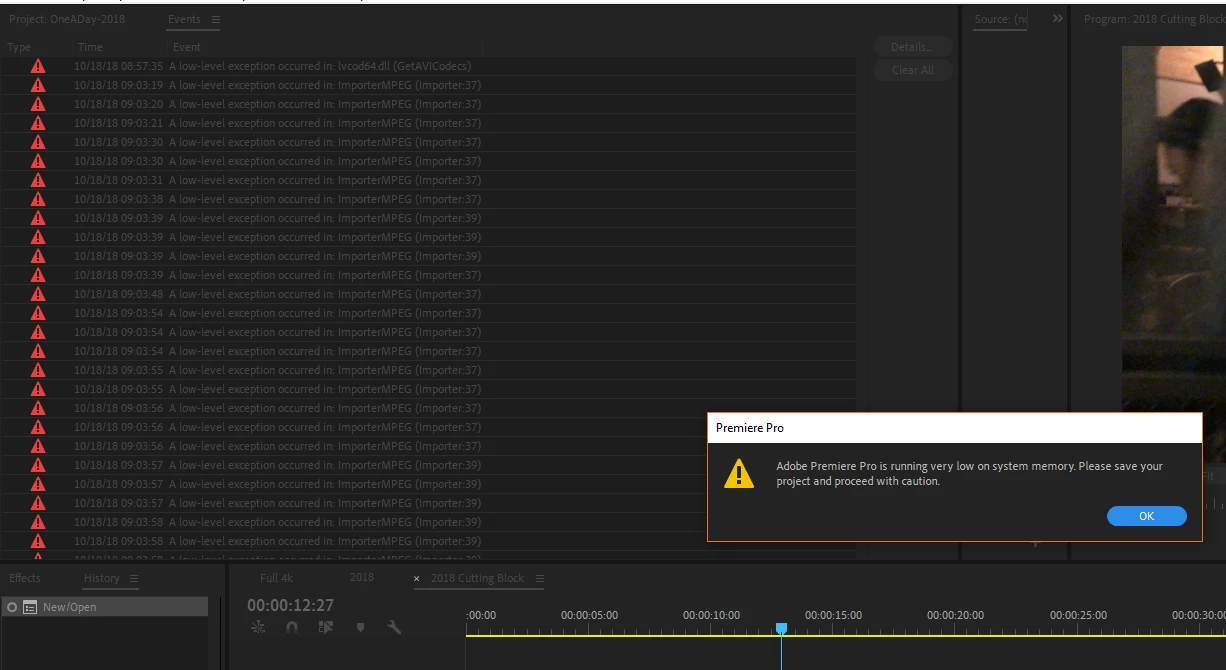
Each time the crash occurs it gets further in loading my files by about 500, so starting in the 3000s it gets to about 2500, crashes, upon next open it starts around 2700.  Currently while letting it load through through crashes I'm at about 1700 files remaining for load.

I don't see a way to attach a crash log and I don't wanna toss it in plain text, so if anyone reads this and knows where to submit it, lmk.

(Premiere actually crashed out while writing this, and interestingly enough also refreshed the page, so I lost half of writing, so sorry if this is a bit brief )

Specs

Intel Core i5-8400 (2.80GHz)

16gb Ram

GeForce GTX 1060 gb (nvidia 416.34 drive released 10/11/2018)

This topic has been closed for replies.
Correct answer Kevin-Monahan

Kevin-Monahan

It took a few tries and failures... but here's whats worked for me so far.

I did two hardware changes (planned outside of this, so not necessarily as a troubleshooting step).  Where I upped from a 4 yeard old SSD as my primary and a 5400 HD as my content drive to two new SSDs (550mb write).  So the data access speed probably helped a bit...

But I exported my entire project to a the new drive (copy file, not copying transforms/etc).  I opened it in 2018, let it find files and conform.  I then created a new project tin 2019.  I did an import from the 2018 project.  It failed three times, memory faults.  The fourth time it worked.  It also automatically launched Media Encoder 2019, which loaded all the files and then crashed itself.  But the timelines and files did load into the 2019 project successfully.  So, to say the least, not an ideal situation, but functioning in 2019.


ZTodd,

Good news to hear you got up and running. We have released a patch in the interim. An update to version 13.0.1 should permanently fix this issue for you. Sorry for the frustration.

Bugs fixed in versions 13.0.1 and 13.0 releases of Premiere Pro

Thanks,
Kevin

2 replies

Kevin-Monahan
Community Manager
Community Manager
October 24, 2018

Hi ZTodd,

Sorry for the frustration. Large and complex projects should generally not be updated mid-project. My suggestion is to avoid doing so.

If you simply must update, try creating a brand new project, then import the legacy project into it. Please try that and report back with the results. Hope it helps!

Thanks,
Kevin

Kevin Monahan - Sr. Community and Engagement Strategist – Adobe Pro Video and Audio
ztodd
ztoddAuthor
Known Participant
October 24, 2018

Hi Kevin,

I'm happy to give it a try.  I'll report back with how it goes.

ztodd
ztoddAuthor
Known Participant
October 24, 2018

Kevin-Monahan

No luck, import doesn't proceed and eventually flat lines.  Still no error logs written.

I've installed 2018 (12.x) again will attempt to load the 12.x version again there.  Prior to 13 release I didn't have any issues...so hopeful.

As well to avoid possibility for virtual memory crashing out I've bumped my primary to 50gb available on virtual.

ztodd
ztoddAuthor
Known Participant
October 23, 2018

Bump?

ztodd
ztoddAuthor
Known Participant
October 24, 2018

Since I haven't gotten any form of answer or response I've continued to try to troubleshoot on my end...

I've installed a new primary disk and performed a clean install of windows 10 (v1803).  I've installed CC, CC PS 19, CC Pr 19.  The primary drive is a 500mb/s read/write SSD.  Reinstalled Office 2016, VLC, Lav Codes 0.73.1, Steam, Nvidia Geforce Exp, Geforce 416.34 drivers, Chrome (nothing else so far)

Confirmed media cache files are clean/empty (its a new disk and Win install... so that is expected)

Upon opening the 2019 version of the project (the one crashing in all prior tests) I receive the same initial error message;

     A Low-level exception occurred in: lvcod64.dll (GetAVICodecs)

The project is still attempting to load and find its media files.  As noted this project is 2900-3400 distinct clips, it is currently loading.  No stackable errors have occurred yet;

Will update with crash info when it occurs.

ztodd
ztoddAuthor
Known Participant
October 24, 2018

Took roughly 20 minutes of loading files to crash.  No automatic crash report was offered.