


- Home
- Premiere Pro
- Discussions
- Premiere Pro CC 2017 crashes when launching on Win...
- Premiere Pro CC 2017 crashes when launching on Win...
Premiere Pro CC 2017 crashes when launching on Windows

Copy link to clipboard
Copied
Hi together,
we are crashing on one Windows 10 Build 1603 client. The product we use is also Adobe Premiere Pro CC 2017.
Premier has stopped working immediately after launch.
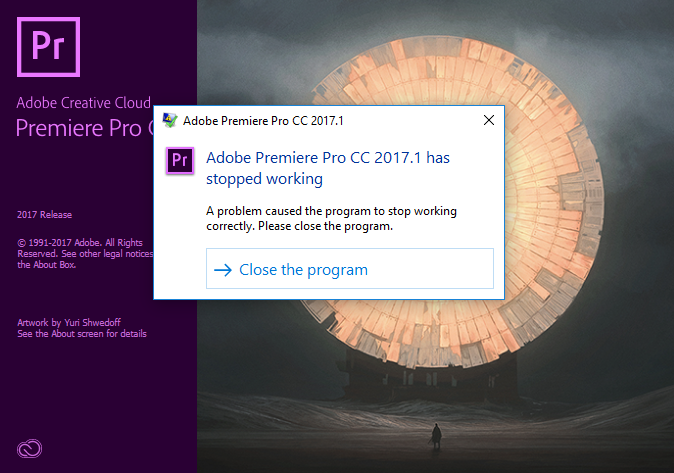
The solution we tried so far:
- install on another computer
- uninstall/install Adobe Premier
- update Graphic Card Driver
- create a new Userprofile
- ran cmd command "netsh winsock reset"
- log off / log on in Create Cloud
We are not using an Administrator account because of company policy. From the Eventlogs we can see the dvaui.dll is causing this issue.
@Vidya Sagar: Do you have other solutions we can try to fix the issue?
Best regards
Tham Tran


 8
Replies
8
8
Replies
8


Copy link to clipboard
Copied
Hi Tham Tran,
Thanks for the reply. Please check if there is an antivirus/firewall enabled in the machine. If yes, just for test, disable the antivirus/ firewall & try launching Premiere Pro.
Also please check if there a crash log generated by Premiere Pro. If yes, it would be really helpful if you share it with us.
Thanks,
Vidya.
Copy link to clipboard
Copied
Hi Vidya,
I checked antivirus and firewall. Disabling it will not solve the issue. We also have other clients in our headquarter in Austria where Adobe Premiere PRO CC 2017 are working properly. The clients are also company managed with the same antivirus and firewall settings.
Here the crash log from the eventlog:
Faulting application name: Adobe Premiere Pro.exe, version: 11.1.1.15, time stamp: 0x590db02a
Faulting module name: dvaui.dll, version: 11.1.1.15, time stamp: 0x590d8c77
Exception code: 0xc0000005
Fault offset: 0x0000000000332571
Faulting process id: 0x1854
Faulting application start time: 0x01d2d2ce299b4416
Faulting application path: C:\Program Files\Adobe\Adobe Premiere Pro CC 2017\Adobe Premiere Pro.exe
Faulting module path: C:\Program Files\Adobe\Adobe Premiere Pro CC 2017\dvaui.dll
Report Id: 2287b773-4d0a-4f40-b645-540366fc7ce2
Faulting package full name:
Faulting package-relative application ID:
Thanks in advance,
Tham Tran
Copy link to clipboard
Copied
Hi Tham,
Please contact out chat support to continue the troubleshooting FAQ: How do I contact Adobe Support?
Thanks,
Vidya

Copy link to clipboard
Copied
I'm having crashes on starting up Premiere and/or opening some projects in 17.1.1
How do I get a crash log? (I'm on Windows 7)
Copy link to clipboard
Copied
Hi Juliend,
Please check this article to find Launch Log files. Find launch log files | Adobe Creative Cloud, Adobe Creative Suite 6, Adobe Creative Suite 5.5, Adob...
Also, check the Event viewer for crash logs from windows How to Find Crash Logs on Windows.
Thanks,
Vidya.

Copy link to clipboard
Copied
Have you tried using Davinci? ... It's not a perpetually crashing BETA product.

Copy link to clipboard
Copied
Hi,
I had the same problem on Windows 10 with Premiere Pro CC 2017. For me the problem seemed to be my Bluetooth Dongle. As soon as I turned off Bluetooth (or disconnected the Dongle) and rebooted my PC Premiere worked without any problems.
Hope this also helps for others..

Copy link to clipboard
Copied
I had this problem and I had seen a recommendation to create another admin account, and someone reported this worked. There was no explanation of why this worked or how to fix it for an existing account. I'm assuming they meant create another admin account and run Premiere under that account. That's not going to work for the long run, so I went ahead and started the program with shift-right-click / "run as different user" and ran it as a local admin account (.\localadminaccountofyourchoice) and it was successful. So, I deleted all temporary files and internet cache files from my profile to no avail. Then I investigated the folder structures that Premiere was using, and found that somehow I had two Adobe folders under my "Documents" folder. One is from my job as an IT manager, where I keep my Adobe documentation, the other one had been created by the installer or when starting Premiere. Anyway, I renamed my folder to Adobe Stuff. After this the program started without issue.


Get ready! An upgraded Adobe Community experience is coming in January.
Learn more
 AdChoices