


- Home
- Premiere Pro
- Discussions
- Premiere Pro CC 2018 Render Speed Extremely Slow
- Premiere Pro CC 2018 Render Speed Extremely Slow
Premiere Pro CC 2018 Render Speed Extremely Slow

Copy link to clipboard
Copied
I recently installed the latest version of Premiere Pro CC 2018 and I am experiencing extremely slow render times. This happens on 1080p footage, 4K footage, GoPro Footage, Mov, H264. I've troubleshot everything I could to know that it is the program itself and not a set up that I have. This has only been happening in the last week since installing the latest version. There are no effects or color grade or anything applied to these clips. To render previews of a 6 minute video with proper timeline settings takes 40-60 minutes. Add any effects to that and it is hours and hours to render out a Youtube H264.
I am running on a MacBook Pro with 16GB of RAM and have never experienced anything this slow. I've already come to far on two projects that I have deadlines for to go back to CC2017 and re-edit them.
Please can someone help.


 99
Replies
99
99
Replies
99



Copy link to clipboard
Copied
Yeah this is making me depressed...
I truly don't understand the issue and like yours, my system is barely using 5% of it's computing power.
And we are on two different platforms - Mac vs. PC so it's not the OS.

Copy link to clipboard
Copied
I am also facing this issue on PC. I have all latest updates to Premiere Pro CC. 2018.0.1. NVidia GTX 680. Latest drivers installed as of yesterday v390.77.
Computer is older but still never had major issues.
OS is on Samsung SSD.
Cache files is on Separate SSD
Project files and video on 1 Gbit ISCSI Qnap RAID Volume. 16 TB.
Project is a 4k uhd project. Gh5 4k 400 MBps ALL-I .mp4 H.264 files 1hr 30 min timeline. Anamorphic footage.
Is taking over 200 hours to render out to intermediary .mov cineform 10bit YUV ALL-I after several failed attempts to render out from timeline normally to H.264 Youtube.
Timeline has Lumetri Color Correction on master of each clip.
CUDA enabled.
i still have to try to run noise removal but cant currently because its not even rendering out with color correction on it.
CPU id not maxed at all. GPU near zero or at zero during most of this process.
VERY FRUSTRATING.
Copy link to clipboard
Copied
Sounds EXACTLY like my issue....going to get on the chat with them again tonight still haven’t heard from them after numerous contact attempts.


Copy link to clipboard
Copied
Are you exporting directly from Premiere or Queueing in Media Encoder? Try using AME and make sure this is selected:
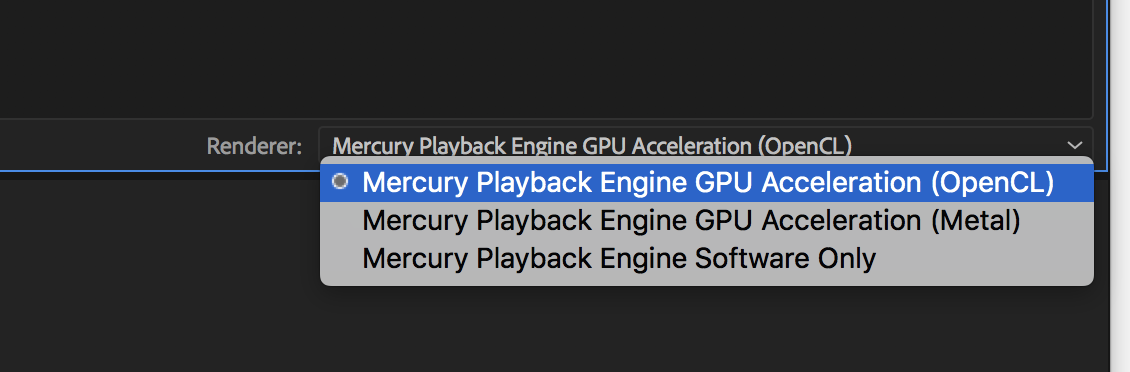
Copy link to clipboard
Copied
Yes I don't know what's going on even old files that I didn't have issues with are taking forever and I even went back one version in the software.
Don't get it.

Copy link to clipboard
Copied
Hi I'm having the same problem. And I am looking for the option to change memory play back inside of Premiere because it's not listed.

Copy link to clipboard
Copied
I simply changed my settings in project settings to software only and it fixed my color monitoring issue.
RYAN HARDY | Art Director
[Personal information removed by moderator.]
Copy link to clipboard
Copied
I'd really like to know whether Adobe is working on the GH5 400Mbps ALL-I Anamorphic re-scaling. It should be using CUDA. So far i'm not seeing my CPU maxed or my GPU even touched. I also have Onboard Intel graphic processor, why is Adobe not making use of these hardware resources ?
Latest run.
Updated Windows patch KB4073290 and system stability seems fine.
Ran the Export now in Premiere Pro Export itself. This time turned on de-noising plugin and output to H.264 for Youtube - initially got rendering times of 40 hours.. but unfortunately we are back to about 133 hours now estimate. Previously over 200 hours.
Lumetri color and resolution of video files i think are to blame here for what ever resizing the computer needs to do for interpreted anamoprhic 2:1 footage. These files are 10-bit files however so i'm wondering how much Premiere struggles with the 10-bit to 8-bit conversion...
My system could partially play back the 4K anamorphic files before but it should not be taking this length of time to convert this.
I think i'll lodge a ticket for this issue and reference this post.
Copy link to clipboard
Copied
Okay i just did a test.
I disabled Lumetri plugin from master clip.
Render time now at 4 hours. instead of over 200 hours.
Its definitely a problem with Lumetri Color Plugin.
Apparently it can't handle the 4K Anamorphic 4:2:2 400 Mbps ALL-I @10-bit GH5 footage properly without serious delays.
The worst part is it wasn't using all of my system resources before, now it is. So i don't know where the slow down is.
Hope that helps you.
Im logging a ticket with support.
Copy link to clipboard
Copied
What if you apply Lumetri to the clip layer instead of master clip layer? Also try applying it to an adjustment layer over the clip instead of the clip itself?
And before anyone posts "But I should just be able to apply it wherever I want!!!" yes, I agree, but we're just testing here if where the effect is applied makes a difference.
Copy link to clipboard
Copied
Nope. Adjustment layer has the same issue. Tried the render and its same result as before.
Clip by clip is also the same result.
Still no serious CPU or GPU usage when Lumetri is turned on with CUDA set I don't get it. Use the freaking hardware ?
Forget about color grading in Premiere for GH5 4K Anamorphic 2:1 footage @ 10-bit 400Mbps 4:2:2 ALL-I to export to YouTube until this is fixed...
Copy link to clipboard
Copied
OK so I figured it out on my end...Adobe, you need to hire me LOL.
Like anything I've tried to solve in the past I broke the process down piece by piece to see where the issue was.
Started with data and determined that RAID was not it.
Moved-on to Adobe and downgrading the software to the original 2018 version of Premiere without the recent update and still no go, not to mention countless settings within the app, clearing cache, recreating subdirectories, you name it.
Realized that there had been updates on Apples' end both in regards to a new OS and an update within the new OS, so called Apple and had them take me back to where I was before all of this stupid render time issue started.
Kicked back my Mac Pro from High Sierra version 3 back to Sierra with no updates...had to reformat my drive and everything but I don't store data on this computer it's just a workstation so no real big deal apart from loading applications and settings.
Reinstalled everything and brought back my settings to exactly what they were and boom, all is well!!
Red Digital 8K 5:1 compression footage being exported out in 5K @ 23.976 FPS with 16-bit color-processing and maximum render quality, ProRes 422 HQ, all graded with lumetri in premiere.
Went from literally a previewed 82 hours of render time (which would have ultimately been even longer than that) down to what is normal and expected of 3 hours for 10 minutes of audio and video.
Thank God, thank God.
Time to call the senior team at Adobe and lead their hunt on this issue so that all of us can operate on current OS and app versions.
My cores are finally being utilized by the system...amazing, so happy.
LOL, it's the simple things in life.
Namaste!!!
Copy link to clipboard
Copied
Glad to hear chrisp got his working..
Unfortunately that doesn't help the PC users.. and doesn't really explain where the problem is related to specifically. That would help other platforms.
If we are expected to rollback everything and reinstall windows (which is ludicrous in my case - its not just an editing station i'll admit) I have already wasted 2 weeks with this problem, i can't waste a few months of installing an configuring to get things back to the way they are.
Sounds like someone messed up in the Adobes upgrade process and missed overwriting or configuring certain feature that should work or forgot to create some configuration. In that case i am also forced to have to uninstall Adobe completely, run the Adobe product remover, reinstall all 3rd party plugins, make sure my presets and workspaces are there and the pray it works...
Several hours of downloading and reinstalling etc..
I can't believe I pay monthly for this.. Only to break my setup. This is not a solution but building from scratch which is above and beyond the call of duty for a customer IMHO.
Adobe has to do better.
Still waiting for my tech support call from Adobe with Case #
Copy link to clipboard
Copied
Sorry man wish I could help more.
Wonder if you all have had any updates in the PC world around the same time and if so, what the common elements were from a software point of view.
Something changed to be sure from my end, and I don't know whether it's Apple or Adobe but one way or the other something from one or from both is causing interference and I'm a definite example of that.
Good hunting.
Copy link to clipboard
Copied
The only thing it could be would be the Microsoft patch released on January 3rd. But tested after that, and then after the next patch i installed that i mentioned above with no changes. If its OS related, its to do with securing kernel access because of that CPU exploit - that affected all PC's and MACs with Intel Processors recently. I don't see how it could be connected to the Adobe Software per say but its possible. too many changes as of late. There have also been NVidia updates as well thrown into mix.
At the end of the day, its not your fault.
I'm going to remove completely the Adobe Suite, run the adobe tool to remove it all and then reinstall everything. I'm not touching the OS i refuse and its working well now finally after weeks of microsoft updates.
I'll carry on and report back.

Copy link to clipboard
Copied
Has anyone had any more luck trying to figure out this issue? I've currently had to start updating some of my old files for this spring, and was surprised to find out, all the pre-rendered clips and templates I created that used to take 30 to 40 minutes to rip through are quoted to take 3 to 4 hours with the render settings toned down to the bare minimum. If I crank the settings up to what I usually render at, its much much longer...
System specs
Operating System: Windows 10 (latest update)
CPU: AMD 8350 8 core processor @ 4.5ghz
32GB of RAM
GPU: Nvidia 760 4GB
Premier is installed on a Samsung SSD,
scratch disks are also stored in a temporary file on the SSD
I personally agree with previous comments about something being wrong involving the GPU... if you look under the premier folder located where you have your adobe programs installed, the text document that used to contain all the compatible gpu models is gone... and GPU sniffer seems to do nothing at all....
I'm currently rolling back 2 releases to the pre 2018 CC2017 version of premier... I will report back if that solves my issues.

Copy link to clipboard
Copied
Nvidia CUDA! Please try the procedure in the link:https://devtalk.nvidia.com/default/topic/1025945/cuda-setup-and-installation/mac-cuda-driver-fully-c...
This solved the problem for me.
(Just remember, when deleting those files, some of them might not exist, that's normal, and some folders might not exist either. In fact, I guess if you've never screwed around with CUDA drivers before, none of the files would exist?)
iMac (27-inch, Late 2013)
3.2 GHz Intel Core i5
16 GB 1600 MHz DDR3
NVIDIA GeForce GT 755M 1 GB
Let me know if this helps! 🙂

Copy link to clipboard
Copied
I too am experiencing slow render times but only on one of my computers. I installed the trial of premiere pro on my surface pro 2017 (m3 4gb ram, very underpowered!) and on my slightly old workstation pc (xeon-2660 8 core 2.2ghz, 20gb 1066mhz ram, 256gb ssd, Nvidia Gtx 570).
SO I was expecting my workstation to completely outperform my surface pro but the opposite happened! I tired to render a reverse of a 3 minute 4k mp4 from my mavic pro and after 5 minutes of rendering my surface pro was at 23% where as my workstation was only at 12%!
Whilst I was very impressed with my surface pro I was very disappointed in my workstation. Any thoughts?
Copy link to clipboard
Copied
I have the same issue, my preview renders (and media encoder renders) are absolutely painful on anything, especially those with Lumetri on them. Everything is slower to render and preview in general, if I add noise reduction, forget about it. The worst problem is that Premiere will just freeze mid render and hang until I force quit. This issue is killing me. I do not have time to completely reinstall my entire suite or system either, nor should I have to. Before the update my renders were never this slow.
Mac Pro trash Can 12-Core 2.7
Dual D700 GPUs
64 GB RAM
Sierra 10.12.6
Adobe, please respond, this is a real issue.

Copy link to clipboard
Copied
Today was the first time I experienced this issue. I upgraded to 2018 a few weeks ago, and my other projects seemed to render in a reasonable amount of time. I am now on about 8 hours for a project that before today would have rendered in about 90-120 minutes. Nothing else has changed, so even though I am on a slightly older Mac with only 8gb of RAM, all other things being equal it seems odd that it started to bog down on rendering today.

Copy link to clipboard
Copied
Has there been any update on this issue. I just got my new pc set up and everything was going smooth all fresh installs latest updates.
running Windows 10 pro, Ryzen 7 1700X, MSI MOTHER BOARD, NVIDIA GTX 1080. Editing etc all smooth esp. for 4k. Video length about 4 min. Made a custom render setting using CBR and on my older machine use Adobe (17) usually only took about 1 hour maybe 2 depending on video length. But just last night It was starting at 5 hours. Then 8 hours.. This can't be my pc. I didn't check for open-CL render or software which I will tonight but I just find it odd that there is this massive change in render time. I used vbr pass 1 at 20 , 25 and not selecting "max render quality" options and it only took a hour. But I want max quality "like everyone does". The adobe update definitely has something going on.
Copy link to clipboard
Copied
I read a suggestion on another post about using Adobe Prelude to render rather than doing so within Adobe Premiere Pro. I tried that out and it worked beautifully. If you have a CC subscription you should have access to Prelude, and there are several good instructional videos on youtube for using it. The learning curve was minimal and in no time I was back to rendering clips at a reasonable speed. One of the cool features is once you send the sequence off to Prelude to render you can go right back in Premiere Pro and continue to work as it doesn't tie up Premiere Pro. I strongly recommend trying this out whether you have rendering delays or not.
Copy link to clipboard
Copied
any tutorial you can suggest?
Copy link to clipboard
Copied
I went back to see if I could find the one I used but couldn't locate it. There are excerpts from various courses like lynda.com and O'Reilly training. Just pop in Adobe Prelude tutorial and start watching - you are sure to find one that is to your liking.

Copy link to clipboard
Copied
I am amazed.. Why wouyld any tutorial be needed here? One day the render time/export time works fine - the next it doesn't. We, the users, shouldn't have to go through all this hassle just to render/export our projects.
Since this is an ongoing issue caused by Adobe I suggest Adobe staff get on this and start keeping us posted.
I can export plain stuff fast enough but when I add a graphics template (the "Documentary main Title" for example) my render/export time goes through the roof. Several hours to render a 25 minute project with no fancy work put into it. Not acceptable.
Start keeping up with us - the users - Adobe because when we stop paying for this product, you are out of business.


Find more inspiration, events, and resources on the new Adobe Community
Explore Now
 AdChoices