


- Home
- Premiere Pro
- Discussions
- Premiere Pro CC 2019 using integrated GPU instead ...
- Premiere Pro CC 2019 using integrated GPU instead ...

Copy link to clipboard
Copied
I was promised a 48 hour turnover, but it has been about 36 hours and no response from Adobe CSR Manager. My GTX 1080 has the latest drivers from October. It was a new install on a new computer. Premiere Pro CC 2019 is using the embedded Intel video processor instead of the GTX 1080.


 1 Correct answer


David S.,
I believe it's expected behavior with H.264 media. Premiere Pro uses the iGPU for Hardware Encoding, which speeds exporting process for H.264 files even faster than your discrete GPU in most cases. The reason? Quick Sync. Try another format, like ProRes and I bet you'll get different results.
The other case is that you will not see any discrete GPU engagement unless you are using a GPU accelerated process, like a GPU accelerated effect, scaling from 4K to 1080p, changing the frame rat
...
 32
Replies
32
32
Replies
32


Copy link to clipboard
Copied
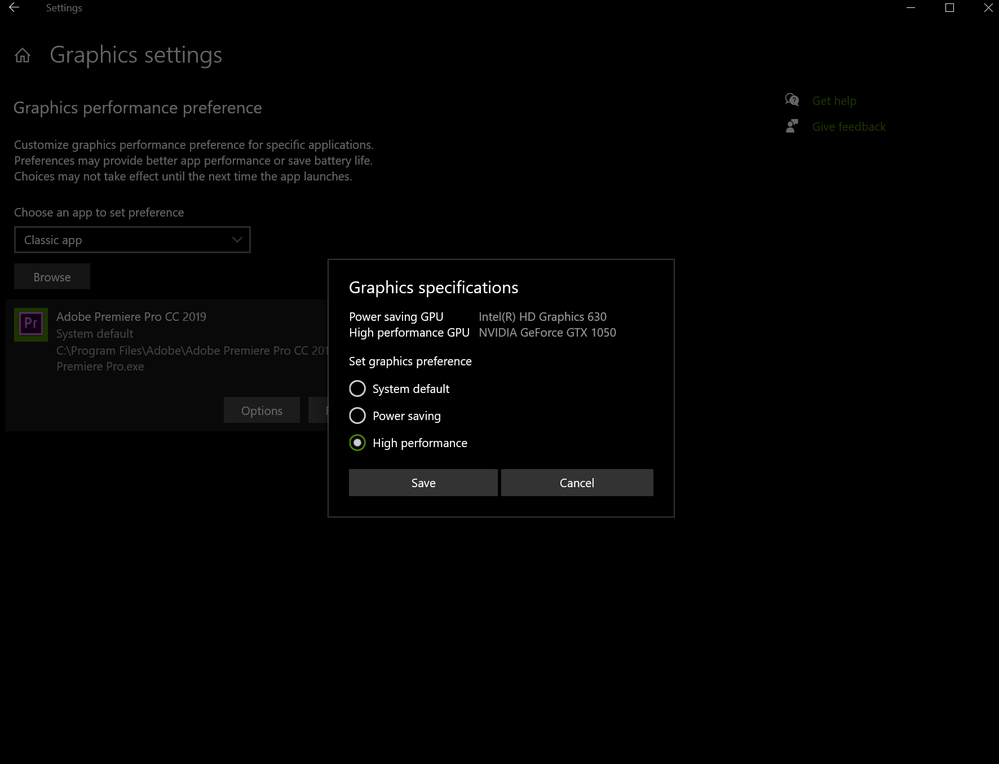
Hope this helps someone:

Copy link to clipboard
Copied
it is 2020 and still the bug is there, and I am on custom-built pc , disabling the onboard gpu (UHD 630) is not an option coz i use it for many things so don't want to keep restarting my pc and disabling it then re-enabling it.

Copy link to clipboard
Copied
Are you connecting a monitor via the on-board connection or through your video card?
Neil
Copy link to clipboard
Copied
I have tried many things, I am very tech-savvy and troubleshooting is easy to me.
I have 2 monitors, I tried to plug one to igpu and other to Nvidia , then tried both on Nvidia, which is the only options I am willing to do coz i want to use my Nvidia gpu + intel UHD 630.
the idea, in general, I even discovered another weird bug that I fixed it, I even contacted their live customer supports which was very rude on many different levels with 3 of them being super rude and useless.
the last guy was the Tech support that suppose to fix it he couldn't help coz his knowledge is way lower than mine in this stuff, in the end, the bug was adobe bouncing between igpu and Nvidia every 0.1 sec , which lead to it being super slow as if am not using any gpu acceleration.
they still have many bugs involved in using 2 gpu setups (intel + Nvidia ) to this day.
I fixed mine by enabling and disabling igpu few times and forcing the Pcie to be priority in bios+ in Nvidia control panel then plugging both monitors to the Nvidia gpu (which is bad for me coz i want one to run on igpu) so technically to this day there is no solution for my problem unless i fix it my own hands which will take me long time and now am doing some projects not free , so much more work on me due to everyone at home era.
the idea I want to run 1 monitor (secondary monitor) on UHD 630 and my main monitor on Nvidia GTX 1080 Ti
if I do that premier will get drunk 🙂 simple , but that is a problem for my work as I use QSV for many things and sometimes i even have to write things to utilize intel gpu forcefully for my work which has both monitors on nvidia gpu won't work, but then restarting to enable and disable isn't an option and having both monitors plugged to 1080 ti not an option either but for now that's what am doing till I get some free time to pull some strings or do it myself.
(ofc tried many drivers with different versions for both intel and nvidia didn't fix it anything even different combo didn't do anything )
now it is using gpu 0 (uhd 630) and gpu 1 (gtx 1080 Ti )
sometimes gpu 0 like for 10 seconds then gpu 1 for 10 seconds which I believe the normal behaviour and how it should work , it will use the gpu 0 to do most of the things that it can do due to it being faster then something like heavier effects or transmission will jump to gpu 1
i might be wrong and it should only use 1 , i don't know i am not the programmer of premier so i cant know for sure if this how it was intended or not, but I know for a fact they did a bad job doing it and i am willing to volunteer for free to fix it for them.
coz am fed up of how many years this have been an issue and i just installed it again to give them another chance recently and it seems they don't deserve it

Copy link to clipboard
Copied
Still having this issue. I have to disconnect my other monitor (using my internal graphics card; a Intel(R) HD Graphics 530) to use my monitor that's plugged into my external graphics card (a NVIDIA GeForce GTX 1060 6GB.) Has this bug been fixed yet?
It's quite frustrating.
Copy link to clipboard
Copied
Why are you connecting a monitor via the onboard monitor out? I would suggest using only the outs on the GPU ... I have three monitors connected via my GTX1060 ....
Neil

Copy link to clipboard
Copied
Here's the problem with that:
On most computer systems at their default settings, plugging in a monitor to the discrete GPU will only disable the iGPU, and therefore QuickSync. Under that circumstance, the user will be locked into software-only encoding. And if that computer system offers no provision at all whatsoever to force-enable the iGPU in the BIOS with absolutely nothing at all whatsoever connected to the motherboard's video out(s), the user must plug monitors into both the motherboard and the discrete graphics card just to enable both QuickSync and CUDA - but then, Premiere will treat the monitor that's connected to the iGPU as primary.
As a result of all that, we do not recommend any of the F-series Intel Core CPUs because that will only force software-only encoding and decoding, especially when there are non-F-series CPUs that are fully compatible with those very same motherboards and chipsets. (In the above instance, Intel's encoding and decoding will actually fall behind that of comparable AMD Ryzen CPUs in terms of performance.) What's more, we do not recommend most big-name-brand prebuilt or custom-built PCs because there is absolutely no provision at all whatsoever to force-enable the iGPU when only a discrete video card is used for monitor output.
Copy link to clipboard
Copied
I have no idea why anyone would want to run a monitor through the drastically less capable onboard chip.
I never have done so.
I have currently a 2560x1080 as my main UI monitor, a 1920x1080 and a 3840x2160 additional. All three are run through my GTX 1080 with different calibration set for each monitor.
It works perfectly across all applications including Premiere, AfterEffects, and Resolve.
Neil

-
- 1
- 2

Find more inspiration, events, and resources on the new Adobe Community
Explore Now
 AdChoices