May 10, 2012
Answered

Premiere Pro could not find any capable video play modules

  • May 10, 2012
  • 39 replies
  • 194496 views

I downloaded the trial of Premeire Pro CS6 today, and after I launched the application, it said "premiere pro could not find any capable video play modules".

Tried again, no luck.

My graphics card is at the latest driver that HP has out.

What should I do before I give up?

HP DV7t Quad 17'' Laptop

i7 2720

AMD Radeon 6770HD (Switchable Graphics)

8GB Memory

    This topic has been closed for replies.
    Correct answer alexandrepitre

    Has any one found a solution? every other CS6 app works fine but PP yet my laptop (same as the one mentioned above, HP dv7) is well within the specs (2.5gb 1920/1080 /w OpenGL 2) it is however a Radeon dualed with an intell HD... could this be the issue (dual cards OR Radeon) as I have noticed Adobe plastering Nvidia all over the website and the laptop won't initeate the higher end card until the program launches (i have mannualy configed it but have noticed that games that set the graphics before loading (Skyrim, Witcher2) willnot detect the higher graphics card, nore will dxdiag) have included some screne shots to hopefully help.
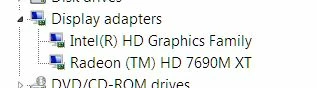
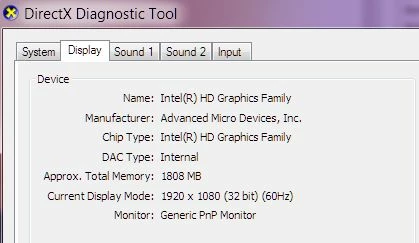
    I was able to resolve this problem on a laptop. In the AMD control panel, the main GPU selected was the Intel integrated video card that come with the processor instead of the more powerfull AMD video card.

    So, for those of you out there that have an Intel processor with the integrated GPU, make sure adobe premiere isn't using the Intel GPU to launch.


    39 replies

    Known Participant
    May 17, 2017

    My System: Windows 10 running nvidia GT 610

    Solution for me was to install the Microsoft Visual C++ 2015 Redistributable

    https://download.microsoft.com/download/6/D/F/6DF3FF94-F7F9-4F0B-838C-A328D1A7D0EE/vc_redist.x86.exe

    When I tried to run the GPUSniffer.exe in the installation folder I got the error: MSVCP140D.dll is missing

    When I tried running Premiere CC 2017 I got the error: premiere pro portable could not find any capable video play modules

    I had also downloaded the nvidia driver.

    nmskinner
    Inspiring
    June 14, 2017

    That error "MSVCP140D.dll is missing" indicates that you are missing a Visual C++ redistributable file. Follow the procedure below to ensure that you have all necessary C++ libraries installed.

    1. Under control panel > Programs and Features, uninstall every program that starts with "Microsoft Visual C++ Redistributable."
    2. To gain access to the Visual Studio C++ Redistributable files from Microsoft (guaranteed to work), create a VisualStudio Account and subscribe to Visual Studio Dev Essentials. It's free, and it'll provide you access to the downloads you need.
    3. Go to the "Downloads" tab and search each of the following items. You will need to download and install each of these individually as they have the same file names:
    • Visual C++ 2005 SP1 Redistributable (x86)
    • Visual C++ 2005 SP1 Redistributable (x64)
    • Visual C++ 2008 SP1 Redistributable (x86)
    • Visual C++ 2008 SP1 Redistributable (x64)
    • Visual C++ 2010 SP1 Redistributable (x86)
    • Visual C++ 2010 SP1 Redistributable (x64)
    • Visual C++ 2012 Update 4 Redistributable (x86)
    • Visual C++ 2012 Update 4 Redistributable (x64)
    • Visual C++ 2013 Redistributable (x86)
    • Visual C++ 2013 Redistributable (x64)
    • Visual C++ 2017 Redistributable (x86)
    • Visual C++ 2017 Redistributable (x64)
    • If you are operating on a 32-bit system, then only install the x64 versions. 64-bit systems require both the x86 and x64 versions.

    4. After double checking that all redistributables are installed (compare those installed in "Programs and Features" to the above list), restart your computer.

    5. Open Premiere-- if you receive an error message upon startup, such as "the program can't start because MSVCR130.dll is missing from your computer," this means that you are lacking a redistributable, which in this example are the 2013 ones as indicated by the 13 in the file name.

    The following websites were the ones I initially obtained guidance from, however the links in the Autodesk site are broken for a few of the downloads (hence the need for a VisualStudio Account):

    https://knowledge.autodesk.com/support/autocad/learn-explore/caas/sfdcarticles/sfdcarticles/How-to-remove-and-reinstall-Microsoft-Visual-C-Runtime-Libraries.html

    https://answers.microsoft.com/en-us/windows/forum/windows_8-winapps/the-program-cant-start-because-msvcr110dll-is/f052d325-3af9-4ae5-990b-b080799724db​ (This one addresses your error message)

    New Participant
    June 15, 2017

    I'm currently having the problem...
    Adobe Premiere Pro could not find any capable video play module.
    I tried everything like updating my drivers, reinstalling the product. Nothing works.

    I have a desktop PC, AMD Radeon 7850 GPU( with latest drivers, 16 Gb ram nd i5 processor.
    Any solution ?

    larsonreevers
    Participating Frequently
    March 4, 2017

    i think you need to update update (download & install) your intel hd graphics drivers. Please update your drivers and try again.

    Below are instructions how to update drivers on Windows .

    1. identify the manufacturer and type of your video card
      • open Device Manager: Start | Run | enter devmgmt.msc
      • open the Display Adapters drop-down; this will show you the installed video card:
    2. identify the device driver version
      • right-click on your display adapter entry and select Properties
      • click on the Driver tab; this will show you the driver version and date:
    3. go to the device manufacturer's support site and download the latest driver
    4. follow the instructions on the manufacturer's support site

    -----------

    Thanks,

    Larson Reever

    Head Of Application Software Dept

    C&C

    California, USA

    New Participant
    February 4, 2017

    I have had exactly the OPPOSITE experience.  I run 4 monitors off my desktop.  2 off a iGPU (intel chipset/mobo) and 2 off and AMD R9 280.  GPU.  Premiere will run ONLY when my primary monitor is one of the 2 driven by intel iGPU.  Premiere will NOT run when my primary monitor is one of the 2 driven by my much more capable AMD GPU.  I need my primary monitor to be an AMD-driven monitor when I run Premiere, and all other times for that matter.  All software, updates, and drivers and the very latest versions.  Tried all the steps on this help page https://helpx.adobe.com/premiere-pro/kb/error---preludevideo-play-modules.html  ​Nothing works.

    New Participant
    July 26, 2016

    Suddently, after year of use without doing anything:

    "premiere pro could not find any capable video play modules"."

    Are we serious? I've read ALL the solutions, tried as Administrator, re-installed Premiere CC 2015 and disabled Antivirus. NOTHING worked!

    A whole bug can't be fixed by a company like Adobe??

    New Participant
    July 27, 2016

    NO reply after 2 days?

    Where is everybody here?

    All solutions written here simply DON'T WORK!

    New Participant
    November 1, 2016

    I am having the exact same issue. Had Premier running fine on Thursday, came back in on Friday and just get the can not find Video Modules error. Tried reinstalling both premier and my Video Cards. Nothing. Updated everything, nothing. I can't do my job.

    New Participant
    April 14, 2016

    Please help. I am getting this error on Windows 10.1 64-bit. I don't have AVG at all, and I have tried disabling my Windows Defender and Windows Firewall. Also updated my video drivers to the latest version, and tried re-installing Premiere. Nothing is working! Does anyone have an answer for me?

    alexm30088962
    New Participant
    April 14, 2016

    Try disabling all antivirus software and not just firewalls. That is what worked for me

    alexm30088962
    New Participant
    April 13, 2016

    Hi There. Spent all day trying to fix this. I did all the suggested options - re installs of software and graphics cards drivers. set battery usage to high performance, Backdated drivers for gpu. Eventually I disabled my AVG antivirus and boom everything works. I hope this helps some one else out there. I was really just about to give up hope.

    bethflowers
    New Participant
    April 7, 2016

    AVG is the issue behind this, I have tried everything for 2 hours before coming across the end of this thread. disable AVG and premiere pro will work!

    New Participant
    April 9, 2016

    The problem seems to be in the Identity protection part of AVG.  With that function disabled, my Adobe apps started working again. 

    Nethus
    New Participant
    April 7, 2016

    On 04/04/2016 AVG Antivirus released a version that makes this issue at starting Adobe Premiere Pro CC 2015. Check for the solution at this thread: AVG Antivirus blocking all my CC apps

    At the moment, the only workaround is to disable AVG antivirus before starting Adobe.

    New Participant
    April 5, 2016

    Here as the AVG.

    I thing that in the early on April AVG made some upgrade that causes this issue.

    New Participant
    April 3, 2016

    Check your Anti-Virus etc.  AVG Anti-Virus Free was preventing Premiere from opening up for me.  After trying everything I read on the forums I took a gamble on temporarily turning it off to see if it was the culprit.  Sure enough, it was.  Now to find a new Anti-virus...  Hopefully that helps those of you that are having an issue with it.

    New Participant
    April 4, 2016

    Yep AVG was doing it to me also. Though I disabled avg before going through all of the other suggestions and it didn't fix it the first time. The final thing I did was change the permissions on the adobe folder to all everyone everything AND then disabled avg and it finally worked. Ive been able to consistently disable avg to get it started several times and feel confident that is the issue. I think I can just temp disable AVG for 10 minutes to get premiere opened. Then when avg turns back on all is good.
