
Premiere Pro Enhance Audio is adding audio artefacts to my clips
Dear Community - please help!
The first clip uses no enhancement, then I set it to 2, 4 and 7.
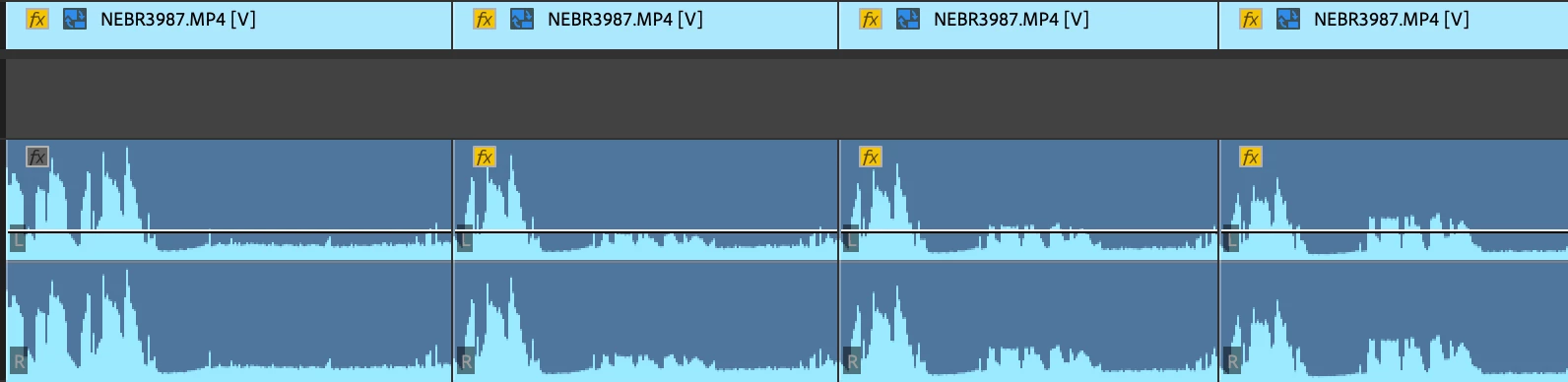
In this particular case, it would appear to be trying too hard to amplify/improve barely audible background noise or mic rustle as it gets worse the more I 'enhance' the audio. But this is the very opposite of what the effect should be doing, surely it should be squashing wind, rustles, noise?
This has also happened over spoken/ambient audio, and not affected the waveform - which is scary, as they are not always picked up in review!
This is happening over multiple Macs and always on the latest version of PP. The error is repeatable using completely fresh projects, sequences and clips. I have had to stop using Enhance Audio for fear of missing some of these glitches and them going live.
Here is the clip info:
Type: MPEG Movie
File Size: 6.49 GB
Image Size: 4096 x 2160
Frame Rate: 25.00
Source Audio Format: 48000 Hz - Compressed - Stereo
Project Audio Format: 48000 Hz - 32 bit floating point - Stereo
Total Duration: 00:05:47:02
Pixel Aspect Ratio: 1.0
Alpha: None
Color Space: Rec. 709
Color Space Override: Off
Input LUT: None
Video Codec Type: HEVC 10 bit 4:2:2
Audio:
Audio track 1 contains 1 type(s) of audio data: Audio data block #1: Format = 16 bit - Stereo Rate = 48000 Hz Compressor = sowt
 AdChoices