danieln82440300
Inspiring
November 10, 2017
Answered

Premiere Pro interface looks soft

  • November 10, 2017
  • 3 replies
  • 6645 views

Good evening folks,

I got my Dell XPS 15 9560 2 days ago and I've had a few issues with it, one of them is a very recent one and an odd one. My friend/colleague bought the same exact model and he doesn't have this issue.

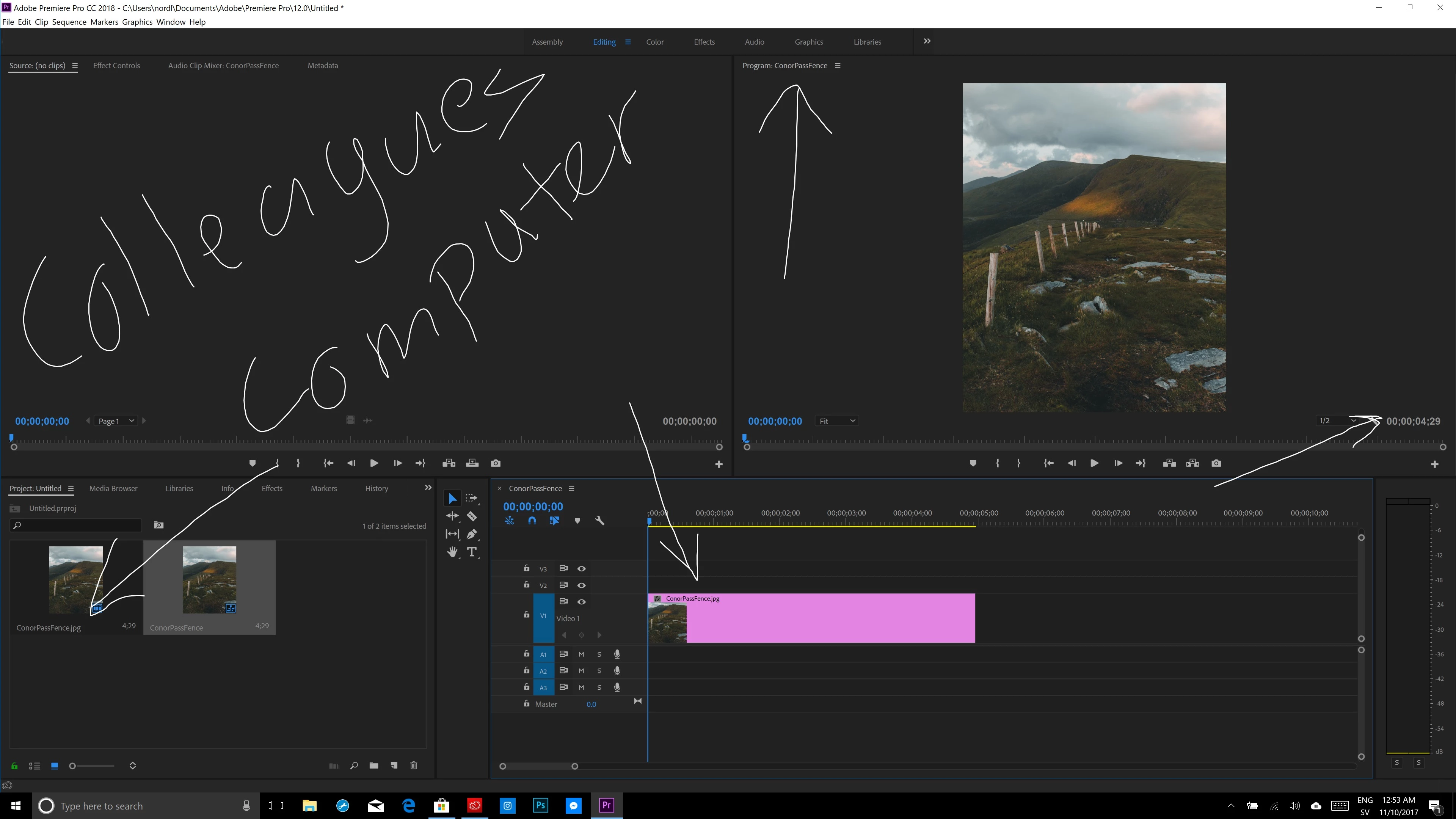
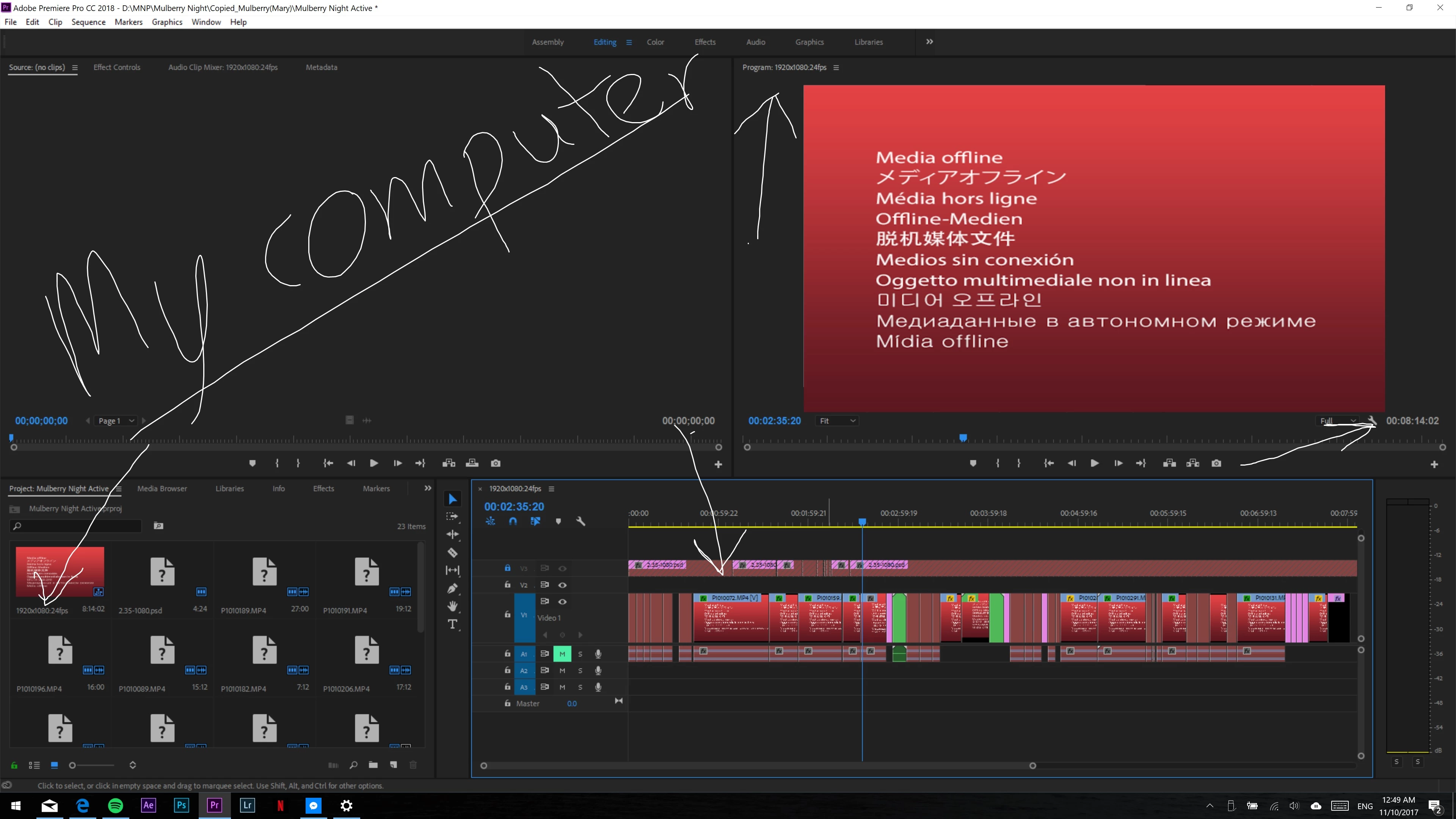
The issue is, my premiere looks soft. The text of the files in the timeline look like they have the wrong resolution compared to the computers resolution. I got the 4k model so my resolution is set to 3840x2160 and I've scaled it down to 175%.

I tried reinstalling it as well as changing back to 250% scaling on the resolution which is the factory setting of it, but I still had the same issue. I've compared it side by side to my colleague and there's definitely a difference. His text all over the program looks sharp and the way it should be while mine look like it's not really corresponding with the rest of the computer's resolution.

If you guys would be so kind and look at the screenshots I've attached you'll see the difference between our computers and when I look at the screenshots where it's very apparent that something is off with mine. Any ideas what that might be?

Thanks in advance!
This topic has been closed for replies.
Correct answer danieln82440300

I finally contacted Adobe directly via chat and alas, the issue was found and resolved!

I was referred to this link and while it wasn't exactly the same way the link said for me, it worked by unchecking "Override high DPI scaling behavior. Scaling performed by:"

https://support.microsoft.com/en-us/help/2900023/some-desktop-applications-may-appear-blurred-on-high-dpi-displays

Thanks all for trying your best to help me out

3 replies

danieln82440300
danieln82440300AuthorCorrect answer
Inspiring
December 1, 2017

I finally contacted Adobe directly via chat and alas, the issue was found and resolved!

I was referred to this link and while it wasn't exactly the same way the link said for me, it worked by unchecking "Override high DPI scaling behavior. Scaling performed by:"

https://support.microsoft.com/en-us/help/2900023/some-desktop-applications-may-appear-blurred-on-high-dpi-displays

Thanks all for trying your best to help me out

Ann Bens
Braniac
November 10, 2017

In 2018 Adobe change font size (smaller) for the UI.

danieln82440300
Inspiring
November 11, 2017

Hey Ann,

The problem is that my friend has an identical computer with identical settings(he also has 175% scaling now) and only I have the issue. So them changing the font size to smaller is fine, but my font actually looks soft and like it's not the right resolution, somehow...

danieln82440300
Inspiring
November 12, 2017

Do you have the same version of graphics driver?


I believe so. Both computers are brand new and identical specs - I just checked my drivers and they appear to be up to date... What's weird is that this is really only in Premiere. After Effects, PS and Lightroom all look the way they're supposed to...

Braniac
November 10, 2017

You should leave Display Scaling at 100%.  If that laves things too small, then you need a larger screen.

danieln82440300
Inspiring
November 10, 2017

No I  shouldn't considering the recommended scaling is 250% and most people with the XPS run at 200% and my friend even ran it at 250% without this issue

[Please respect other members of the forum.  Sarcasm removed by moderator.]

Stan Jones
Braniac
November 10, 2017

Are you both using the same graphics card?

Are you using both monitor scaling and text scaling?