Participant
March 10, 2015
Answered

Premiere Pro mute track problem

  • March 10, 2015
  • 12 replies
  • 59321 views

I don't know how but my mute button on A2 track is keyframed and I cant find where is these keyframes. And when I turn it off and move the playhead, mute is still keyframes, and constantly turning on and off by itself.

This topic has been closed for replies.
Correct answer MWH1

This issue (Tracks muting apparently automatically) was kicking me around for hours and hours until I was about to go "postal" about all of the cash I was losing wasting time with this...  Then I looked into Richard Knight's post a little closer.  I haven't used it before so I didn't even know where to look.  This fixed this issue for me very quickly and easily.  This is how I did it:

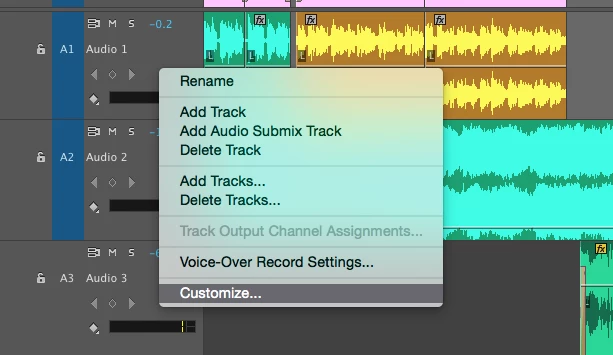
1) Right click on the grey track toolbar on the left side of the audio track and select "Customize",
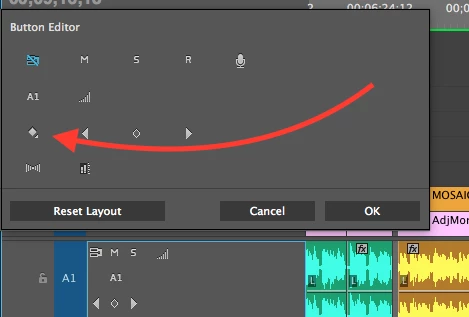
2) Add the "Show Keyframes" by dragging it to the toolbar,
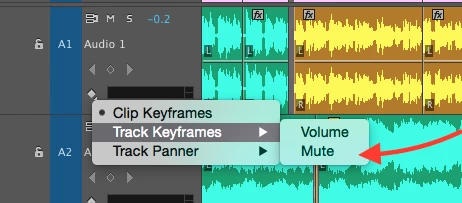
3) Left click on the "Show Keyframes" symbol and select "Track Keyframes > Mute".  This will show you all of the Mute keyframes on the audio track.   I deleted them all and never had a problem with this again.  I'm not sure how I'll silence the audio on a track in the future if "Solo and Mute" no longer work the way I have grown accustomed to using them, but at least I should be able to deliver my 12 minute project to my client.  
Hope this is helpful to others in the same bind!  Thanks Richard!!! 

12 replies

Known Participant
June 17, 2015

I just updated to CC 2015 and now the mute button doesn't work. I mute a track on premiere and as soon as I start playback the mute turns off!!

I also lost all of my personal settings and keyboard layouts.

I'm sorry to say but I am going to take another look at FCPX, Premiere has too many bugs that really hamper my ability to JUST EDIT, it's great having all these other gimmicks like matching styles to grades you capture on your iphone, but if you can't just make something that can let me cut fluidly, what is the point Adobe?

Known Participant
June 18, 2015

I'm running into the same problem with MUTE right now. Additionally, wave forms are disappearing from my SOURCE window, another bug that seems to pop up randomly when I set IN and OUT points.

I've had to stop working and re-install 2014. I was all too eager to jump into 2015...

-

Is there an area on this site to report these sort of 'workflow bugs'?

-

You said it right. The root issue is that these bugs "hamper my ability to JUST EDIT". Bugs are always going to be around, sure, I'm sure we all get that. But when it's a bug relating to a simple core function of general editing, like MUTING or looking at a waveform, you stop working and look around for solutions to things that should just work. That is a problem.

I tried SpeedGrade 2015 this morning too and it was straight unusable for me. Had to go back to 2014 as well...

Inspiring
June 20, 2015

Hi jeremyw54803074

Please can you point me to the CC 2014 download link - I too want to go back to a functioning suite.

Thanks

Dave

Peru Bob
Community Expert
Community Expert
March 10, 2015

For all clips put on the track?

Community Expert
March 10, 2015

Can you open up the mute keyframe view?
