


Participant
November 7, 2019
Question

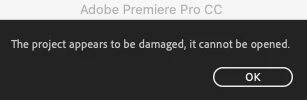
Premiere Pro - The project appears to be damaged, Cannot be Opened

  • November 7, 2019
  • 3 replies
  • 1165 views

Hello,


Seeking assistance, please. Recently backed up one hard drive from one to another only duplicating the files for safety.


After doing so every project file on both hard drives displayed this error upon opening.


Extremely frustrating.


Can anyone help?
 

This topic has been closed for replies.

3 replies

MyerPj
Community Expert
Community Expert
November 9, 2019

Try creating a brand new project and use FILE\Import to import the elements from problem project.

Community Expert
November 8, 2019

have you looked in the autosave folder?  are you on a mac or pc?

Inspiring
November 8, 2019

Ouch, that hurts the brain.  What possibly could cause that?  Try right clicking a clip in the project window and select reveal in explorer.  Does that work?

Inspiring
November 7, 2019

Do you have the original files? Do they still work?  If so, try re backing it up in pieces to see exactly what goes wrong.   I  Hope that helps.  Good luck.

Participant
November 7, 2019

We have all the raw footage however the timeline is completely blank if the project even opens.