

carlopixelframe
Participating Frequently
November 11, 2024
Answered

Premiere Pro v 25.0 plugins cannot be loaded more

  • November 11, 2024
  • 17 replies
  • 5602 views

Hello everyone,
I am facing a problem with Premiere Pro version 25.0.

My previously purchased and well-functioning advanced plugins cannot be loaded.

They appear in the window, but nothing else happens; they just don't load.

Has anyone had similar experiences or other feedback on this? It is particularly strange because I am using the German version of Premiere Pro. Apparently, the plugins work on the English version but not on the German one. This problem did not exist in the previous version 24.


Now with the new version 25.0, the plugins are not loading and the window does not start. 


  • Adobe Premiere Pro version number: 25.0.0 (Build 61)
  • Operating system - Windows 11 Pro Laptop MSI - the operating system is German language
  • System Info: 
    • Intel i7 -10710U 

    • 32 GB RAM

    • NVIDIA GeForce GTX 1650 with Max Q Design
    • Hard Drive 1 TB SSD  


My plugin providers are: 

  • AE Viewer,
  • Atom X, Envato,
  • Motion Pro,
  • Premiere Builder


All these providers claim that they have no problem. I suspect that I have a German version of Premiere Pro 25. Everything worked perfectly up to version Premier 24. After updating to version 25, all these plugins no longer work. I have contacted the respective providers, and they confirm that the plugins work for them. I really hope that you fix this problem as soon as possible. 

Thank you for your feedback and help with troubleshooting. Thanks!
Correct answer Bruce Bullis

> You urgently need to address this.


We can only address behaviors we can reproduce, and no one else on the planet has reported this behavior.

Multiple team members have attempted to reproduce the behavior, without success. I've checked with the partners whose panels you've mentioned; none of them have encountered anything like the problem you've described.


> I am really getting annoyed about this.


Understandable!

The key will be determining what's unique about your system, that's preventing the extensions from loading. 

Have you experienced this behavior, on any other computer? Do you have another system, in the same environment, on which you can test? 


Is there anything special/unique about the network access, available on that system? [closed ports, VPN, anything that could impact web browsers...]


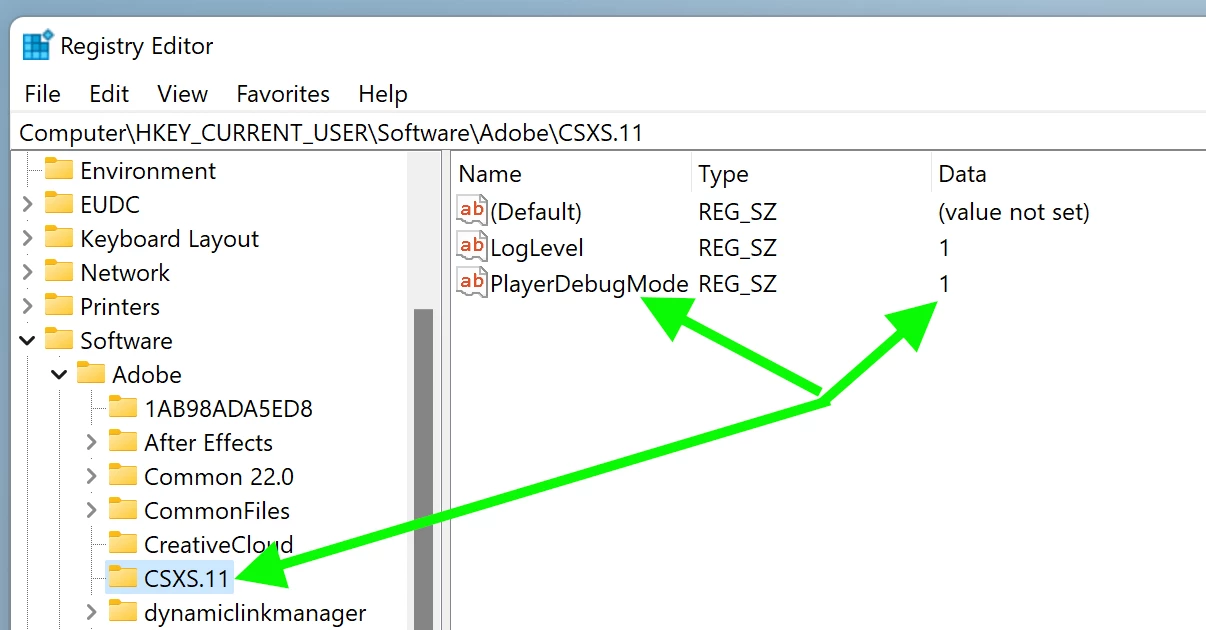
Has your system ever been used to develop extensions? I'm wondering whether you've ever had occasion to set 'PlayerDebugMode', which allows the loading of unsigned extensions. 

If you enable PlayerDebugMode, does the behavior change? Here's a screenshot from our developer documentation, showing the necessary Registry edit. NOTE: PPro 25.0 uses CEP12, so make the change in the "CSXS.12" folder, not "CSXS.11".


17 replies

Participant
December 21, 2024

is a plugin in an extension,and zxp installer:There is also a plugin issue reported by zxp that cannot connect to the network。


DevTools listening on ws://127.0.0.1:7000/devtools/browser/5c5a4320-41b7-4417-a285-7da7fa058520
2024-12-13 08:10:44:611 : ERROR ClientInitialized begin
2024-12-13 08:10:44:611 : ERROR ClientInitialized end
[1213/081045.445348:ERROR:network_service_instance_impl.cc(286)] Network service crashed, restarting service.
[1213/081045.445348:ERROR:network_service_instance_impl.cc(286)] Network service crashed, restarting service.
2024-12-13 08:10:45:679 : ERROR --OOPS! Render process terminated---
[1213/081046.647146:ERROR:network_service_instance_impl.cc(286)] Network service crashed, restarting service.
[1213/081046.647146:ERROR:network_service_instance_impl.cc(286)] Network service crashed, restarting service.
2024-12-13 08:10:46:885 : ERROR --OOPS! Render process terminated---
[1213/081047.849103:ERROR:network_service_instance_impl.cc(286)] Network service crashed, restarting service.
[1213/081047.849103:ERROR:network_service_instance_impl.cc(286)] Network service crashed, restarting service.
2024-12-13 08:10:48:081 : ERROR --OOPS! Render process terminated---
[1213/081049.064818:ERROR:network_service_instance_impl.cc(286)] Network service crashed, restarting service.
[1213/081049.064818:ERROR:network_service_instance_impl.cc(286)] Network service crashed, restarting service.
2024-12-13 08:10:49:305 : ERROR --OOPS! Render process terminated---
[1213/081050.303878:ERROR:network_service_instance_impl.cc(286)] Network service crashed, restarting service.
[1213/081050.303878:ERROR:network_service_instance_impl.cc(286)] Network service crashed, restarting service.
2024-12-13 08:10:50:547 : ERROR --OOPS! Render process terminated---
[1213/081051.542378:ERROR:network_service_instance_impl.cc(286)] Network service crashed, restarting service.
[1213/081051.542378:ERROR:network_service_instance_impl.cc(286)] Network service crashed, restarting service.
2024-12-13 08:10:51:663 : ERROR --OOPS! Render process terminated---
[1213/081052.619536:ERROR:network_service_instance_impl.cc(286)] Network service crashed, restarting service.
[1213/081052.619536:ERROR:network_service_instance_impl.cc(286)] Network service crashed, restarting service.
2024-12-13 08:10:52:853 : ERROR --OOPS! Render process terminated---
[1213/081053.702908:ERROR:network_service_instance_impl.cc(286)] Network service crashed, restarting service.
[1213/081053.702908:ERROR:network_service_instance_impl.cc(286)] Network service crashed, restarting service.
[1213/081054.755602:FATAL:gpu_data_manager_impl_private.cc(407)] GPU process isn't usable. Goodbye.
[1213/081054.755602:FATAL:gpu_data_manager_impl_private.cc(407)] GPU process isn't usable. Goodbye.

Participant
December 21, 2024

Okay, good, look at what I found The third person on the planet encountered the problem of PlayerDebugMode, I am on the mac, I ae and pr all the plugins can't be loaded, please how should I set it up on the mac

Participant
December 17, 2024

Im on mac

Participant
December 17, 2024

same issue gal toolkit doesnt work on new update


Participating Frequently
January 7, 2025

Yep I am the same.

Bruce Bullis
Legend
January 7, 2025

Does your CEP extension rely on node.js?

Bruce Bullis
Legend
December 2, 2024

> I also tried your registry edit solution and there is no 'playerdebugmode' entry in my CSXS folder.

You can create one, as the documentation suggests

The only theory we have so far (based on these two known occurrences) is that there's a problem with loading and enabling node.js, for extensions which rely upon it. 


Participant
December 2, 2024

Well now you have 2 people on the planet that have this exact same issue and its a pretty big problem. I also tried your registry edit solution and there is no 'playerdebugmode' entry in my CSXS folder. please advise how to fix this problem where no extensions are working with premiere 25 when they were wokring perfectly fine in 24. thanks

Bruce Bullis
Legend
November 15, 2024

>I am not pleased to hear that it will not run stably with this setup.

?! Now that you have extensions working, there's no reason to presume any instability.

carlopixelframe
Participating Frequently
November 15, 2024

I am not pleased to hear that it will not run stably with this setup. I have a completely normal commercial license, an annual license without Enterprise and without Creative Cloud for Teams or educational license. The price is the normal commercial price from the website.

I am a completely normal user who works without major PC settings and blockers. I create videos and creative content and rely on everything running stably. Unfortunately, I can't really help you further here.

However, it would be good to know about the stability. You should clarify this with the team. I will keep you updated if complications become noticeable on my system.

Thank you and regards.

Bruce Bullis
Legend
November 15, 2024

>...I am not sure if Version 25 runs stably with this PlayDebugMode hack.

It's not a hack; it simply skips the certificate check on installed extensions. 

The fact that it works, indicates that Creative Cloud's certificate check is failing. Since it fails after a reinstallation of Creative Cloud, that makes me suspect your CC account type; anything special, there? Are you part of an Enterprise license? Creative Cloud for Teams? Education license? 

PS: Your tone was fine; I would be frustrated too.

carlopixelframe
Participating Frequently
November 15, 2024

Hey Bruce,


you have the solution! Brilliant, it works.

The solution to my problem is the PlayerDebugMode. I adjusted the registry as you described. Now Premiere Pro Version 25 works with all my plugins that also worked perfectly on Version 24. I had neither VPN nor browser blocker on my system.

The PlayerDebugMode according to your instructions worked perfectly, as you can see in the screenshot.


Please excuse my annoyed tone, but it did cost me some time and nerves, especially when a project has a deadline. Therefore, I am now glad that it works.


I will continue to keep Version 24 on my system because I am not sure if Version 25 runs stably with this PlayerDebugMode hack. That would be good to know.


As I said, thank you very much and I apologize again sincerely.

Let's hope that Version 25 now runs stably.


Thank you also, best regards,
Carlo