so actually, when i upgrade the mac, its better to upgrade to 64 gb? to avoid this bug problem
By @ocloop14453207
64GB is much, much better than 16GB, because 16GB today would be considered too low for professional work. Personally I will never buy another work Mac that has less than 32GB; I’ll probably aim for 48GB–64GB next time.
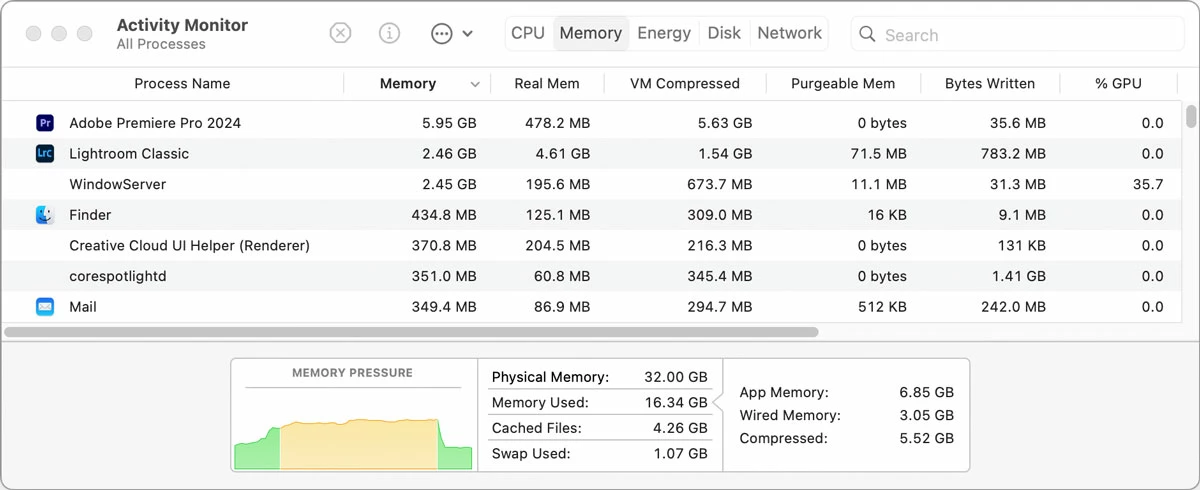
To better understand how much memory your Mac needs for your work, one important thing you should do is keep macOS Activity Monitor open in the background, click its Memory tab, and keep an eye on the Memory Pressure graph as you work. If Memory Pressure is usually green, the Mac doesn’t need more memory. If Memory Pressure spends a lot of time being orange or red, your workload needs a Mac with more memory. In the screen shot below, I know Memory Pressure is usually green but I see it went orange for a while during certain tasks, then when I finished those the memory got released, and Memory Pressure went back down to green. From this I can conclude that my 32GB is usually enough, but having 48GB or more wouldn’t hurt.
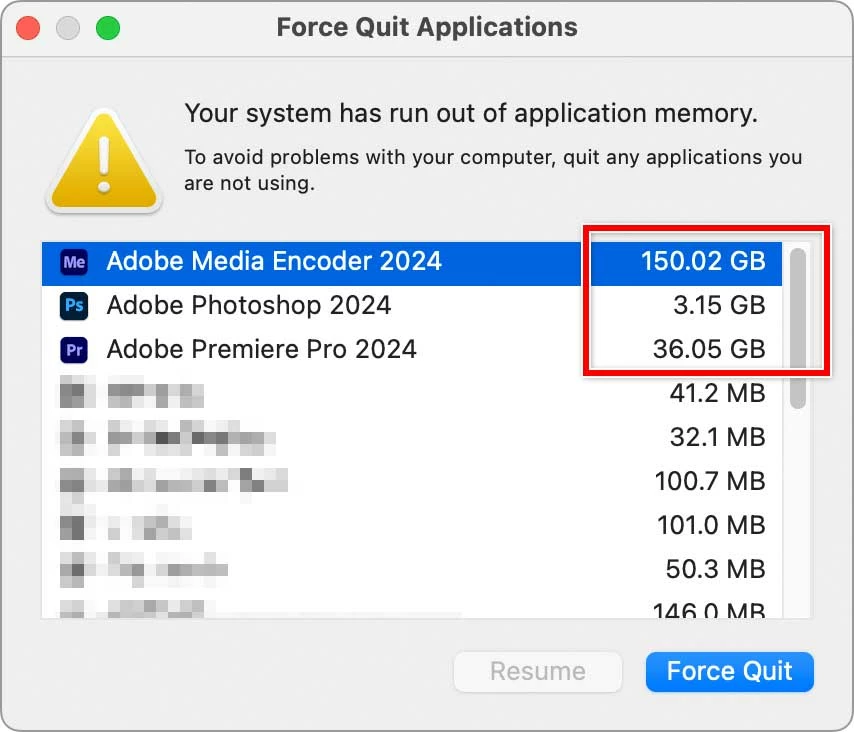
As far as what you call the "bug problem," there is no guarantee that a similar problem won’t happen again because if it’s really a bug, it can still cause a bad memory leak exceeding what your Mac has. In the example I mentioned earlier from almost a year ago (so it probably doesn’t apply to the current version), macOS reported that during an edit/render session, Premiere Pro and Media Encoder eventually ended up asking for more than 180GB of memory on my 32GB Mac and it was causing the system to lock up. I was sending Media Encoder projects that were simple cuts-only edits with almost nothing on other tracks, no effects, no plug-ins, and less than 5 minutes each (they were software tutorials, just screen recordings, nothing fancy). I concluded this had to be somebody’s bug due to the extremely simple nature of the projects, and because Premiere Pro memory usage for me is often under 10GB. I posted about it here back then, and I never did find out if it was a bug in macOS memory allocation or Premiere Pro, but obviously there was a memory leak bug somewhere because in no way could this be “expected behavior” for such simple projects. Below is a screen shot of that situation a year ago.
Regarding Premiere Pro vs Resolve, I just watched a video where a YouTuber who edits in Resolve is now happily using an M4 MacBook Pro, and she edits frequently in Resolve. She said that she now orders her Mac with no less than 48GB of Unified Memory to take full advantage of the current Resolve feature set.
So this got kind of long but to answer your question:
- Yes, a Mac with much more than 16GB of Unified Memory is recommended. 32GB is probably a realistic minimum for pro work today, so if you can budget for more, that would have a higher chance of avoiding memory problems, especially if you like to keep multiple major apps open.
- Although a Mac with more memory should avoid most memory issues, it’s always possible for a memory problem to come up no matter how much money you spend, either from bugs or from workign on a project that’s a lot more complex and demanding than what you usually work on.




 AdChoices