


cctriad
Participating Frequently
April 18, 2019
Question

Problem with Lumetri curves

  • April 18, 2019
  • 7 replies
  • 4883 views

Hi,

first of all, my English is a bit rusted, so sorry for any mistakes.

I'm using the latest version of Premiere and for some days now I experience a problem with the Lumetri curves.

Whenever I start to alter the lower tones the image gets a yellow-ish tint.

Same happens when I touch the "shadows" and it happens with any footage of any codec I want to use.

This effect does not show when I use the obsolete curves.

I'm right now in the postproduction of a big project, so I hope you can help me out quickly.

Thank you very much,

Chris
This topic has been closed for replies.

7 replies

Legend
April 27, 2022


Reduce the effect of correction in dark areas as in the screenshot (Sat/Sat). This means that your grade or LUT will not affect the dark areas of the image. Then adjust the tone of the skin with a shade (Luma/Sat curves) and make the skin lighter.

R Neil Haugen
Legend
April 27, 2022

Your media has a yellow cast, and making the part darker is exagerating it. That's why Baffy's suggestion and excellent graphic is so useful.


I use a preset with the Sat-Sat and Luma v Sat set to roll off color casts in the shadows and near-whites. Always.


Neil

Everyone's mileage always varies ...
Legend
April 27, 2022

perfect Neil 🖖

Legend
February 15, 2022

Lumetri, as a tool for color correction, has long been outdated and has been requiring significant changes for a long time. And this is not only fine-tuning the work, but rebalancing all the elements of working with color on the Lumetri page. This tool is as important as it is comparable to the existence of the Premiere program itself. And, unfortunately, many people here do not understand that Lumetry is important in working with the material. This is an integral part of content creation. I'm already tired of writing here and in the user's damn voice. She's old and clumsy. There are no subtle color settings there. Now there are only basic tools for basic color settings. And then in a limited composition.

Jorge Jaramillo Hdz
Known Participant
January 19, 2022

Hello, I just notice the same Problem (Premiere Pro 2022) the yellow tint added in the curves in lumetri. I tough at first that it was the footage (V-Log Lumix S5), but then I tried to use the RGB Curves (obsolete) and it worked perfectly, no yellow tint, so I'm no longer using the Lumetri Curves. 

Have you still experience this problem in recents versions?


R Neil Haugen
Legend
January 19, 2022

Haven't heard of anyone getting this in a couple years.


Could you share screengrabs, just drag/drop them onto your text reply area.


Aand also make a clip available to download so others can test via Dropbox or whatever?


Neil

Everyone's mileage always varies ...
Jorge Jaramillo Hdz
Known Participant
January 19, 2022

Thanks

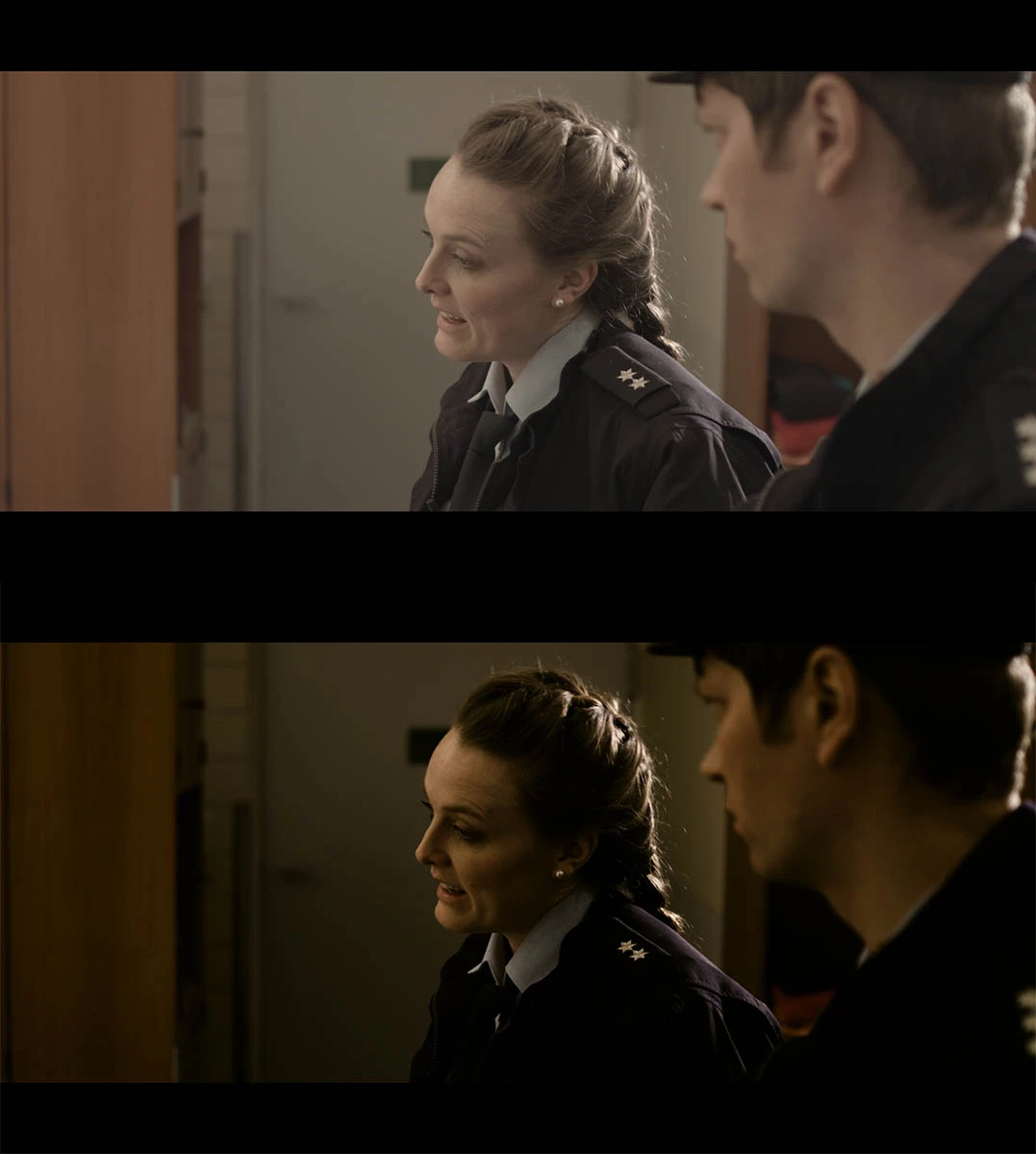
It affects yellow and red tones as you can see. 

Up Lumetri Curves

Down RGB Curves (obsolete)


Same settings in Lumetri in both images, just one with Lumetri Curves and the other one with RGB Curves obsolete

cctriad
cctriadAuthor
Participating Frequently
April 26, 2019

The new update was just installed and BANG: the curves behave completely different.

I'm "careful" saying that, but the main problem is gone now. There is no yellow-ish tint anymore.

R Neil Haugen
Legend
April 18, 2019

This is NOT normal behavior in Lumetri ... so let's start with some troubleshooting basics.

First, of course, the standard OS/CPU/RAM/GPU/vRAM, and what Mercury Acceleration option is in use? (Not to blame the hardware, just to see if commonality can be found along the way.)

Next ... what is the media involved, created by ... what? What other effects are involved? And what exact steps did it take to get the behavior?

If you could share a couple frames of a clip, I'd be happy to try and replicate.

Neil

Everyone's mileage always varies ...
cctriad
cctriadAuthor
Participating Frequently
April 18, 2019

I'm working with Premiere everyday, that's my job.

I experienced the problem the first time a few days ago, but I thought that I had maybe done something wrong before

locating the problem within the Lumetri curves.A week ago everything was fine. (As I said earlier: I talked to another Premiere

user some hours ago and he told me he had the same problem, waiting for a fix)

For this project I'm running Win 10 (64Bit) on a Dell notebook with an i7-7700HQ , NVidia GTX 1050 Ti, 16GB RAM.

I can't really understand what is happening. As soon as Im touching the curves towards the lower tones, something goes out of control.

R Neil Haugen
Legend
April 18, 2019

I think I may understand your puzzlement ... ?

There are two parts to the 'contrast' we see ... Luma (pure brightness, apart from color) and Chroma (color, apart from brightness).

However ... in the file, they are completely linked. If you increase contrast, you are naturally increasing both forms of contrast, Luma and Chroma. And in dropping a section of a curves, you are increasing the overall contrast. These curves are SO fast to respond, that it is easy to add a TON of contrast fast.

A very common thing in tutorials for colorists who love working with curves, is the continual balancing act between the curves tool and the saturation controls. Because of the interlinked nature of visual contrast.

I get the same reaction on my computer's "confidence" monitor. That is very tightly spec'd for video sRGB/Rec.709/gamma 2.4/brightness 100 nits, in my moderately dark room with measured bias lighting between the monitor and background was. And after profiling by Lightspace, nothing ever goes above the all-important delta-E 2.3 line. So I'm comfortable with a proper viewing situation for Premiere.

If you drop the lower end, via either the general RGB Curves tool or the Color Wheels ... Saturation as shown in the Vectorscope YUV goes up. If you raise shadows, Sat goes down. And ... the actual same reaction ... if you raise Highlights, Sat goes up as you've increased overall contrast. Lower highlights, Sat goes down, as you've decreased contrast.

But I get the same changes whether done in Curves or the Color Wheels ... or just raising Contrast with the contrast tool in the Basic tab.

I know this will happen, and just expect it ... in fact, depend on this as I work in the process. So it's become very natural to me. Whether in Pr or Resolve.

Neil

Everyone's mileage always varies ...
kokmanos
Inspiring
April 18, 2019

It is a known behavior that has now been acknowledged officially by Adobe. The User-Voice is full with such reports. It makes Lumetri completely useless. Right now the only option is to use good old RGB curves and/or fast color corrector.

Also there are several bugs regarding LUTs, where you see a color shift while playing/pausing.

Alternatively, if you have time, have a look at DaVinci Resolve. It seems Premiere is really far behind in color science from competition.

cctriad
cctriadAuthor
Participating Frequently
April 18, 2019

Depressing to hear that.

As you said, it makes Lumetri completely useless.

cctriad
cctriadAuthor
Participating Frequently
April 18, 2019

Just talked to a friend and he confirmed the same problem.