


Inspiring
January 18, 2018
Answered

Project could not be loaded, it may be damaged or contain outdated elements

  • January 18, 2018
  • 3 replies
  • 6731 views

This seems to be a common issue with multiple solutions none seem to work for me but here what happens and what I have tried:

I have an iMac and a Macbook Pro, both running High Sierra and Premiere Pro 12.0.0 (Build 224).

I have a premiere project which I've been working on using my iMac with no issue.

I now try and open the same project on my Macbook Pro and I get this message : "Project could not be loaded, it may be damaged or contain outdated elements"

I've then tried about 10 different projects all saved in the latest version of Premiere on my iMac and they all do the same thing.

Also worth nothing I used this Macbook Pro with the same projects about a month ago and they worked fine.

So what I tried:

  1. Logging in and out of Creative Cloud as detailed here - didn't work
  2. Tried starting Premiere holding down the option key to reset the preference - didn't work
  3. Tried starting Premiere holding down the shift-option key to reset the prefs and media cache - didn't work
  4. Created a new account on my Mac, logged into that and openned the project in premiere - worked fine - so underlying installation is ok
  5. Uninstalled Premiere and included option to delete preferences - then re-installed - didn't work
  6. Uninstalled Premiere and included option to delete preferences, then manually removed the main prem preference plist file and removed my profile from ~/documents/adobe/Premiere Pro/12.0 - then restartred my mac and then re-installed - didn't work

I don't want to reinstall High Sierra (too much time) and from (4) it would seem the OS is all good with a clean account.

I also don't want to import my projects into new projects - I have too many projects I need to use and some are huge so I don't want to deal with the issues and time of importing them all.

There must be some fix out there but I can't think what else to try.

And frustratingly I leave today for a month filming and editing overseas where internet is pretty bad so re-installing over the internet is going to become an issue.

Anyone got any ideas?

The continued joy of being a Premiere user!!
    Correct answer Rob Claisse

    OK, found a workaround.

    Open Premiere.

    Then log out of Creative Cloud

    Then open the problem project

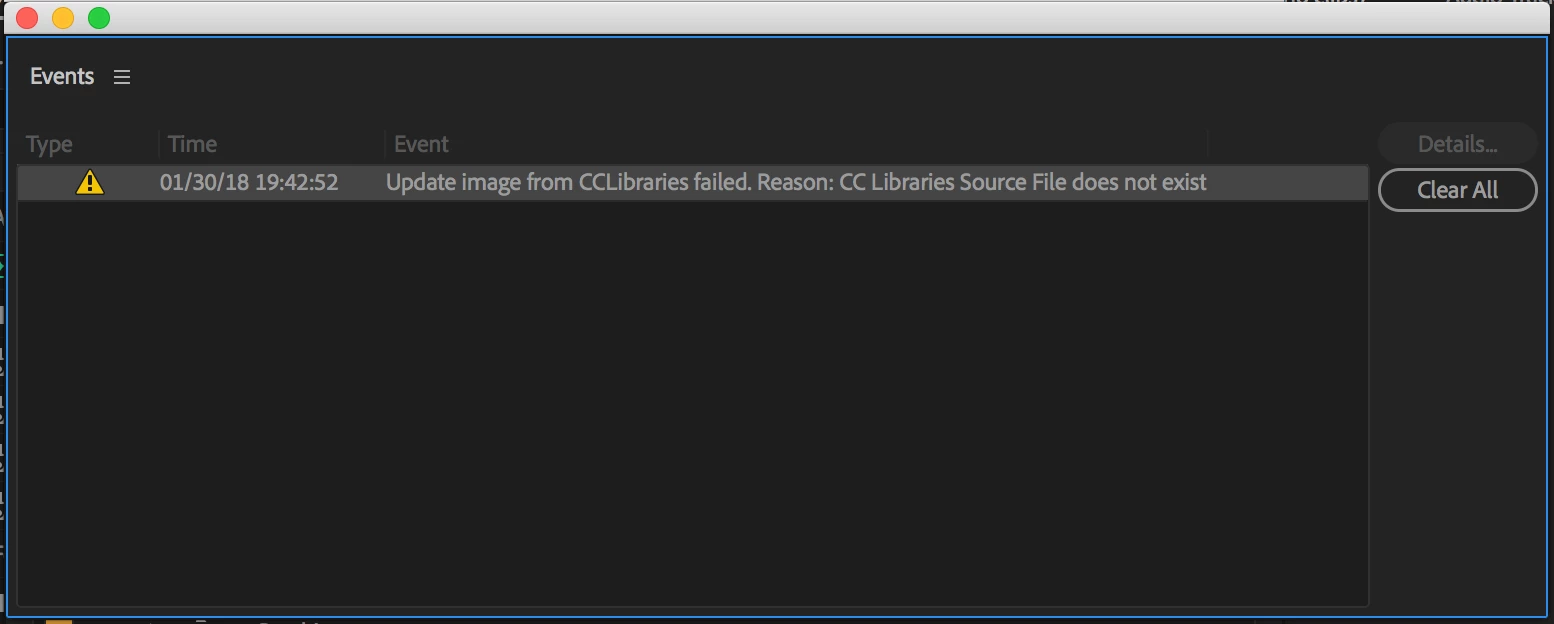
    It opens fine but you get a warning saying it can't load CCLibrary assets.

    Then log back into Creative Cloud

    This is the warning:

    So at least I can open all my projects now. I'm writing a new bug report to Adobe that explains all of this but would be nice to hear from Adobe at some point and know this is being fixed in the future. Bug reports are just a shout in the void, so you never really know if anyone is really listening.

    3 replies

    Inspiring
    January 30, 2018

    An update! So a project that was opening fine on my MacBook Pro now won't open, with the same error message, since I upgraded from 12.0.0 to 12.0.1. Thanks Adobe.

    Rob ClaisseAuthorCorrect answer
    Inspiring
    January 30, 2018

    OK, found a workaround.

    Open Premiere.

    Then log out of Creative Cloud

    Then open the problem project

    It opens fine but you get a warning saying it can't load CCLibrary assets.

    Then log back into Creative Cloud

    This is the warning:

    So at least I can open all my projects now. I'm writing a new bug report to Adobe that explains all of this but would be nice to hear from Adobe at some point and know this is being fixed in the future. Bug reports are just a shout in the void, so you never really know if anyone is really listening.

    Participating Frequently
    January 30, 2018

    Brilliant idea! Thanks.

    Participating Frequently
    January 23, 2018

    I found out that happens when I changed folder name or moved the folder which has the project contains CC Library contents.

    Couldn't find a solution yet.

    Inspiring
    January 23, 2018

    Thanks Erica, I think you are right. Looking at projects that will open and those that won't, it seems to tie in specifically to projects that use images from my Shared CC library.

    So the question is now to reset or relink the CC library elements.

    I have logged the original bug with Adobe but annoying lt their black hole of a bug tracking system means there is no way to update a logged bug or even know if anyone at Adobe is paying any attention. I guess I'll log the same bug again and include the info about CC libraries and wait and hear nothing and hope something gets fixed at some point in the future. Oh the joys of being an Adobe user :-)

    Participating Frequently
    January 23, 2018

    Yes. What a joyful Adobe world we are in~

    By the way, I looked up the original file and folder location & name in Time Machine. After I restored the EXACT same folder from the Time Machine, I move the project file & CC library folder in the restored folder. And then I could open the project file. Wish you luck!

    Brainiac
    January 18, 2018

    This is most often seen when trying to open a project in an older version of PP.  Double-check that.

    Inspiring
    January 18, 2018

    Thanks Jim but the first thing I checked as its mentioned in every other forum about this (there are a lot). Both system at using the exact same version as noted above - 12.0.0 (build 224)

    Brainiac
    January 18, 2018

    Got it.

    Unfortunately, the only other suggestion I have is Step 4 below.  You may find it a bit extreme, however.

    Unofficial Premiere Pro Troubleshooting Guide