

Averdahl
Community Expert
Community Expert
February 6, 2019
Question

ProRes on Windows - 8-bit or 10-bit?

  • February 6, 2019
  • 2 replies
  • 8532 views

In the Apple ProRes white paper i can read:

"The ProRes family of video codecs has made it both possible and affordable to edit full-frame, 10-bit, 4:2:2 and 4:4:4:4 high-definition (HD), 2K, 4K, 5K, and larger video sources..."

However, the Export Settings indicates that 8-bit is the default as you can see and that makes me wonder what we get when we export. Do we get 8-bit or do we get the expected 10-bit? Are those depth settings i see left overs, or why are they even there? The file size of the exported files do not change no matter if i choose 8-bpc or 10-bpc. AFAIK it´s not possible to even render out 8-bit ProRes files, hence this post wondering why those settings are present in the Export Settings window.
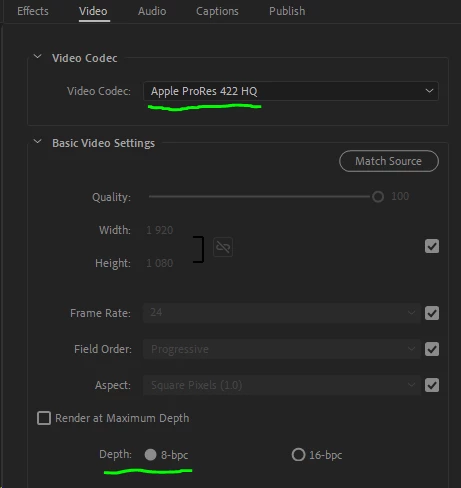
    This topic has been closed for replies.

    2 replies

    Mike Dziennik
    Community Expert
    Community Expert
    July 9, 2019

    As long as you have CUDA enabled it doesn't matter whether you choose 8bit or 16bit or Max Bit Depth - the export will give you 10bit export for ProResHQ and below. It gets far more complicated than this, which Neil can testify to; but it's a good rule to work from.

    Legend
    July 9, 2019

    Averdahl   do you by any chance have resolve 15 installed ?

    it will tell you what you got... from your export …,

    right click on top of that panel to make bit depth visible with checkbox if it aint there already

    R Neil Haugen
    Legend
    July 9, 2019

    I have exported more than a terabyte of ProRes from my Win10 system, mostly without Max Depth checked, and they're all 10 bit except for the occasional 12 bit export.

    Neil

    Everyone's mileage always varies ...
    chrisw44157881
    Inspiring
    February 6, 2019

    that option must be from a holdover or something, but I'm farely sure you also need to enable max bit depth or the color engine will clip to 8 bit before even compressing to a codec. you could easily do some gradient exports and compare what happens.

    R Neil Haugen
    Legend
    February 6, 2019

    My understanding is that Pr works in 32-bit float internally, and naturally the start nature of any media is the bits it comes with. The 32 bit float processing just makes sure of the accuracy of the math, and enables processing clips of varying bit-depth on the same sequence.

    It exports into the bit-depth of the media selected for export. Of course, starting with an 8 bit file and exporting to 10 doesn't get you anything really. So if the OP started with an 8bit file, exporting to 10bit isn't gaining anything.

    Neil

    Everyone's mileage always varies ...
    Legend
    February 7, 2019

    It exports into the bit-depth of the media selected for export. Of course, starting with an 8 bit file and exporting to 10 doesn't get you anything really. So if the OP started with an 8bit file, exporting to 10bit isn't gaining anything.

    Yes, but the question is not about that at all. The question is about what do we get when we export ProRes on Windows, do we get 8-bit as the user interface indicates or do we get 10-bit as the Apple ProRes Whitepaper indicates. AFAIK, there is not even a 8-bit version of ProRes aviable, thus the question about the confusing, misleading user interface.

    I work with 10-bit footage and do naturally want 10-bit exports but am unsure what i get with ProRes since the user interface clearly indicates that the default is 8-bit.

    I wish someone from Adobe could chime in on this one. (Kevin-Monahan)


    Play the export back in the following.

    Global Potplayer

    Right click on the image when playing and you'll get an option for file info.  That will tell you the bit depth of the file that is playing.