


Participant
December 29, 2016
Question

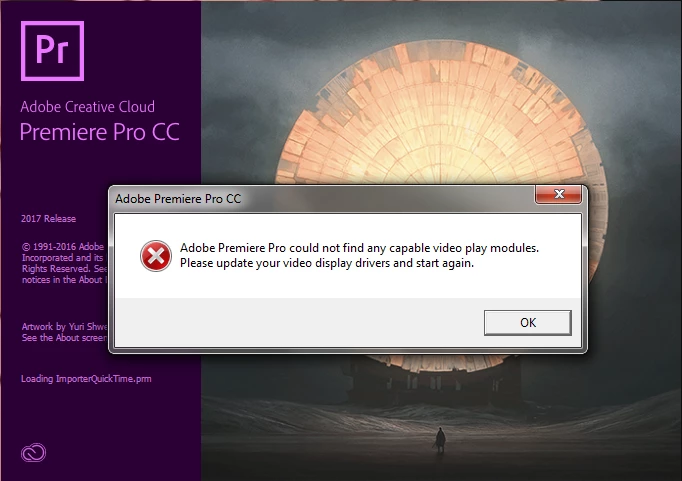
"Adobe Premiere Pro could not find any capable video play modules. Please update your video display drivers and try again."

  • December 29, 2016
  • 11 replies
  • 3719 views

I've tried every possible fix short of physically removing my graphics card...

I'm trying to run the trial version of Premiere Pro CC 2017. I have successfully run After Effects, Creative Cloud(obviously), and Photoshop, but Premiere refuses to start up. Every time I try to run it, it loads for a while and then comes up with the "Adobe Premiere Pro could not find any capable video play modules. Please update your video display drivers and try again." message and then crashes.

I have an NVIDIA GTX 1060 graphics card that I've reinstalled the drivers for at least 4 times.

I am running as admin, I've tried disabling firewalls, I've looked everywhere for an option to disable on-board video (with no luck), and I've even tried to change BIOS settings (which I changed back after it didn't work).

I've tried every possible fix I can find, and I always get the same result...
This topic has been closed for replies.

11 replies

Participating Frequently
June 12, 2017

Having the same problem with windows 10, creators update installed. NVIDIA GTX970 as the graphics card with latest drivers. I find this extremely frustrating as I need Premiere for work.

Participant
June 5, 2017

After following a link to the C++ redistributable files. Reinstalled them and I am successfully running Premiere right now.

Participant
June 6, 2017

Can you post a link to instructions on how to reinstall redistributable files?

nmskinner
Inspiring
June 6, 2017

Here is a series of instructions and files I came across from Autodesk: How to remove and reinstall Microsoft Visual C++ Runtime Libraries | AutoCAD | Autodesk Knowledge Network

I will be attempting this myself shortly and will share its outcome.

Participant
June 5, 2017

I've been trying to fix this same problem since may 29th.  I've followed every step provided by adobe. I even have AMD working on it. Rolling back updates are causing driver problems in other directions. So I think it's an Adobe issue. Since everything else is solid and running fine.  I have even bought a new Graphics card of a different manufacture to find that the error is not on that side. 

Adobe is now asking me to reinstall C++. I will try that after my 9 to 5.

nmskinner
Inspiring
June 5, 2017

Good to hear that it's not an issue with hardware, but annoyed to learn it's on Adobe's end. I found this thread, it could be of use to you but I'm doubting its chance at success as well.

Windows 10 ver 1703 (Creators Update): No GPU acceleration any more

Please keep the thread updated on your findings! Thank you for your input

nmskinner
Inspiring
June 5, 2017

I too have the same problem, and have had it for about a month now. Using NVIDIA GTX 1050 and Intel HD 630 (intergrated). I have tried every single possible solution, including BIOS and a fresh install of both Windows and Adobe. I have had only temporary success after the fresh install, but upon opening Premiere for a third time I was presented with the same dialogue message, and now it won't go away.

Here are my two threads on the issue if you would like more detail on my (our) problem and attempted fixes.

1st thread (with pictures): Cannot find capable video play modules, GPU Acceleration disactivated - Dell XPS 15 9560

2nd thread (with attempted solutions): No video play modules detected - switchable graphics card

I completely understand your frustration. Best of luck.

christineb40504602
Participating Frequently
May 14, 2017

Time for a strongly-worded letter to Adobe. A scheduled update should not cripple a perfectly working system.

christineb40504602
Participating Frequently
May 13, 2017

How do I revert to the last working version of CS6 Premiere Pro? I have the discs and would like to avoid doing a clean reinstall if I can. I have already lost too much time as it is.

Ann Bens
Community Expert
Community Expert
May 13, 2017

Deinstall and install from the disks that will give you 6.0.

christineb40504602
Participating Frequently
May 12, 2017

I have used CS6 without a problem until yesterday, when I made the big mistake of downloading the latest CS6 updates. Now *none* of the suggestions I've seen in these forums or on the 'net have fixed it. Installed the newest device drivers, updating Visual C++ to the latest version, removing the drivers and reinstalling during reboot... NOTHING works.

P.S. Ever since that update, now Aftereffects generates error messages that several .aex files can't be loaded.

Ann Bens
Community Expert
Community Expert
May 12, 2017

Do a clean install or revert back to the version you last used.

Participant
April 19, 2017

I also have the same problem.

I have a NVIDIA GeForce GTX 970.

I have tried updating the drivers several times, tried changing Firewall config to let Adobe QT32 have nternet access, tried deleting any third party Codec, tried deleting iTunes... tried mostly every solution I could find on the internet. But I still can't open the Adobe Premiere Pro CC

Does anyone have any other idea on what could possibly be going on?

Thanks!!

kulpreet singh
Inspiring
April 19, 2017

Hi Edunavega,

tried mostly every solution I could find on the internet. But I still can't open the Adobe

You can try few more steps: Error "Premiere Pro could not find any capable video play modules" | Startup

Thanks,

Kulpreet Singh

Participant
May 8, 2017

Thanks! But that didn't work either...

larsonreevers
Participating Frequently
March 7, 2017

Hope this will help.

On Mac OS X, your Graphics Driver is actually part of the Operating System, and as such can only be upgraded by checking for a software update from Apple.

Identifying your Graphics Card

  1. Open System Information by choosing About this Mac from the Apple menu, then click More Info
  2. Select Graphics/Displays in the Hardware section to see the make and model of your graphics card.
  • If this option is grayed out, it means your version of OS X is fully up to date!

Note - If you choose to Upgrade your version of Mac OS X to a newer version, it will take some time to download and complete the install process

----------------------------------------------

Thanks,

Larson Reever

Head Of Application Software Dept

C&C

California, USA

larsonreevers
Participating Frequently
March 4, 2017

i think you need to update update (download & install) your intel hd graphics drivers. Please update your drivers and try again.

Below are instructions how to update drivers on Windows .

  1. identify the manufacturer and type of your video card
    • open Device Manager: Start | Run | enter devmgmt.msc
    • open the Display Adapters drop-down; this will show you the installed video card:
  2. identify the device driver version
    • right-click on your display adapter entry and select Properties
    • click on the Driver tab; this will show you the driver version and date:
  3. go to the device manufacturer's support site to download and update device drivers
  4. follow the instructions on the manufacturer's support site

-----------

Thanks,

Larson Reever

Head Of Application Software Dept

C&C

California, USA

Participant
March 4, 2017

Good morning,

Thank you for the email but I do not have a windows computer. Do you know a fix for a MAC?

Sent from my iPhone