


Participating Frequently
August 7, 2016
Question

"Bad allocation while creating disk aligned video frame" (RAM issue?)

  • August 7, 2016
  • 9 replies
  • 72223 views

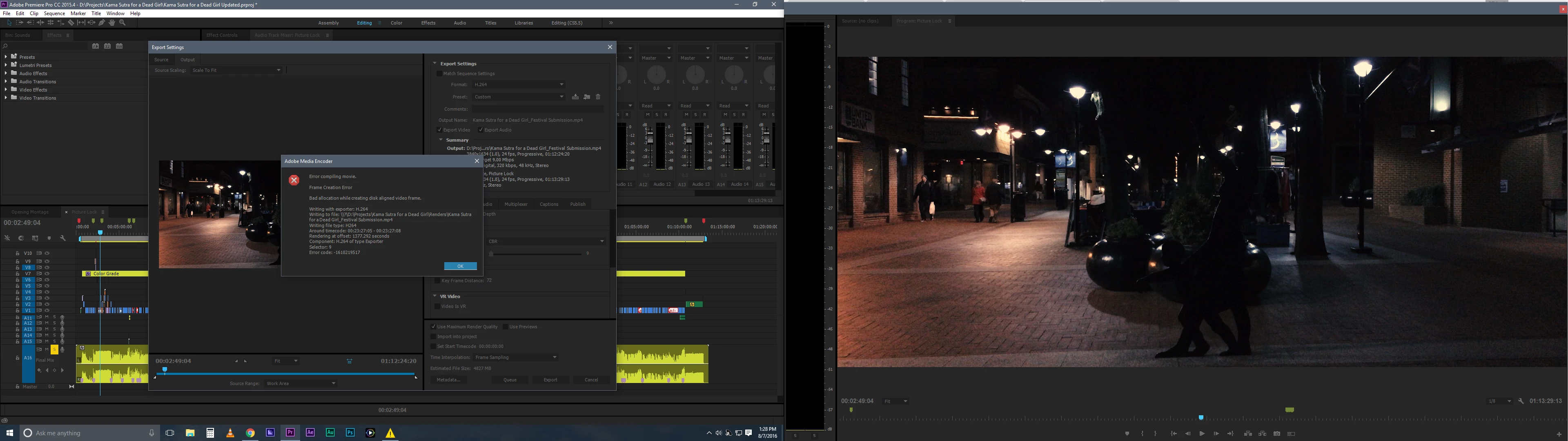
So, another problem. While I've seen plenty of "error compiling movie" posts, they all seem to vary and this one I haven't found. See attached image.

"Error compiling movie.

Frame Creation Error

Bad allocation while creating disk aligned video frame.

Writing with exporter: H.264

Writing to file: \\?\D:\Projects\Kama Sutra for a Dead Girl\Renders\Kama Sutra for a Dead Girl_Festival Submission.mp4

Writing file type: H264

Around timecode: 00:23:27:05 - 00:23:27:08

Render at offset: 1377.292 seconds

Component: H.264 of type Exporter

Selector: 9

Error code: -1610219517"

The attempt to render previously was also stopped, earlier in the timeline, by the Lumetri error (same "Error compiling movie", but different reasoning having to do with the Lumetri effect).

At the same time as this error code, windows popped up with the "running out of RAM" error and advised me to close Premiere. This has also started happening since updating to 2015.4 - the peak generation/infinite RAM usage bug.

Computer:

Windows 10

i7 3770k @ 3.5ghz

32gb RAM

GTX 780ti

OS/Premiere running off SSD

Footage running from hardware RAID via eSATA (where all cache files are also stored)

I'm at my wit's end. The forum has been very helpful recently and I am once again stuck.

Thank you!
This topic has been closed for replies.

9 replies

New Participant
July 10, 2023

Got the same error, but it was fixed when I changed the video's path from the disc to the desktop.

Inspiring
August 3, 2022

Just deleting and re-rendering all previews fixed it for me.

After trying all other sorts of fixes to no avail.

New Participant
December 1, 2021

https://www.youtube.com/watch?v=QrVhjSZn1Oc
That guy really help me to solve that problem

New Participant
January 28, 2021

I'm having the same problem but I don't understand the responses here because I don't know what AME is so I can't do anything through that to fix the problem.  I also don't know where the render preferences are.  All the explainations here are too complex for computer illiterate people like myself.  I need it in childlike terms.  I know that makes me sound stupid but I don't know computers for crap.

New Participant
February 18, 2021

Mike, I'm working through the solution  so I don't have anything there for you but AME stands for Adobe Media Encoder. An adobe program designed to take multiple sequences and render/create them in the background or at one time as part of a batch. 

OrganizedChaos
New Participant
October 17, 2021

Is there a solution for this? I have multiple projects I need completed for my YouTube channels and nothing is finishing except for audio only files.

Dan.T
Participating Frequently
December 31, 2020

I have the same problem. This problem started first when I upgraded my GPU driver. I'm almost sure that the problem is in my GPU driver or something about my graphic card.

fantastic_mind5E7A
New Participant
April 18, 2017

This is how i solved it.
The problem was that it wasn't rendering some of the clips with effect. So I deleted the effect, I then nested the clips in question, then i applied the effect i wanted back  after nesting and what it worked, no issues.

Nesting is a very useful tool, eg: if you want to add speed and stabilisation on the same clip, you must add one of the effects after you nest it and one before. very useful.

New Participant
February 11, 2020

Well I used the same effects in whole video transition I dont know how I will delete all and re-add. What is the "nesting clips in question?"

Richard van den Boogaard
Community Expert
February 11, 2020

Nesting is available in the context menu. Much like Precomposing in After Effects or creating a subgroup that will hold any number of selected clips. In the original timeline, the nested footage is replaced with a placeholder. Double-click that to open up the nested sequence.


Nesting is a great way to prevend conflicts as individual effects get rendered out separately.

Brit.b
Inspiring
February 7, 2017

Same problem. And additionally when I restart Premiere, I continue to have the white screen on the second monitor problem... but this time the color layout is not available (the weird work around in order to get a normal program monitor screen). Late for another assignment... I'll give Premier one more chance.

New Participant
October 11, 2016

I get this bug too.

Ann Bens
Community Expert
August 7, 2016

Turn off Render at max as you dont need that if you have MPE hardware turned on.

Have you tried via the queue (AME)?

Participating Frequently
August 7, 2016

I'll try that, thanks! As for AME, it's decided to crash 100% of the time whenever I add the sequence to its queue. This, another lovely change post-2015.3.

Ann Bens
Community Expert
August 7, 2016

Turn off Import Sequences Natively in AME preferences, see how that goes