


Participating Frequently
June 12, 2017
Answered

"Default Scale to Frame Size" Gone???

  • June 12, 2017
  • 2 replies
  • 26561 views

So it appears that Adobe really hates it's paying subscribers and decided to remove the "default scale to frame size" option in it's preferences! Why??? So besides manually scaling to frame size all mismatched clips in the timeline, is a solution or workaround to achieve this more simply? 
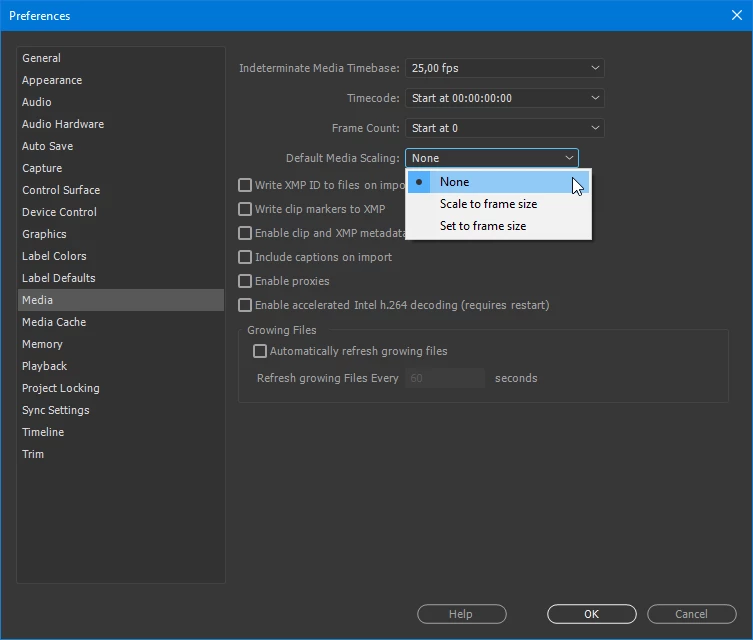
This topic has been closed for replies.
Correct answer Ann Bens

2 replies

Participant
July 24, 2017

Thanks for showing us where it's moved to.... does not wok tho  - using Win 10/CC2017 11.1.2(22)


I'm splicing 4k footage into a 1080p timeline.

Scale to frame size does nothing
Set to frame size resizes to 49% that fits the whole width with black bars top and bottom, so no good for what I'm doing. Needs to scale to 50% which I assume "Scale to Frame Size" is supposed to do.

Adobe team, we love u but please fix this!!!

Inspiring
July 25, 2017

Is your source material DCI 4K: 4096 X 2160? If so, Premiere is correctly scaling it to 46.9  to get the wider dimension (4096 px) to fit it in the 1920 px sequence frame size.

If your source material is UHD 4K: 3840 X 2160, then Premiere will set the scale to 50% as 1920 is 50% of 3840.

The empty space at the top and bottom is because 4096 X 2160 is not a 16:9 aspect ratio.

MtD

Inspiring
August 13, 2017

So where is the option for Premiere to do the helpful thing and set the size so there are no black bars?

Premiere is resizing my 4K DCI footage to fit the width of a 16:9 project, resulting in these black bars, regardless of the setting of the "scale to frame size" dropdown menu preference. I've tried all three and the behavior is the same.

What is the point of Premiere's behavior right now? I do not want to rescale every clip that I dump onto the timeline just to get rid of black bars. So what option do I change to make it do this, or is this another bug?

Ann Bens
Community Expert
Ann BensCommunity ExpertCorrect answer
Community Expert
June 12, 2017

Participating Frequently
June 12, 2017

Oh Jeez! They moved it there? I just got out of a chat with Adobe support and they told me they got rid of it entirely. It's good to know I can come to these forums for advice from helpful people who actually know the software, as oppose to what half-assed help Adobe hires. Thank you!!!!

Participating Frequently
June 12, 2017

And I just tried it and it of course doesn't work. So glad Adobe knows how to make a reliable product we need to pay a monthly subscription for. Thanks Adobe