


Inspiring
April 27, 2013
해결됨

"Premiere Pro stores the preview files in a folder you can specify" But how?

  • April 27, 2013
  • 2 답변들
  • 27507 조회

Specifying a Preview folder

On page 265 of the PDF it states:

Premiere Pro stores the preview files in a folder you can specify.

QUES 1

But how do you specify the folder? I just rendered a test clip and was not offered the option of specifying a folder. And there is no other mention of preview folders in the PDF.

Preview Files for Encoding

On the same page is:

Note: Adobe Media Encoder does not automatically use Premiere Pro preview files for encoding. To make use of the Premiere Pro preview files, you must select the Use Previews option in Adobe Media Encoder for each encoding process.

It is not clear from the PDF what is the quality of these preview files.

QUES 2

If I select the Use Previews option when exporting, aren't I degrading the quality of the export by encoding from an already encoded preview?

QUES 3

For the absolute best quality, should Use Previews be turned off?
    이 주제는 답변이 닫혔습니다.
    최고의 답변: joe_bloe_premiere

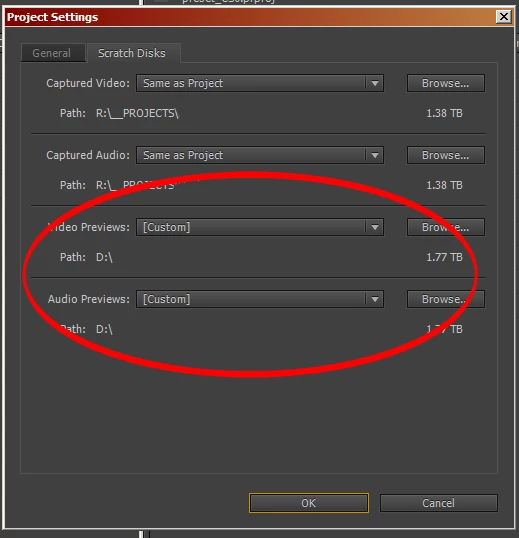
    Preview File location is determined in the overall Project Settings.

    Set this location before you render any Preview Files.

    Project > Project Settings > Scratch Disks...

    Some documentation regarding the Scratch Disk location is buried here:

    Specify scratch disks to improve system performance

    QUES 2

    If I select the Use Previews option when exporting, aren't I degrading the quality of the export by encoding from an already encoded preview?

    In most (if not all) cases... yes.

    Previews are intended for real-time playback in the Timeline only.

    You should not use previews for export.*

    QUES 3

    For the absolute best quality, should Use Previews be turned off?

    Yes!

    *There are a few semi-obscure exceptions to this general rule.

    2 답변

    R Neil Haugen
    Legend
    May 10, 2020

    If you export using the "smart preview" process, using previews on export ... you should use the same format/codec for the preiviews that you expect to use for the export. Then yes, the quality is great and the speed of the export is awesome. This works with intraframe codecs like Cineform, DNx, and ProRes ... but not with H.264/HEVC.


    Second question ... it depends. The old practice was to keep every major part of the process on separate internal discs or a massive high-speed RAID to keep from hitting read/write bottlenecks. With SSD and Nvme drives, that's somewhat modified.


    Depending on the drives ... it may be possible to combine the previews on the same drive as  the project files without issue on some systems. It is still oft suggested to have OS/programs on one drive, all cache/preview files on another, and projects/media on a third using internal SSDs.


    Neil

    Everyone's mileage always varies ...
    Inspiring
    April 27, 2013

    Preview File location is determined in the overall Project Settings.

    Set this location before you render any Preview Files.

    Project > Project Settings > Scratch Disks...

    Some documentation regarding the Scratch Disk location is buried here:

    Specify scratch disks to improve system performance

    QUES 2

    If I select the Use Previews option when exporting, aren't I degrading the quality of the export by encoding from an already encoded preview?

    In most (if not all) cases... yes.

    Previews are intended for real-time playback in the Timeline only.

    You should not use previews for export.*

    QUES 3

    For the absolute best quality, should Use Previews be turned off?

    Yes!

    *There are a few semi-obscure exceptions to this general rule.

    Guy Burns작성자
    Inspiring
    April 27, 2013

    Thanks for the info. The Premiere manual sure needs some work.

    Inspiring
    April 27, 2013

    Here's a thread discussing changing the Preview File format:

    Video Preview files