


Inspiring
January 25, 2019
Question

"We were unable to open file on disk"

  • January 25, 2019
  • 5 replies
  • 22324 views

I have an error with two files in Premiere Pro CC 2019 (13.0), where they appear offline although they previously played fine in PPro.

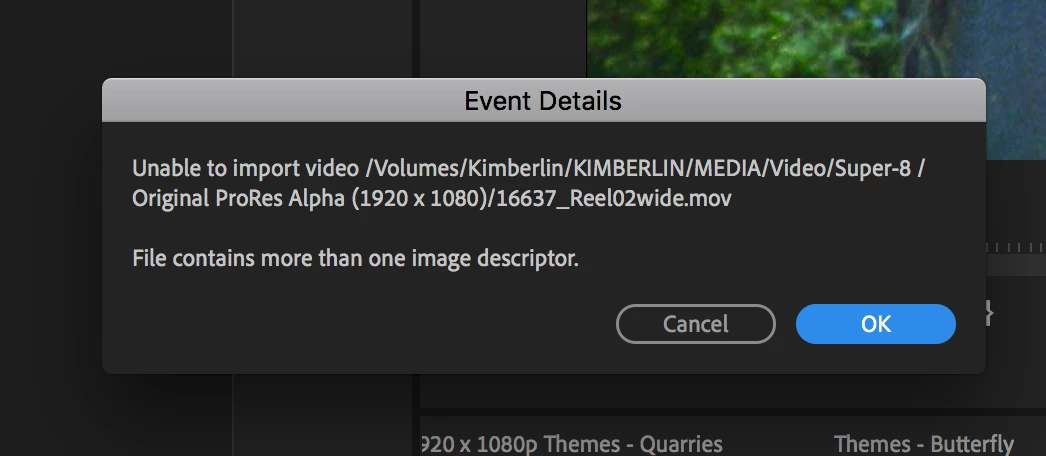
When I try to relink the files or import them fresh into PPro, I get the error message "We were unable to open file on disk". When I look at details in the "Events" panel, I see: "File contains more than one image descriptor".

What does this mean?

The files (Pro Res Alpha 4444 1920 x 1080) play fine in Quicktime 7 and VLC player, but now won't open in either AE or Premiere Pro. What could be the issue?
This topic has been closed for replies.

5 replies

Participant
December 13, 2020

For Mac users, you can just change the file extention name from ".mov" to ".mp4" and Premiere will magically accept your file.

Participant
December 18, 2020

That's what I thought too. I've used that method before, but for this file it did not work.


If that doesn't work for anyone else and you're not worried about the quality too much...I just used QT and screen recorded and exported it as h.264 and replace it with that file. Then it will work fine when you pull it into premiere. 

Legend
December 18, 2020

and if quality is an issue (it almost always is with me) you might want to purchase apple compressor which might be able to convert the clip another high quality format without any discernable loss.

Participant
May 1, 2020

Ran into this same problem trying to take ProRes 4:4:4:4 files output from Apple FCP-X into Adobe AE or Premiere. I found that taking the problematic ProRes 4:4:4:4 files into Apple Compressor and re-outputting them as new ProRes 4:4:4:4 files solves the problem. Note that compressor has to be set to "ProRes 4:4:4:4" and NOT to "ProRes 4:4:4:4 with Alpha."  The "Preserve Alpha" button in the video setting must NOT be checked (this is the default setting).


This is, obviously, not the most elegant solution. But at least it works.

Inspiring
March 2, 2019

I got the same error message. I am on Win 10 and when I tried importing a 4K Prores4444 file that opens on Mac in Quicktime or FCPX I got this error message. However, some 4K Prores4444 files work and this one is not special in any way so it seems it's some bug

Participant
May 1, 2019

Using mediainfo we found the working files to be YUV and when they have alpha (YUVA) they import as audio and the error "File contains more than one image descriptor". *MAC10.14 & WIN10

Inspiring
October 28, 2019

I am having the same exact issue. Any fixes yet?

elkalamarAuthor
Inspiring
January 29, 2019

And to emphasise, these files did open and play fine previously in my Adobe software.

Legend
January 29, 2019

I don't recall anything like this ever reported here.  The specific error message seems OS related.  As I'm not a mac guy, this one's difficult to help with.

Were the problem files created by yourself, or downloaded from some other creator?

elkalamarAuthor
Inspiring
January 29, 2019

They are Pro Res Alpha digital scans of super-8 films. They have worked fine in all software up until now, Adobe software now rejects them whilst other software has no problem opening them

elkalamarAuthor
Inspiring
January 29, 2019

So does anyone have any idea what the message "File contains more than one descriptor" means?

- and what I can do to get these files open in Premiere Pro? As mentioned previously, they open and play fine in Quicktime and VLC player. I'm rather desperate to use these files as I'm mid-edit but they won't open in the Adobe programs (hence it's not as if I can transcode them).

Thanks...

Participant
September 15, 2021

In your fcpx timeline, add a gap (edit > insert generator > gap) for  a second or less. Your first frame should be a black screen.  


Export as prores, then import in premiere. Works with me 100%

karma_koan
Inspiring
February 5, 2023

"In your fcpx timeline, add a gap (edit > insert generator > gap) for  a second or less. Your first frame should be a black screen."

Excellent tip, and solved the issue for me, but I also wanted to point out that audio should not be exported with Prores 4444 with alpha files.  It never works for me when the file is exported with audio.  This was pointed out somewhere else but I wanted to put these two tips together in one message for future reference to those that might need it.