


Inspiring
September 19, 2018
Question

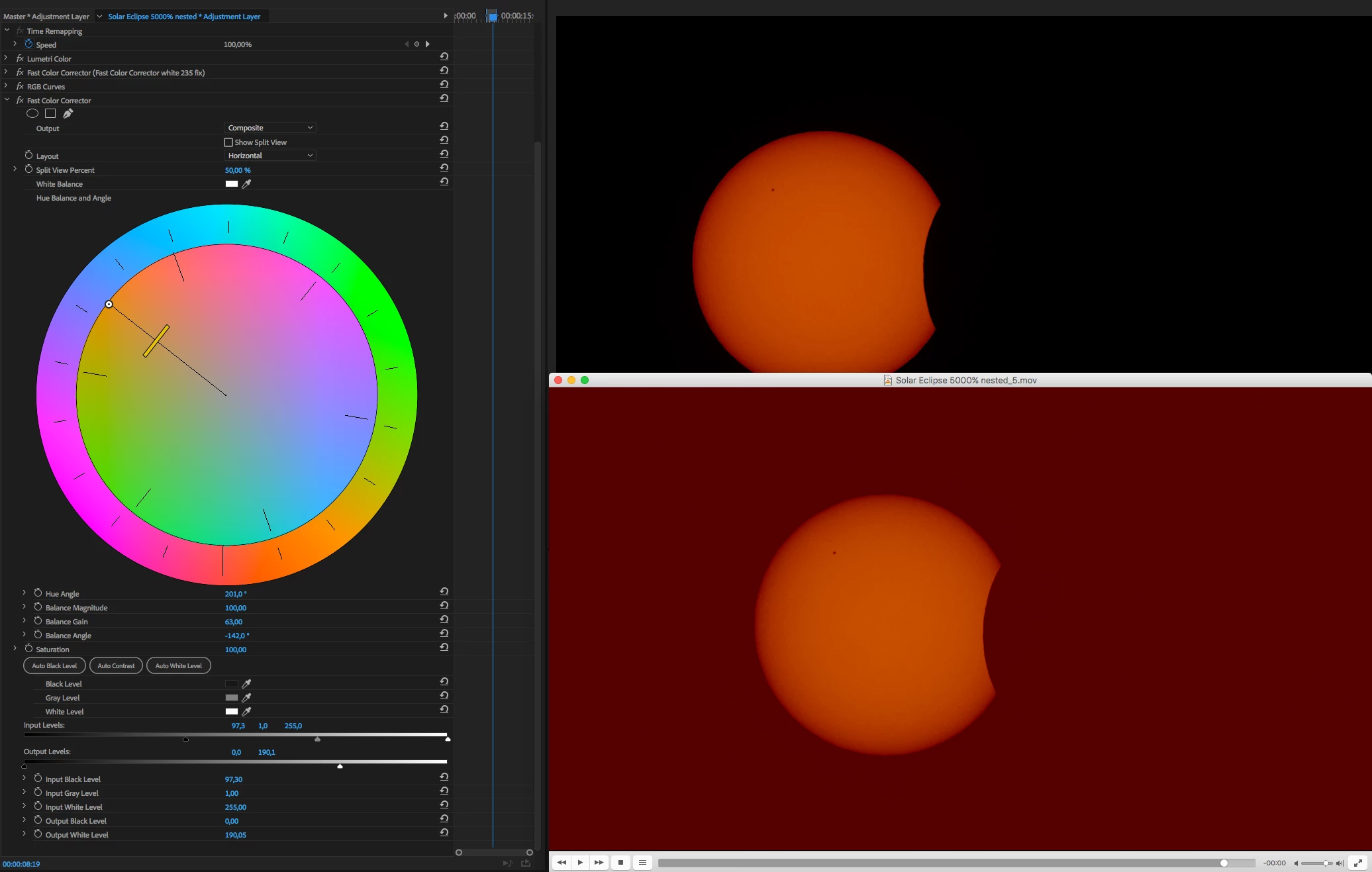
Render messes my color correction of solar ecplipse

  • September 19, 2018
  • 2 replies
  • 1080 views

Hi,

As you can see in the picture attached when I try to render it out the fast color corrector completely messes the render. I've created a strong color correction for a solar eclipse (original clip is b&w of course). I would gladly recreate this in Lumetri but I'm not getting anywhere near the vibrant orange color I'm getting with fast color corrector.

So if someone can point out what's wrong with the settings to get it to render correctly or how to do this with other non legacy tools I'd appreaciate it!

PS. When I export a frame it looks as it should.
    This topic has been closed for replies.

    2 replies

    Legend
    September 19, 2018

    You must have one of two viewing environments set up.

    1. A dedicated I/O card (AJA Kona, Blackmagic Intensity, etc.) to a calibrated monitor.

    2. An export from Premiere Pro played from hardware to a calibrated monitor.

    You need to get the software, display driver and even the OS out of the signal chain.  How it looks on the calibrated monitor is all that matters.

    R Neil Haugen
    Legend
    September 19, 2018

    It looks like you're viewing that export from a Quicktime player on an Apple computer.

    You've got two things jumping in here ... you may have a P3 monitor, which has a very different and wider gamut/space than the Rec709/sRGB that PrPro uses for b-cast standards. So often things have less saturation and contrast. Exacerbated by viewing the export in Quicktime player, which isn't just non-color managed, but plain color stupid.

    If you import the export back into PrPro, what's it look like?

    Neil

    Everyone's mileage always varies ...
    samsanAuthor
    Inspiring
    September 19, 2018

    It's VLC player I'm viewing it on. I have an older iMac (no P3 monitor). If I import it back to Premiere it looks wrong. Same red blacks.

    samsanAuthor
    Inspiring
    September 20, 2018

    Glad to see you got the article for some ideas ... I spent a couple minutes in Lumetri ... I don't normally use the "blacks" in the Basic tab, as it's a weird action, sort of like a tail hinged at 20 on the left hand scale. But as I wanted blacks so far "up", I dropped Basic tab blacks a chunk.

    Then went to Color Wheels tab, and as shown ... pulled the Shadows luma slider all the way down, pushed the shadows/mid/highs color well up into the 'right' orange hues, and pushed the mid/highs Luma sliders up some also. Causing the Vectorscope YUV to show saturation way outta bounds, so back to basic tab to pull saturation back within legal bounds.

    Took about a minute. Tops.

    Neil


    Looks great, thank you!