


- Home
- Premiere Pro
- Discussions
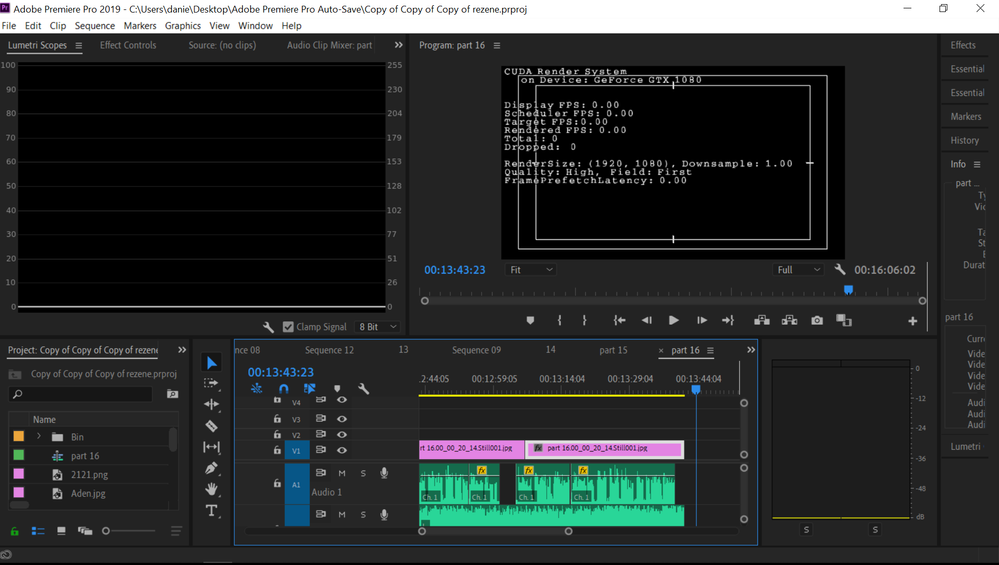
- render status ''cuda render system" displayed on p...
- render status ''cuda render system" displayed on p...

Copy link to clipboard
Copied


 1 Correct answer

Hit CTRL-Shift-F11 and then play. Source: https://www.dellemc.com/resources/en-us/asset/white-papers/products/storage/h17334-wp-isilon-adobe-premiere-pro-config-optimization-guide.pdf

 6
Replies
6
6
Replies
6


Copy link to clipboard
Copied
Hit CTRL-Shift-F11 and then play. Source: https://www.dellemc.com/resources/en-us/asset/white-papers/products/storage/h17334-wp-isilon-adobe-p...
Copy link to clipboard
Copied

Copy link to clipboard
Copied
OMG! Thank you! This was driving me nuts! I dropped something on my keyboard and then this popped up. I have no clue how I managed to turn it on but thankfully, after a good long search on the internet, I found this chat, and you, the angel of adobe premiere, showed me how to turn it off. 😄

Copy link to clipboard
Copied
I completely agree with you, having also spent a lot of time searching, I am very happy that it no longer interferes with work.

Copy link to clipboard
Copied
I agree MadAlice76. Thank you very much!
You saved me from torment!

Copy link to clipboard
Copied
Thanks! On a Mac the keyboard shortcut is Command + Shift + Fn + F11 (Fn required as F11 is the volume down media key by default on my Apple keyboard.) And you must play the timeline to get the Program Monitor picture to refresh and clear the Metal Render System message. (aka "DogEars" apparently)


Get ready! An upgraded Adobe Community experience is coming in January.
Learn more
 AdChoices