


New Participant
May 3, 2020
Question

Rendering work area is not working

  • May 3, 2020
  • 1 reply
  • 3514 views

Hello, 

I am having an issue where I try to render a portion of my clips and after the rendering is complete, the portion of the timeline is still red and yellow. Below I have a picture of my work area bar. I will then click sequence -> render entire work area. Then I will get the loading sign while it renders the frames. Then after it has finished, nothing will have changed and the lines will still be yellow and red. 


Picture before render
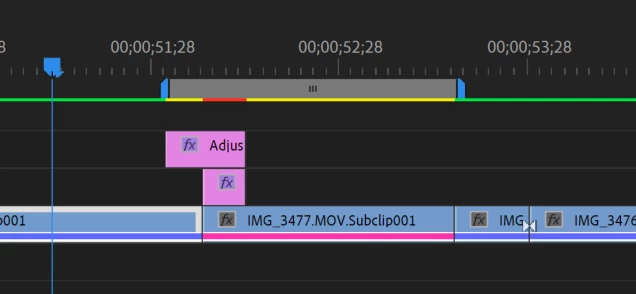
Picture after render (same exact thing, rendering isn't actually working)

I have also tried alternate rendering strategies like render selection and render to in and out, they all don't work.


This topic has been closed for replies.

1 reply

Peru Bob
Braniac
May 3, 2020


Delete the Media Cache and Media Cache files:
https://community.adobe.com/t5/premiere-pro/faq-how-to-clean-delete-or-trash-media-cache-files/td-p/...


If that doesn't work,try resetting the preferences:
https://community.adobe.com/t5/Premiere-Pro/FAQ-How-to-reset-trash-preferences-in-Premiere-Pro/td-p/8236158

If that doesn't work, try resetting the Workspaces:
Reset a workspace
Reset the current workspace to return to its original, saved layout of panels.
1. Do one of the following:
• Click the Workspace menu icon and select Reset to Saved Layout.
• Choose Window > Workspace > Reset to Saved Layout.
from here:
https://helpx.adobe.com/premiere-pro/using/workspaces.html

If that doesn’t work, try updating or rolling back your graphics driver directly from the video card manufacturer’s site.