Exit
  • Global community
    • Language:
      • Deutsch
      • English
      • Español
      • Français
      • Português
  • 日本語コミュニティ
  • 한국 커뮤니티
0

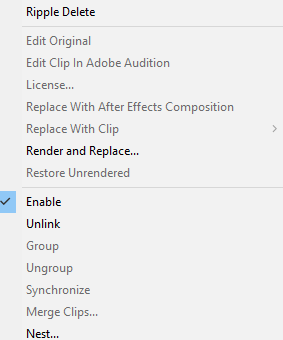
Replace with After effects Composition not working

New Here ,
Nov 11, 2020 Nov 11, 2020

I have read through the other forums but nothing is working. I have the PP 2020 version and the AE 2020 version. I imported a clip into PP and then right click and the 'Replace with After Effects Composition" is greyed out. Please let me know how to fix this.


leahm42419886_0-1605136349487.png


TOPICS
Editing , Error or problem
659
Translate
Report
Community guidelines
Be kind and respectful, give credit to the original source of content, and search for duplicates before posting. Learn more
community guidelines
Community Expert ,
Nov 11, 2020 Nov 11, 2020

have you edited it into a sequence and then right clicked and chosen "replace with ae...?"  might want to tell us

your system specs: OS version, Premiere version, amount of RAM, Hardware specs including graphics card and your source properties and sequence settings.

Translate
Report
Community guidelines
Be kind and respectful, give credit to the original source of content, and search for duplicates before posting. Learn more
community guidelines
Community Expert ,
Nov 11, 2020 Nov 11, 2020
LATEST

What media type is the source footage in your Sequence?   

Translate
Report
Community guidelines
Be kind and respectful, give credit to the original source of content, and search for duplicates before posting. Learn more
community guidelines