


Inspiring
June 22, 2022
Answered

Saving new projects in wrong folder

  • June 22, 2022
  • 2 replies
  • 4298 views

As I create new projects and try to save the file in a folder, it saves it in the higher folder. 


ie:

-Create new project

-create new folder to save project in called "Premiere"

-new folder in "premiere folder called "project file"

-title project "example edit" and save it in "project file" folder

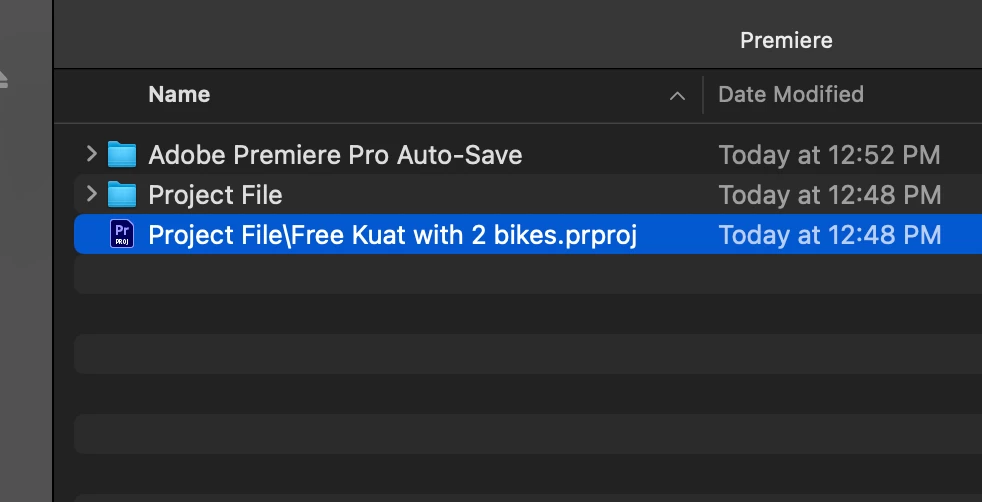
- file saves as Projectfile/exampleedit.prproj inside "Premiere" folder and not inside "Project file" folder
 

WHY IS THIS HAPPENING?!?

This topic has been closed for replies.
Correct answer travisbakcou

Teri, I didn't have to restart my machine and I'm not sure that dashes would cause the problem (but what do I know since I didn't think slashes would cause the problem, haha 🙃) but I did just create a chain of folders like this: "Video/Folder" > "Folder 1" > "Folder 2" and then I created and saved the project "Test Project.prproj" in "Folder 2" and experienced the issue again. The project file "Test Project.prproj" was saved in "Folder 1" and the name of the project was changed to "Folder 2/Test Project.prproj" instead of just "Test Project.prproj".

So it looks as though the issue could stem from any folder in the path containing one of the most specialest of characters, such as a "/". Are there any folders in the entire path that contain special characters?


I FIXED IT!!!!!!! So the dash "-" in my master folder called "-work folder" was changed to "work folder" and then I restarted my computer and now the problem has been fixed. So I guess it is the right answer that with the new update the file name cannot support being in a location that has a special character. Thanks everyone for the help! 

2 replies

Participating Frequently
July 6, 2022

I'm having this same issue on Mac! It's incredibly frustrating.

New Participant
July 15, 2022

Having the same issue. Were you ever able to fix it?

travisbakcouAuthorCorrect answer
Inspiring
July 22, 2022

Teri, I didn't have to restart my machine and I'm not sure that dashes would cause the problem (but what do I know since I didn't think slashes would cause the problem, haha 🙃) but I did just create a chain of folders like this: "Video/Folder" > "Folder 1" > "Folder 2" and then I created and saved the project "Test Project.prproj" in "Folder 2" and experienced the issue again. The project file "Test Project.prproj" was saved in "Folder 1" and the name of the project was changed to "Folder 2/Test Project.prproj" instead of just "Test Project.prproj".

So it looks as though the issue could stem from any folder in the path containing one of the most specialest of characters, such as a "/". Are there any folders in the entire path that contain special characters?


I FIXED IT!!!!!!! So the dash "-" in my master folder called "-work folder" was changed to "work folder" and then I restarted my computer and now the problem has been fixed. So I guess it is the right answer that with the new update the file name cannot support being in a location that has a special character. Thanks everyone for the help! 

Jeff Bellune
Brainiac
June 23, 2022

Mac or Windows? I can't duplicate it on my Mac. When I create a new folder and save the new project in it, it is saved in the correct location.

Did you copy/paste the path instead of just the file name? It looks like Pr thinks the project file is named "Project File/Free..." That looks like a full path instead of just the project name.

Inspiring
June 23, 2022

Mac. I'm not copy/pasting at all. Just open premiere, create new project, new save location, click new folder, think that it's saving it in there, then I go to open it and it's in the folder that the new folder is in, not in the new folder. It's been driving me crazy. 

Jeff Bellune
Brainiac
June 24, 2022

But do you see what I see? 

Instead of the .prproj file being named "Free Kuat with 2 bikes", it seems to be named "Project File/Free Kuat with 2 bikes".

That indicates that somehow the containing folder name and the project file name are being appended and used as the project file name. That's not expected.