
Exit
  • Global community
    • Language:
      • Deutsch
      • English
      • Español
      • Français
      • Português
  • 日本語コミュニティ
  • 한국 커뮤니티
0

Scene Edit Detection

Mentor ,
Apr 20, 2022 Apr 20, 2022

In order to check the Scene Edit Detection I downloaded 4 videos from the YouTube and combine them using Premiere Pro to make it single video. Then I imported that single video into Premiere Pro & use Scene Edit Detection to separated it into original form (4 videos) but it converted it into many videos. What is the reason?  
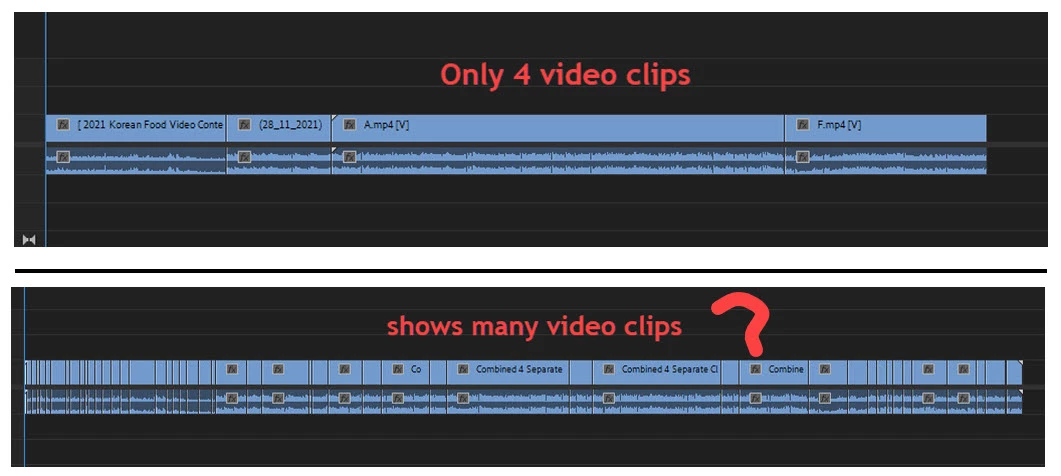
 

4 clips shows many clips.jpg

TOPICS
Editing
1.6K
Translate
Report
Community guidelines
Be kind and respectful, give credit to the original source of content, and search for duplicates before posting. Learn more
community guidelines

correct answers 2 Correct answers

LEGEND , Apr 20, 2022 Apr 20, 2022

Because it doesn't have any idea where the clips "original" boundaries were, nor is that the use of it.


Scene detection is for breaking apart a clip into segments that are visually distinctive. As in ... scenes, not clips.


It's biggest use is to separate out the timeline to make color corrections possible. By breaking the total clip into what seem to be the individual scenes.


It's not about breaking up into clips. You can have say several clips shot with a camera on a tripod on a balcony o

...
Translate
Advisor , Apr 21, 2022 Apr 21, 2022

It is absolutely true. The algorithm of 👉Scene Edit Detection👈 is not aimed at the number of clips, but at the difference in the scenes of these clips. If the frame changes and something else is shown after a while, the CUT-scene goes. And that's how it should work. Of course, it would be great if the developers added the ability to select the definition of scenes or clips. But, it won't be real. There are no definition boundaries.

Translate
LEGEND ,
Apr 20, 2022 Apr 20, 2022

Because it doesn't have any idea where the clips "original" boundaries were, nor is that the use of it.


Scene detection is for breaking apart a clip into segments that are visually distinctive. As in ... scenes, not clips.


It's biggest use is to separate out the timeline to make color corrections possible. By breaking the total clip into what seem to be the individual scenes.


It's not about breaking up into clips. You can have say several clips shot with a camera on a tripod on a balcony overlooking the ocean. Shoot for three seconds, wait a few seconds, shoot another short clip. If nothing in front of the camera changes, that's still the same scene. Scene detection will probably skip through these.


But if you change the view, so the camera is pointed back at the building for the next clip, that will be a different scene for color correction needs. And probably selected by "scene detection" as a scene change.


Neil

Translate
Report
Community guidelines
Be kind and respectful, give credit to the original source of content, and search for duplicates before posting. Learn more
community guidelines
Mentor ,
Apr 21, 2022 Apr 21, 2022

Thanks.

Translate
Report
Community guidelines
Be kind and respectful, give credit to the original source of content, and search for duplicates before posting. Learn more
community guidelines
Advisor ,
Apr 21, 2022 Apr 21, 2022

It is absolutely true. The algorithm of 👉Scene Edit Detection👈 is not aimed at the number of clips, but at the difference in the scenes of these clips. If the frame changes and something else is shown after a while, the CUT-scene goes. And that's how it should work. Of course, it would be great if the developers added the ability to select the definition of scenes or clips. But, it won't be real. There are no definition boundaries.

Translate
Report
Community guidelines
Be kind and respectful, give credit to the original source of content, and search for duplicates before posting. Learn more
community guidelines
Mentor ,
Apr 21, 2022 Apr 21, 2022
LATEST

Thanks.


Translate
Report
Community guidelines
Be kind and respectful, give credit to the original source of content, and search for duplicates before posting. Learn more
community guidelines