


Participant
July 9, 2020
Answered

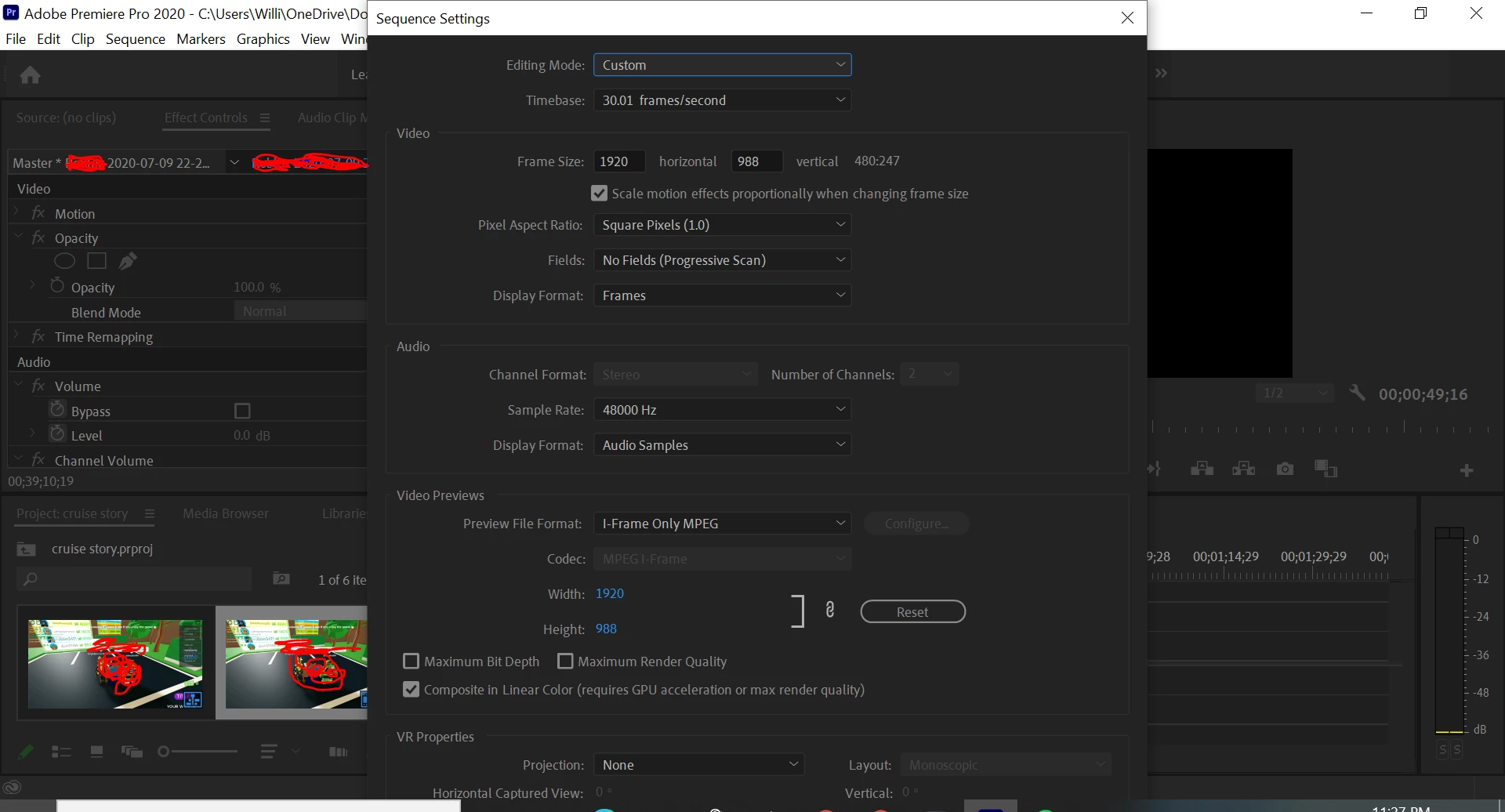
Sequence settings (or maybe other settings in general) window is too large to navigate in.

  • July 9, 2020
  • 7 replies
  • 8572 views

When I want to change the sequence settings in premiere pro, the window is literally too large for my laptop so I cannot reach the buttons below my screen, also I cannot resize the window too, I don't know how but I remember before resizing a window, but I can't do the same to the sequence settings. The window is also created in a way that it cannot go past the boundaries above your screen. Think there should be a fix for this or something. 
 

Correct answer GAMING38634442az3a

I found a better solution,simply in display settings just set the scale to 125 Percent or 100 percent for me 125 percent worked perfectly fine

7 replies

GAMING38634442az3aCorrect answer
Participant
July 16, 2024

I found a better solution,simply in display settings just set the scale to 125 Percent or 100 percent for me 125 percent worked perfectly fine

Participant
August 15, 2024

I have the same problem. Have tried all the suggestions listed above and nothing is fixing it / making it possible to save the settings. Have no idea what to do now. 


Participant
August 22, 2024

Try changing the resolution of your display then

Participant
November 10, 2023

I changed the resolution settings on my laptop, which reframed the screen for me so I could see the button. Simply change the settings back once you are done if you prefered the previous resolution.

Participant
October 12, 2023

I just enocountered the same issue. The only thing I can do to bypass that is to use the TAB key and I press enter once its gone past all the possible options and the only thing it could be is the save/confirm button that you can't see. Hope that helps.

Participant
November 24, 2023

Thank you so much. I almost cried.

Participant
November 24, 2023

Do you think connecting to my TV can help?


Community Expert
July 9, 2020

And if you can't solve it by making everything smaller, remember that to accept a configuration in a dialog box you can always directly press the Enter / Return key.

Byron.
Participant
July 9, 2020

My screen resolution is 1920x1080

Community Expert
July 9, 2020

that's sufficient.   Have you tried resetting the workspace?  Also, I remember some posts about this issue.  Do some searching here...

Community Expert
July 9, 2020

that's probably the case, but let's find out what the actual screen resolution is...  I seem to remember this happening to me on my 15" macbookpro which did meet the minimum requirements.  Unfortunately, I can't remember the solution, but you might try resetting the workspace or connecting to an external monitor if possible...  and demaximize and remaximize the screen (not sure what the technical term for this is, but it's the icon at the top right to the left of the "x"

Participant
July 9, 2020

Yeah tried minimising window but it makes no difference to changing the sequence settings because it cannot be changed. I think that premiere pro should at least be compatible to all screens and have some calibration for resolutions or something.

Averdahl
Community Expert
Community Expert
July 9, 2020

That´s an indication of that your computers screen resolution does not meet the minimum requirements.


Read this: Premiere Pro system requirements