


blackburn.49963592
Inspiring
October 21, 2020
Answered

Set Source Range as "Sequence In/Out point" by default in Export Settings

  • October 21, 2020
  • 3 replies
  • 5091 views

By default, when you go to Export Settings to Render your video, Source Range is set on "work area". Is this possible to change that. I want it to be "Sequence In/Out point"  by default


This topic has been closed for replies.
Correct answer Averdahl

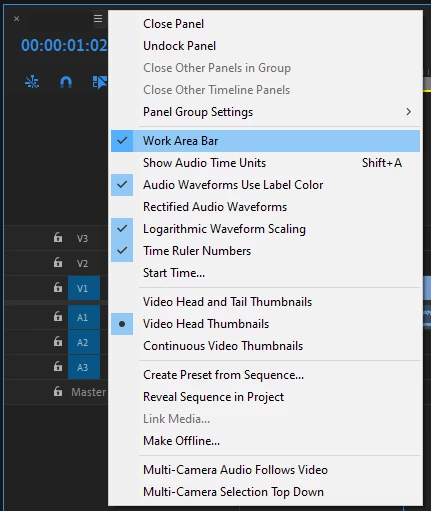
Yes, disable the Work Area Bar on your timeline. When the Work Area Bar is enabled on a timeline the default on export will be Work Area. 


Work Area  Bar has been replaced by using In and Out points when rendering previews, etc, etc.
 

3 replies

Java Editor
Participating Frequently
October 19, 2022

You just solved a long standing pain the tush issue. Thanks!!!!

Averdahl
Community Expert
AverdahlCommunity ExpertCorrect answer
Community Expert
October 21, 2020

Yes, disable the Work Area Bar on your timeline. When the Work Area Bar is enabled on a timeline the default on export will be Work Area. 


Work Area  Bar has been replaced by using In and Out points when rendering previews, etc, etc.


Participant
September 29, 2022

i have mine shut off and it still defaults to work area when i render. i hate having to change it everytime since i tend to make clips of my videos

analoguejunkie
Participant
April 19, 2023

Mine still defaults to work area as well. No matter what I do it defaults to Work Area, even sometimes when I select Source In/Out when exporting it will still switch back to Work Area when I click export. It's getting VERY annoying. I am a long time Premiere Pro user and I've never had an issue with this until I got my new Mac Studio M1 Ultra. 

blackburn.49963592
Inspiring
October 21, 2020

I talking about this