


westley
Participating Frequently
July 8, 2015
Question

Shock result: OpenCL vs CUDA vs CPU

  • July 8, 2015
  • 6 replies
  • 117674 views

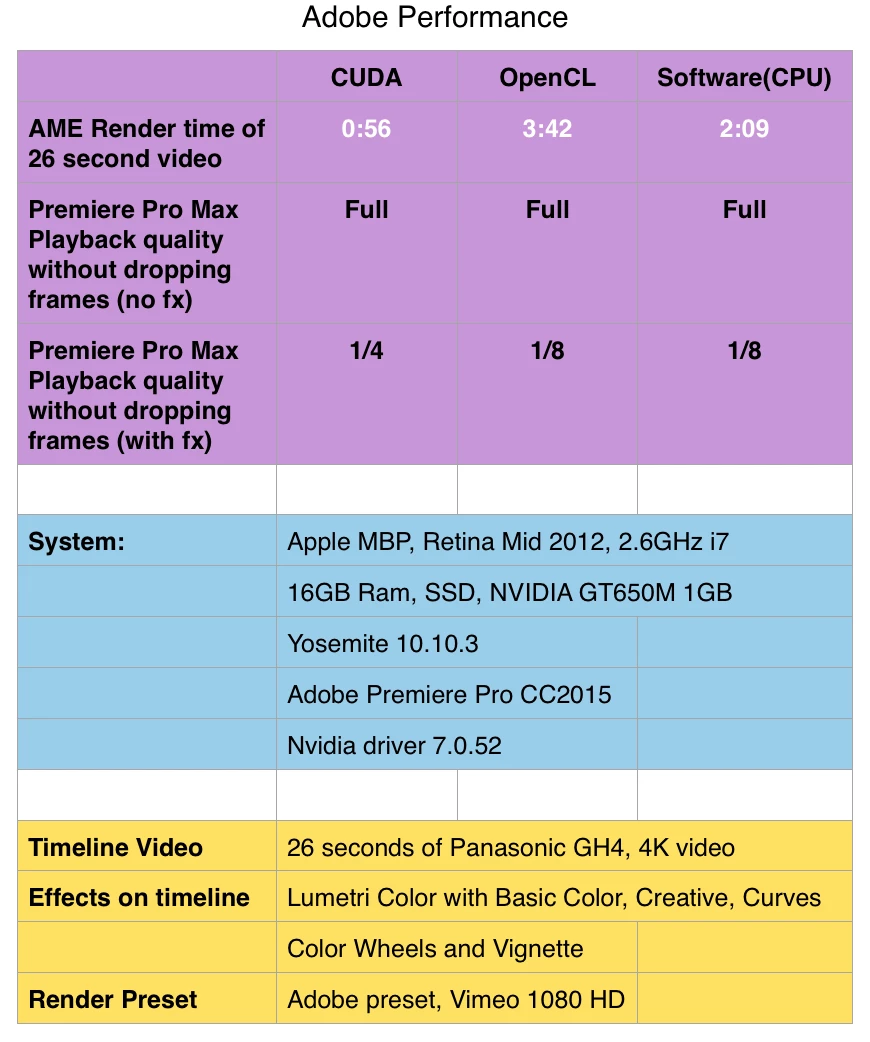
I did a rather unscientific test today on my Macbook Pro with CC2015 and got quite a surprising result. Turns out OpenCL is the worst performing option

I was in the process of considering purchasing an AMD Radeon R9 390 for my desktop machine but if the OpenCL performance of my Mac Book Pro are anything to consider then I best avoid OpenCL and AMD.

Looks like we still have to stick with NVIDIA and CUDA for any GPU performance benefits.
This topic has been closed for replies.

6 replies

Brainiac
April 14, 2018

I have just analyzed your original results, and now conclude that OpenCL is not to blame for that sluggish "accelerated" performance. It's the consistently poor nVidia Kepler and earlier GPU performance in OpenCL that is to blame. The GT 650m is a Kepler GPU, which means that this abysmal OpenCL rendering performance is not surprising. The newer nVidia Maxwell and Pascal GPUs perform much better than their predecessors in OpenCL. But because even the latest version of Premiere Pro (CC 2018.1) must continue to support Kepler GPUs (as long as the drivers continue to be updated for those GPUs), the OpenCL GPU acceleration support in the Windows versions of Premiere Pro CC remains disabled when an nVidia GPU is used (making only CUDA and software only available).

Participating Frequently
April 6, 2016

This is not a good test, as nVidia doesn't really do well with OpenCL, if you tested the nVidia CUDA performance to a comparable AMD cards OpenCL performance I would understand your concern.
Also to the Adobe staff, does anybody know if you guys have got OpenCL performance on par or better than CUDA performance yet? You guys might need to catch up to Apple's FCPX in that regard, and the only way you can do it is to stop favoring CUDA and be competitive with OpenCL performance, specifically on the MacPro and other AMD based Macs and PC's.  You could potentially really kick Apples butt in this area.

New Participant
June 2, 2016

Why would people who work on Windows/Linux with CUDA have to suffer because of Mac people and their choice to invest into OpenCL?

CUDA is still faster than OpenCL on comparable GPUs and what's more important is a lot easier to implement than OpenCL. And that's probably why Adobe favors it along side every GPU renderer out there as well as Resolve and SCRATCH to name the few.

New Participant
September 14, 2016

vladi013​ There is no reason for Adobe to abandon CUDA, however they need to remember that Macs no longer can be equipped with CUDA cards. Believe me, we've tried! We tested placing an Nvidia CUDA card in a PCIe Thunderbolt expansion chassis connected to our test MacPro, and the CUDA chip was not recognized by Premiere, so the CUDA option was not available. Therefore, anyone with a recent model MacPro won't be able to install a CUDA card. To my knowledge, CUDA hardware acceleration does not run on non-Nvidia hardware; it requires a CUDA chip. From Nvidia website: "With the CUDA Toolkit from NVIDIA, you can accelerate your C or C++ code by moving the computationally intensive portions of your code to an NVIDIA GPU."

Therefore, Adobe must continue to develop their software to run using OpenCL as well as CUDA; that's why there's a little menu to choose that.

January 18, 2016

‌hi i bought amd firepro w7100 and its not working in realtime when i using osmo 4k footage to edit. The rendering in timeline is also slow.. Do anyone know how to fix it? How do i know if im using the latest OPEN CL? What is the latest OPENCL for adobe CC vers?where can i download it?

Kevin-Monahan
Community Manager
Community Manager
January 18, 2016

Hi Mohd,

hi i bought amd firepro w7100 and its not working in realtime when i using osmo 4k footage to edit. The rendering in timeline is also slow.. Do anyone know how to fix it? How do i know if im using the latest OPEN CL? What is the latest OPENCL for adobe CC vers?where can i download it?

In Project Settings > General, can you set GPU Acceleration to OpenCL?

Thanks,
Kevin

Kevin Monahan - Sr. Community & Engagement Strategist – Pro Video and Audio
January 19, 2016

tq kevin i done it already however the 4k footage that i put just 1 optical flare effect  its still lagging when i playback in adobe premier cc ...is there any new update or software that i need to download to keep my editing more faster that i should download?

westley
westleyAuthor
Participating Frequently
July 8, 2015

I guess one thing to consider is that the OpenCL version of the nvidia GT 650M is OpenCL 1.1. Where are the OpenCL version of the likes newer of AMD R9 Radeon 390 is OpenCL 2.0.

However I can't seem to find any information in the Adobe documentation about supported or suggested OpenCL versions. Maybe someone here can point in the direction of suitable information.

Inspiring
July 8, 2015

For me, on my MacBook Pro (Retina, 15-inch, Early 2013, NVIDIA GeForce GT 650M 1024 MB), I've found using CUDA in Premiere CC2014 to be extremely unreliable. I'll get a lot of crashes, and weird render glitches. If I switch to OpenCL, I generally get better real-time performance, and far less issues and crashes. So even if CUDA is faster in a speed test, I personally find it's not suitable for day-to-day work, at least on my system.


I'm running Premiere 8.2, MacOS 10.10.3, CUDA 7.0.52 and GPU Driver Version: 10.2.7 310.41.25f01.

Kevin-Monahan
Community Manager
Community Manager
July 9, 2015

Hi Chris,

For me, on my MacBook Pro (Retina, 15-inch, Early 2013, NVIDIA GeForce GT 650M 1024 MB), I've found using CUDA in Premiere CC2014 to be extremely unreliable. I'll get a lot of crashes, and weird render glitches. If I switch to OpenCL, I generally get better real-time performance, and far less issues and crashes. So even if CUDA is faster in a speed test, I personally find it's not suitable for day-to-day work, at least on my system. I'm running Premiere 8.2, MacOS 10.10.3, CUDA 7.0.52 and GPU Driver Version: 10.2.7 310.41.25f01.

For you and others on MacBook Pro and iMac computers, I would 100% agree with you. I have precisely the same model and issues that you do. That said, NVIDIA CUDA is absolutely a joy with none of these issues on my PC running WIN 8.1.

I know that info is meaningless if you only own Macs, but it is interesting that:

  1. The problem does not exist on the PC side
  2. The problem did not exist in OS X 10.8.5. It began in OS X 10.9.

If it were me, I'd be running Premiere Pro CC 2014.2 on OS X 10.8.5 with NVIDIA CUDA enabled. However, I have updated in order to troubleshoot items a bit better. I completely erased my drive, have a new installation of OS X 10.10.4 and I do have this problem now. I have been running in NVIDIA OpenCL GPU acceleration. It's OK.

Thanks,

Kevin

Kevin Monahan - Sr. Community & Engagement Strategist – Pro Video and Audio
jasonvp
Inspiring
July 8, 2015

westley wrote:

I did a rather unscientific test today on my Macbook Pro with CC2015 and got quite a surprising result. Turns out OpenCL is the worst performing option

As Kevin pointed out: older (and yes, 3 years is "older") NVidia GPUs were not really well-suited to OpenCL, so basing your decisions on that is probably not a great idea.

Kevin-Monahan
Community Manager
Community Manager
July 8, 2015

Hi Westley,

Can you try with different source footage? I'm curious to see if GH4 footage is causing a memory leak and creating performance problems. There have been a couple of reports along those lines.

I would also like to see a test without Lumetri Color being involved. If you have time...

You should see different OpenCL performance on one of the newer R9 card in comparison with an older NVIDIA GPU, as well.

Thanks,

Kevin

Kevin Monahan - Sr. Community & Engagement Strategist – Pro Video and Audio
westley
westleyAuthor
Participating Frequently
July 8, 2015

Hi Kevin, I've run it through with OpenCL, CUDA and CPU using HD 1920x1080 H264 footage. The render times on the results show performance with and without fx (Lumetri) output was Adobe Preset Vimeo 720HD therefore scaling operation is also taking place.

Again rather shockingly the OpenCL performance is extremely poor. I understand that the Nvidia GT650M is most likely optimised for CUDA over OpenCL. All that said it is a curious result that CPU outperforms GPU (OpenCL).

These test have been done on my Mac Book Pro. I am looking at upgrading my GPU on my windows desktop and considering an AMD Radeon R9 290/390 which will solely use OpenCL, however these tests do have me a little concerned.