


Known Participant
November 13, 2024
Question

Subtitle issues - Not exported yet - how will it come out?

  • November 13, 2024
  • 3 replies
  • 989 views

Hello everyone,

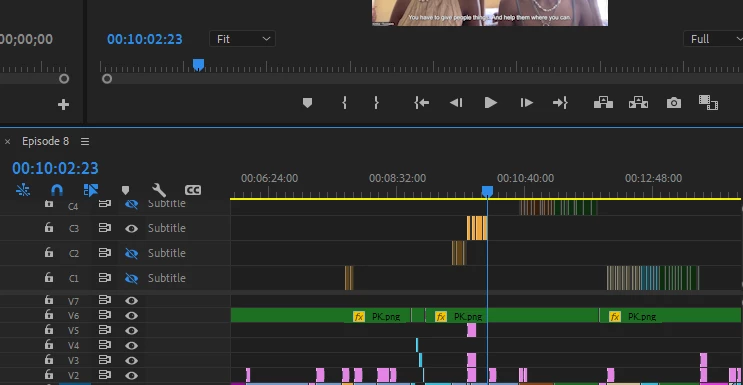
I don't get why Adobe put them all on different lines. So I only see them if I activate the 'eye'. 
I'm a bit worried not all of them are going to come up on the screen, if I export? That is my main question.


This topic has been closed for replies.

3 replies

DJWNAuthor
Known Participant
November 16, 2024

It didn't export 😞 even with everything on the same line.


Averdahl
Community Expert
Community Expert
November 16, 2024

Did you enable Captions for export? Captions are disabled by default, so checking that setting is critical for them to export.


  • What version of Premiere Pro do you use?
  • How do you export, from Premiere Pro or via Media Encoder?


I noticed that some of the of you captions are bright orange while some of the are dark orange. I cannot reproduce that in Premiere Pro 25.0.


R Neil Haugen
Legend
November 17, 2024

I've just checked. I've got version 23.6.0. I'm wondering if that is the issue. I did enable captions for export and to burn into the video but they still wasn't coming up everywhere only the highlighted parts on the video from the photo I posted. 
I export from Premiere Pro.


The whole subtitles/caption workflow went through a major upgrade in the 24.x series.


We are now in the era of the 25.x series, of course. I'm wondering why you stay with 23? So many things, including text/captions and color management are so massively updated.

Everyone's mileage always varies ...
Averdahl
Community Expert
Community Expert
November 13, 2024

When i have done testings the only subtitles that exports are the ones on a track with the eye enabled. So in the screen dump you posted here only C3 will be exported. You can manually move all text from C2 down to C1, from C3 down to C1, C4 down to C1 and enable that track to export all subtitles in one go.

quote

I'm a bit worried not all of them are going to come up on the screen, if I export? That is my main question.


By @DJWN


DJWNAuthor
Known Participant
November 16, 2024

Thank for this reply. I will test it out.

R Neil Haugen
Legend
November 13, 2024

First, you can always test a short segment of a sequence, by setting an in/out point, and exporting. Then you know


Second, that 'eye' turns on the track. If on, it's 'visible', and will be in the export. If off, not.

Everyone's mileage always varies ...
DJWNAuthor
Known Participant
November 16, 2024

Thank you. I will try this.