Participant
May 8, 2023
Answered

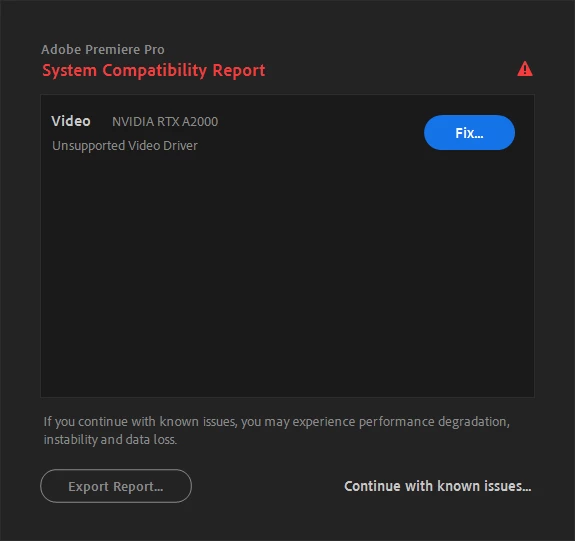
System Compatibility Error — driver RTX A2000
  • May 8, 2023
  • 5 replies
  • 6605 views

Is this video driver not supported??

This topic has been closed for replies.
Correct answer Levy26634235y8wr

Thanks. Solved the issue by installing version 528.49.

5 replies

Kevin-Monahan
Community Manager
Community Manager
May 19, 2023

Hi,

I am using 531.41 for my NVIDIA Quadro P1000. I also had the situation where the configurator on the NVIDIA website was saying that an older driver was the latest one. That was not the case. I had to manually search for the driver after the GeForce Experience app said that a newer studio driver was available. Otherwise, I'd still have this problem.


Thanks,
Kevin

Kevin Monahan - Sr. Community and Engagement Strategist – Adobe Pro Video and Audio
Legend
May 10, 2023

I am sorry to tell you this, but the Quadro P1000 will also have the very same compatibility issue with that driver as well. Both driver versions 528.89 and 528.95 have serious issues with Adobe programs. The most recent driver version that worked properly with Adobe programs was driver version 528.49. You will need to look in the beta/older driver link in the Nvidia Web site for that driver.


Had you picked a GeForce GPU instead, I would have told you to get Studio Driver version 531.41 or newer. Unfortunately, the Quadros/workstation GPUs do not currently have a production branch driver above that incompatible 528.95. The 531.41 driver is numerically the highest driver version available for the workstation GPUs; however, it is of the new feature branch and not the production branch.

Levy26634235y8wrAuthorCorrect answer
Participant
May 16, 2023

Thanks. Solved the issue by installing version 528.49.

Ann Bens
Community Expert
Community Expert
May 8, 2023

Make sure you have the latest driver installed.

Participant
May 9, 2023

Sure, I downloaded the latest driver from Nvidia.

Ann Bens
Community Expert
Community Expert
May 9, 2023

Do not use windows. Go to Nvidia site, download and install the driver manually.

davescm
Community Expert
Community Expert
May 8, 2023

Hi , I've moved your post from the Photoshop forum to the Premiere Pro forum where you are more likely to get help with your issue.

Ged_Traynor
Community Expert
Community Expert
May 8, 2023

@Levy26634235y8wr this is the Photoshop forum, your screenshot shows Premiere Pro, try posting your query on the Premiere Pro forum
