


Participating Frequently
March 12, 2024
Answered

Text based editing - "Insert" does not work - Bug or is it me.

  • March 12, 2024
  • 1 reply
  • 795 views

Hi, I tried to insert transription parts from a source video to a sequence with "insert" - or drag and drop, but it does not work. Anyone experiencing this? 


I can drag and drop from source video to create a new sequence, but after that, i cannot insert further parts. Also overwrite is not working. Both are not greyed out. It is just nothing happening. Drag and drop ends in a "forbidden hand"


My workaround currently: I load the whole clip in a sequence and delete parts that I dont need.


Am I missing sthg? It is all one clip, sequence settings according to clip parts i want to insert, the { } is toggled on, also "follow active monitor", and V1
 

This topic has been closed for replies.
Correct answer mattchristensen

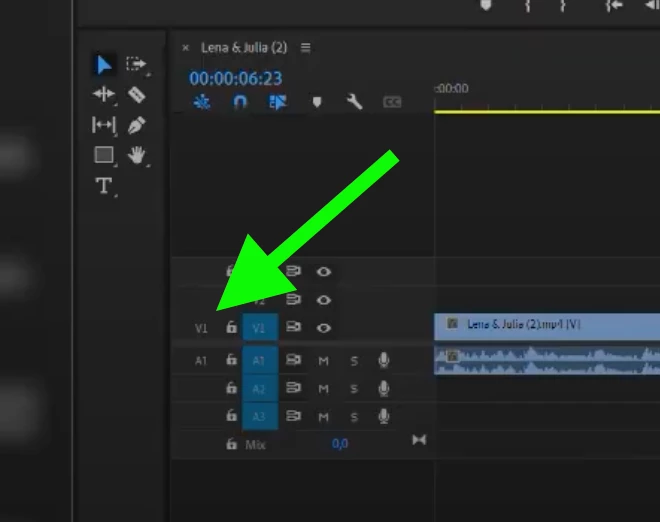
@julzaut Yes that is helpful, thank you. To perform an Insert or Overwrite edit you need to make sure the track targeting is set up correctly in the track headers. In your case the Source patching for V1 and A1 is disabled, so Insert/Overwrite commands won't do anything because it's like there is no source "turned on" for them to pull from. So just click on V1 and A1 to turn them blue, and it should work. Dragging from the Source Monitor ignores those track headers, which is why that works.


1 reply

mattchristensen
Community Manager
Community Manager
March 12, 2024

@julzaut That's strange, it sounds like you've covered all your bases. Would it be possible to make a short screen recording showing you load a clip to Source Monitor and attempt to use the Insert buttons? Sometimes seeing it will make it clear.

julzautAuthor
Participating Frequently
March 12, 2024
mattchristensen
Community Manager
mattchristensenCommunity ManagerCorrect answer
Community Manager
March 12, 2024

@julzaut Yes that is helpful, thank you. To perform an Insert or Overwrite edit you need to make sure the track targeting is set up correctly in the track headers. In your case the Source patching for V1 and A1 is disabled, so Insert/Overwrite commands won't do anything because it's like there is no source "turned on" for them to pull from. So just click on V1 and A1 to turn them blue, and it should work. Dragging from the Source Monitor ignores those track headers, which is why that works.