


Participant
June 22, 2024
해결됨

Text layer not visible in Source Monitor in Production

  • June 22, 2024
  • 3 답변들
  • 607 조회

I just started using the Production feature in Premiere Pro to save disk space and de-clutter the workspace. When I am working on a project and create a new layer (weather shape or text layer), I can see them in the timeline, Essential graphics panel, or Effects control panel but I can't see them in my source monitor. I can't seem to find where it is stored. I intent to make a copy of it so I can use it in different projects. I am working in PP 2023.
이 주제는 답변이 닫혔습니다.
최고의 답변: MyerPj

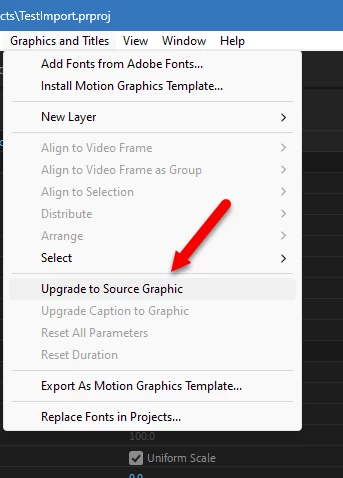
If you select the graphic in the timeline, you can then use the Graphics and Titles menu to turn it into a Source Graphic, which does have a presence in the project.


3 답변

MyerPj
Community Expert
MyerPjCommunity Expert답변
Community Expert
June 22, 2024

If you select the graphic in the timeline, you can then use the Graphics and Titles menu to turn it into a Source Graphic, which does have a presence in the project.


Participant
June 23, 2024

That's the way to go!! thanks for the tip!

R Neil Haugen
Legend
June 22, 2024

Graphics created do not go into bins. If you save as a mogrt, they go to the local mogrts folder you specify or to the LIbrary you specify.


If you simply create something on a sequence, it is only metadata from that sequence stored in that seqeunce's metadata.

Everyone's mileage always varies ...
Participant
June 22, 2024

hey, you can drag and drop with ALT key pressed to duplicate it directly on the timeline... cheers

Participant
June 22, 2024

I am doing that but I would really like to know why its not showing in source panel and where is the location. I just want to be ready with backup in case something goes wrong.

Participant
June 22, 2024

did you explore the "export as motion graphics template" option when right clicked? maybe it helps some how for you to back it up. cheers