


Known Participant
June 25, 2022
Answered

Text tool not showing

  • June 25, 2022
  • 2 replies
  • 3203 views

I found another thread with a similar problem where it was suggested to update and reboot. I've done both of those things and still don't seem to have a Text tool. I'm not wanting the Title tool - the newer Text tool. I'm a newbie so I might be missing something simple but I thought it was supposed to be below the magnifying glass. My screen looks like this:
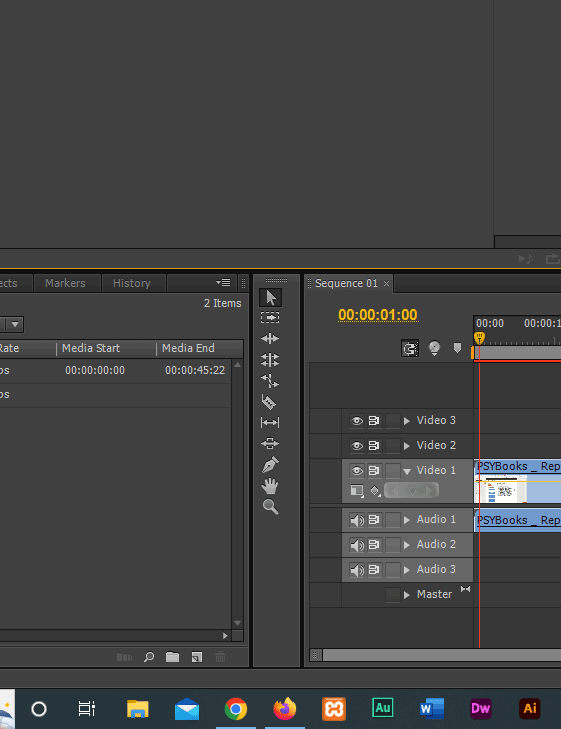


Any ideas?


Thanks in advance.

Correct answer Carlos Ziade

reset premiere pro preferences

hold ALT(or Option) on the splash screen

2 replies

Ann Bens
Brainiac
June 25, 2022

Update to what?

CS6 (screenshot) does not have a TEXT tool.

2017 was the first version with the new tool.

Carlos ZiadeCorrect answer
Brainiac
June 25, 2022

reset premiere pro preferences

hold ALT(or Option) on the splash screen

Known Participant
June 25, 2022

Sorry - I'm not following. Where do I hold Alt/Option? I tried going to Preferences - not sure what you mean by splash screen.


Btw - I've also tried uninstalling/reinstalling - that didn't fix it either. Although I opted to save my settings and from what you're saying, that may be where the problem is.