


Inspiring
January 23, 2025
Answered

Text tool not working

  • January 23, 2025
  • 4 replies
  • 2335 views

Hi there, 


I woke up this morning to open Premiere and it said I was logged onto too many devices. For some reason, my desktop was listed as 3 or 4 devices, all with the same name and log in time. 


After dealing with that issue and changing my password, I went back and opened Premiere (24.1 on a Mac 12.6.6) to find that all my text was missing, and I couldn't create new text with the text tool. 


I opened multiple old projects, and found the same thing. 


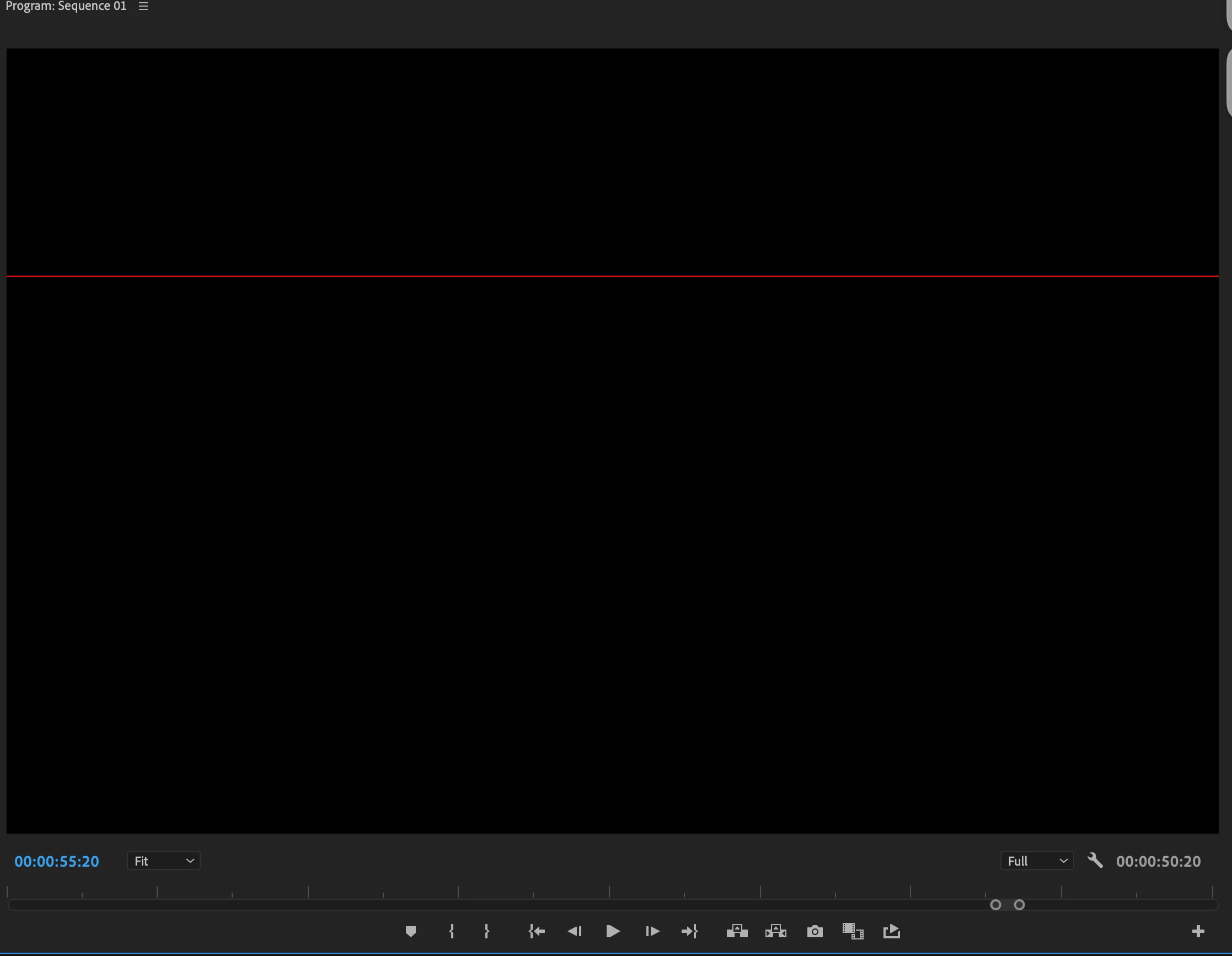
When trying to create new text, there was a red line across the program window (shared below). 


I tried manipulating the text under the effects control window to see if anything would pop up, but the text remained invisible (though not sure if it's even there, as I can't select it). 


Thank you! 
Correct answer gordoneick

I also keep a copy of 15.0 for older projects - but now I cant open any of my older projects - it says the files are damaged or contain outdated elements. But it's a lot of projects, not just a few. And both versions on my desktop are showing me Lesson elements as if the sotftware was recently updated, but neither version has been updated. 


This is feeling apocalyptic on my end. I can't do my job. 


Thank you! 


I reinstalled Premiere 24.1 and the text tool is back. Easy fix! Thank you! 

4 replies

New Participant
November 5, 2025

Es noviembre de 2025 y tuve el mismo problema. Después de probar todo lo que encontré en foros y que nada me sirviera, hablé con un técnico de ADOBE, se me tió a mi computadora y dio con la solución, le pedí un resumen para poderlo compartir aquí: This is an old Font cache bug. You need to browse to this location:
~/library/caches/Adobe and rename the Adobe folder to Adobe old and relaunch Premiere


It's November 2025 and I had the same problem. After trying everything I found on forums and nothing working, 
I spoke with an Adobe technician. He accessed my computer and found the solution. I asked him for a summary so
I could share it here: This is an old Font cache bug. You need to browse to this location
~/library/caches/Adobe and rename the Adobe folder to Adobe old and relaunch Premiere

🙂


New Participant
August 19, 2025

i am also ahving the same problem...have u found any solution...please share...m stuck at my new project with a same problem u shared!! thank u..have a nice day


caroline_edits
Community Manager
Community Manager
August 20, 2025

Hi Sunny,

Sorry for the issue with text! Have you tried uninstalling and re-installing the app? Here's an article that can teach you how to uninstall the app: https://adobe.ly/4fVke9J


If uninstalling and reinstalling doesn't help, have you tried updating your GPU drivers? You can google how to do that, or you can let us know which OS you're using (Mac or PC?) and the model of your Graphics Card, and we can provide a link.


You can also try resetting preferences. Here's a YouTube link to show you how to do that: https://adobe.ly/4fLIP0I


Hope this helps,

Caroline

New Participant
May 5, 2025

Hi there,


I am having the same issue - can someone explain what the solution to this is? Basically a red text box is showing up - but no text - even after adjusting text settings etc.... any suggestions?

Kevin-Monahan
Community Manager
Community Manager
January 24, 2025

Hi @gordoneick,

Thanks for the note. I read that you had some trouble with the application, and now you can't create text easily, anymore. Can you a screenshot of your Properties panel. If any text is there, select it, so we can see any parameters.


If there isn't anything here, you might try a couple of options in the Reset Options dialog box. Press Shift at launch. In the dialog box, choose to reset preferences and delete the media cache. Let us know if that helps.


Thanks,
Kevin


Kevin Monahan - Sr. Community & Engagement Strategist – Pro Video and Audio
Inspiring
January 25, 2025

Thank you, Kevin! 


I reset preferences and deleted the media cache - no luck. 


Here is the effects panel - I'm not able actuall select the text as it isn't there any more, but I selected the text clip.  


Again, thank you! 


Inspiring
January 25, 2025

Another weird thing - After Effects is not opening. 


After Affects Warning: Unknown Exception


I don't know if there's maybe some root issue connected to all of my apps? 


Just spitballing. 


Thank you.