


Participant
June 29, 2022
Answered

The clips on my timeline have become thin and I can't stretch them out

  • June 29, 2022
  • 2 replies
  • 2450 views

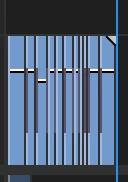
I don't know what happened, but all the clips on my timeline have become super thin. This makes editing the clips harder. They used to be stretched out. I tried different things but nothing seems to work. I think I accidently clicked something my keyboard which caused the problem. Has anyone else had this problem and know how to fix it?


This topic has been closed for replies.
Correct answer Steve Griffiths

and also you can hit the '+' or '-' keys on your keyboard to expand or shrink the clips. Or hit the backslash key '\' to expand the current edit to fill the available space in your sequence window. Hit backslash again to return it to the compressed view.

2 replies

Steve GriffithsCorrect answer
Inspiring
June 30, 2022

and also you can hit the '+' or '-' keys on your keyboard to expand or shrink the clips. Or hit the backslash key '\' to expand the current edit to fill the available space in your sequence window. Hit backslash again to return it to the compressed view.

Participant
June 30, 2022

That seemed to work. Thank you!

Ann Bens
Community Expert
Community Expert
June 29, 2022

There is a slider at the bottom of the timeline: try that.

Participant
June 30, 2022

That seemed to help. Thanks!